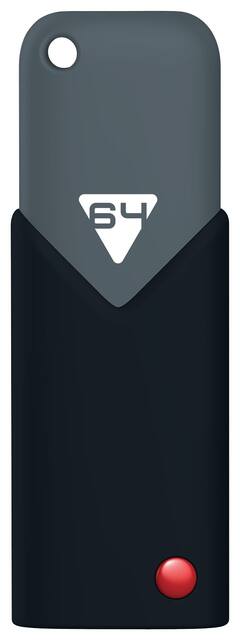
EMTEC - Click 64GB USB 3.0 Flash Drive - Black/Gray
Model: ECMMD64GB103
SKU: 3962112
This item is no longer available in new condition. See similar items below
- Key Specs
- Storage Capacity: 64 gigabytes (Measured in megabytes (MB), gigabytes (GB) and terabytes (TB), this is the amount available for storing files, music, movies, photos and more. The total includes the capacity of the hard disk drive and solid state drive if both are included on the computer.)
- Connector Type(s): USB-A (Type of interface connection found on the device.)
- USB Generation: USB 3.0 (The specification (generation) of the USB standard. Generations are backwards compatible with previous specifications (provided that those devices have the necessary adapter to accommodate the connection type).)
- Maximum Read Speed: 80 megabytes per second (The greatest speed at which the device can read information; for example, opening files.)
- Maximum Write Speed: 12 megabytes per second (The greatest speed at which the device can write information; for example, saving files.)
- General
- Brand: EMTEC
- Model Number: ECMMD64GB103
- Product Name: Click 64GB USB 3.0 Flash Drive
- Color: Black/Gray
- Capacity
- Storage Capacity: 64 gigabytes (Measured in megabytes (MB), gigabytes (GB) and terabytes (TB), this is the amount available for storing files, music, movies, photos and more. The total includes the capacity of the hard disk drive and solid state drive if both are included on the computer.)
- Connectivity
- Connector Type(s): USB-A (Type of interface connection found on the device.)
- USB Generation: USB 3.0 (The specification (generation) of the USB standard. Generations are backwards compatible with previous specifications (provided that those devices have the necessary adapter to accommodate the connection type).)
- Speed
- Maximum Read Speed: 80 megabytes per second (The greatest speed at which the device can read information; for example, opening files.)
- Maximum Write Speed: 12 megabytes per second (The greatest speed at which the device can write information; for example, saving files.)
- Features
- Retractable: true
- Dimensions
- Product Height: 2.24409 inches (The out of box height of the item. Height is measured as the vertical distance from the bottom of the item to the top as it would be primarily used or placed.)
- Product Width: 0.826772 inches (The out of box width of the item. Width is measured as the horizontal distance from one side of the item to the other as it would be primarily used or placed.)
- Product Depth: 0.472441 inches (The out of box depth of the item. Depth is measured as the distance from the front of the item to the back as it would be primarily used or placed.)
- Product Weight: 0.5 ounces (The out of box weight of the item.)
- Warranty
- Warranty - Parts: 2 years
- Warranty - Labor: None
- Other
- UPC: 846143005072
Take important files with you on the go by storing them on this EMTEC Click ECMMD64GB103 USB 3.0 flash drive, which features a 64GB capacity, so you have ample space to house pictures, videos, music and more.
- 64GB capacity: Offers ample room to store important files.
- USB 3.0 interface: Allows you to connect your Windows 2000, Me, XP, Vista, 7 or 8, Mac OS X or Linux 2.6x computer. Backward compatible with USB 2.0.
- Read speeds up to 80MB/sec. and write speeds up to 12MB/sec.: For rapid data transfer.
- Sliding system: Makes it simple to open and retract the flash drive.
Whats Included
- Click 64GB USB 3.0 Flash Drive
- Owner's manual
A: Hi BT, The flash drive should work just like any other flash drive. If the drive is not showing up in Explorer then I would first try a different USB port on your computer. If you are receiving write-protection errors or "Please Insert Disk" errors when you try to access it then the drive is likely defective and should be replaced. Please contact our tech support department from our website if you need further assistance.