ENHANCE - Laptop Cooling Stand - 1 x 1264 RPM Fan & 4 x 2630 RPM Fans - 3 Adjustable Height Settings - Up to 17" - Green
Color
GreenMore Buying Options
Related Item

About This Item
Reviews
Customer Images
The vast majority of our reviews come from verified purchases. Reviews from customers may include My Best Buy members, employees, and Tech Insider Network members (as tagged). Select reviewers may receive discounted products, promotional considerations or entries into drawings for honest, helpful reviews.
Compare similar products
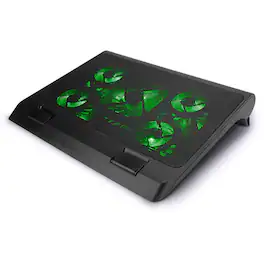
ENHANCE GX-C1 Laptop Cooling Stand Premium Cooling LED Fans Designed to minimize the overheating that can occur with laptop computers, the GX-C1 comes equipped with 5 ultra-quiet LED fans that produce an alluring red light and provide superior airflow while maintaining a noise-free environment. The scroll wheel allows you to tune the power of the LED lights and fans. Turn them way up or keep them at a lower power to whatever fits your needs. Comfortable Ergonomic Design The lightweight and versatile design lets you use the cooling stand in a stationary position or take it with you wherever you go. Its metal mesh surface helps increase airflow while pulling away excess heat from the bottom of your laptop. The 3 adjustable height settings provide you with multiple typing and viewing positions. Lay back on your bed and type on an incline or sit upright on your desk and type all while remaining comfortable. Built-in front bumpers help secure your laptop in place and prevent unwanted sliding. Dual USB Ports The laptop cooling pad is powered by the USB port on your computer. It also comes equipped with an extra USB port so you can connect other devices for data transfer capabilities. Compatible with Laptops: Apple Macbook , Pro , Air / Acer / Alienware / Aorus / ASUS / CyberpowerPC / Dell / Digital Storm / HP / Microsoft / MSI / Origin / Toshiba And more Laptops
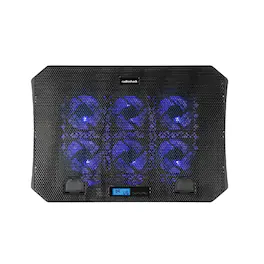
Enhance your gaming experience with the Gaming Cooling Stand, designed to keep your equipment cool and your gameplay smooth. This versatile stand features 4 adjustable height levels, allowing you to customize your setup for maximum comfort and ergonomics. Whether you’re in the middle of an intense gaming session or working on important tasks, the adjustable angle range of 10°-30° ensures you can find the perfect viewing position for your screen. The efficient cooling fan, measuring 70x70x15mm, operates at speeds between 1400-2200RPM to provide effective cooling and prevent your devices from overheating. With a fan life of up to 30,000 hours, you can rely on this stand to keep your equipment running smoothly for years to come. The durable construction, featuring a combination of plastic and iron net, ensures that the stand can withstand the rigors of daily use. The Gaming Cooling Stand also includes a convenient USB-A port, making it easy to connect your devices. The 50cm cable provides ample length for flexible setup options, allowing you to position the stand exactly where you need it. This cooling stand is not just a practical addition to your gaming setup; it’s a tool that enhances your overall experience. Imagine the peace of mind knowing that your equipment is protected from overheating, allowing you to focus on your game without any interruptions. The sleek design and durable materials make this stand a stylish and reliable addition to any gaming station. Whether you’re a casual gamer or a dedicated enthusiast, the Gaming Cooling Stand offers the perfect blend of functionality, durability, and style. Upgrade your gaming setup with the Gaming Cooling Stand and enjoy the benefits of a cooler, more comfortable gaming experience. With its adjustable height and angle, efficient cooling fan, and convenient USB-A port, this stand is designed to meet the needs of every gamer. Stay cool, stay comfortable, and stay ahead of the competition with this exceptional cooling stand.

The 17” Dual Fan Chill Mat™ provides a comfortable and ergonomic work surface to keep you and your laptop cool. The chill mat rests on your lap and disperses heat, using dual fans to provide ventilation which can be obstructed if the laptop is used on a pillow or comforter. Simply plug the USB connector into the laptop to activate cooling. The ergonomic tilt makes typing easy, while the soft neoprene material provides cushioned comfort on your lap. The open design allows fans to run quietly and stimulates constant airflow. Four rubber stops on the face of the chill mat prevents the laptop from slipping and makes using your laptop an enjoyable experience.

Stay cool when things heat up with the Razer Laptop Cooling Pad – a smart stand that dynamically controls fan speeds based on your laptop’s temperature. Featuring an airtight pressure chamber, customizable fan curves, and a 3-port USB A hub for maximum connectivity, give your laptop the boost it needs for better performance.
| Pros for ENHANCE - Laptop Cooling Stand - 1 x 1264 RPM Fan & 4 x 2630 RPM Fans - 3 Adjustable Height Settings - Up to 17" - Green | |||
|---|---|---|---|
| There were no pros for this product— | There were no pros for this product— | Cooling Performance, Noise Level | Cooling Performance, RGB Lighting, Build Quality, USB Hub |
| Cons for ENHANCE - Laptop Cooling Stand - 1 x 1264 RPM Fan & 4 x 2630 RPM Fans - 3 Adjustable Height Settings - Up to 17" - Green | |||
| There were no cons for this product— | There were no cons for this product— | There were no cons for this product— | Noise Level, Compatibility, Portability, Size |