Rating 4.4 out of 5 stars with 2525 reviews
4.4- Print Quality (1085)
- Ease of use (619)
- Size (155)
- Wireless (139)
- Price (51)
- Paper Tray (73)
- Scanning (11)
Customer Images
The vast majority of our reviews come from verified purchases. Reviews from customers may include My Best Buy members, employees, and Tech Insider Network members (as tagged). Select reviewers may receive discounted products, promotional considerations or entries into drawings for honest, helpful reviews.
- Rated 5 out of 5 stars
I shouldn't have doubted Epson - great machine!
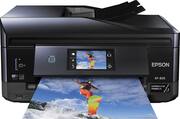
So, I traded in an old Epson Artisan 810 printer two nights ago on a trade in deal to get 15% off of any HP inkjet printer. This deal continues into next month, by the way. However, I went home with an HP Envy 7640 and was severely disappointed with the production speed regarding printing and scanning, as well as the poor photo quality. While I tried to decide whether or not to take it back, or to settle, I decided to stop by Best Buy on my way home from work last night and purchase an Epson Expression Premium XP-830 on sale for $129.99 so that I could compare the two side by side. This printer is like the more modern, smaller brother to my old Artisan 810, only with a few design improvements, and I feel that it greatly outperforms the HP Envy 7640 where it counts. I ended up taking the HP printer back tonight. For one thing the paper trays are no longer connected together, which ended up being part of the downfall of my Artisan, because it caused paper jam errors a lot as of recent days. Now the photo paper tray has been separated completely and sits just above the regular paper tray. The paper tray can be extended to allow legal paper to be loaded to print on, as well as a few other odd sizes, and of course letter size. The photo tray guides easily slide left and right to hold either 4x6 or 5x7 photo paper. There is a CD tray that is stored under the regular paper tray on the bottom of the machine. It slides out in front and can be inserted over the paper catching tray to print photos or titles on printable CDs and DVDs. There is included software for this, although very basic. There is a USB slot and an SD card slot on the front of the printer to import photos for printing without the use of a computer. The printer has Wi-Fi and AirPlay capability. It has the capability to scan two sided documents automatically in the document feeder. You don't have to reposition the documents into the feeder after the first side scans - it really automatically scans both sides. The lid to the document feeder closes which keeps dust to a minimum inside the scanning area. The top raises up to reveal the flatbed scanner. There is a door on the back of the machine for the insertion of paper in the back and that door has built in guides for envelopes to be printed easily. When you turn on the machine and touch the touch screen, the front console tilts up toward you. The touchscreen works very well and is nice and bright. You can print greeting cards, calendars, personal stationary, lined paper, and photos directly from the printer without a computer. You can use photos directly from a USB thumb drive that you plug into the printer. Regular printed document quality is very good and the photo quality is superb on this printer. Altogether, ink costs through best buy with a Mybestbuy membership (at 15% off ink price) should total about $53 for a full set of 4 color photo cartridges (Magenta, Cyan, Yellow, Photo Black) and 1 dedicated Black cartridge just for text. (410 is the Epson Ink that is used) If it works the same way as my Artisan 810 did, you have to replace a cartridge when one runs out in order to continue printing. However, my Artisan actually began mixing colors when black ran out to compensate. Not sure if this works that way or not, but probably not since there is a much bigger (than the photo ink cartridges) dedicated black ink cartridge for text. The Epson software leaves a little bit to be desired but it is functional and not really difficult to use. The minus to the software was that it took the disc a LONG time to install on my 64-bit Windows 7 PC. I would estimate the install to be 30-45 minutes before I actually had to start doing some things to setup my preferences. The Wi-Fi connected to my home network automatically through the software setup which was a plus. I operate my network using an ASUS RT-AC87R Dual Band 4x4 Wireless-AC 2400 Gigabit Router, which has both 2.5 and 5.0 bands. The printer connected quickly and easily with no problems. The printer takes up a small footprint on the desk, which was a feature we were looking for. The only cords coming from it are the wall plug and the fax telephone line. Fax was easy to set up. Color scan reproduction looks great and the AirPrint functionality worked flawlessly. One function that I haven't tested out yet is the print to cloud feature. Although I have tested the email to printer function which also worked flawlessly. I took a photo with my iPhone and then emailed it to an address that we set up for our printer and it printed the email message as well as a 4x6 photo just seconds after sending the email. I tried it again this afternoon (forgetting that my printer was turned off last night) and nothing printed. But, after I got home and turned the printer on, a couple of minutes later it printed. You can set a list of approved senders and give your relatives and friends access if you like. It is a cool feature to have. There is no NFC touch to print function but I can live without that. It is supposed to be able to scan a photo and post to Facebook, but I haven't figured out if it really has that ability and how that works. Overall I am very happy and impressed with this small-in-one machine. I would definitely recommend this printer to anyone who likes great looking photos and needs an all in one machine. Normally the printer costs $200, but definitely worth it. Even better if you can come across a sale. And my experience with Epson's customer service has been great in the past. My limited speed test results were: 2 sided B&W 200dpi scan took about 20 seconds 2 sided color 300dpi scan took about 45 seconds 1 sided B&W 300/200dpi scans took about 8 seconds 1 sided color 300dpi scan took about 20 seconds On first use the flatbed scanner took a few seconds to warm up (between 5 and 10) - after that flatbed scanning seemed to start immediately Cons: Slightly lighter weight plastic, seems like somewhat of a weaker build than HP, Epson software leaves something to be desired as far as extra functions. Pros: Full featured, Touch screen, WiFi, AirPlay, print without a computer, separate paper and photo trays with an envelope/paper door on back, GREAT photo quality, dedicated larger black ink cartridge for text (about twice the size of the photo ink cartridges and only costs $12.99 plus tax to replace - $11 plus tax with a MyBestbuy rewards account), Photo black ink cartridge with 3 other colors for photos resulting in richer photos (these are about $40 plus tax with MyBestBuy rewards - $49 normal price), faster printing and scanning times, loadable automatic document feeder for scanning, closeable lid on document feeder to minimize dust build up inside unit, added flatbed scanner, autoduplexer for 2 sided printing of documents, ability to print directly on printable CDs with added tray, ink isn't too expensive, good customer service from Epson.
Posted by Malcolm30
- Rated 5 out of 5 stars
Much more than I expected
I agonized before springing for this one. I didn't need the FAX, but it was a bit faster, has better photo printing and was on sale. I only let go of my Epson Aritan after so many years as it kept having paper jams. This thing is much smaller, was a piece of cake to set up wireless with a Mac and printing from my iPhone & iPad is a snap. I also like that the printout tray retracts and the prints closes up preventing dust from getting in. I would have done this sooner, if I had know. I'm fussy and this thing is amazing for the money.
Posted by leprechaun
- Rated 4 out of 5 stars
Mostly good, but what about envelopes?
My Hewlett-Packard Photosmart printer was eating me out of house and home. Every time I had a few pages to print, I had to drop another $80 to $100 on ink cartridges. I wanted to drop the thing from a tall building just as a certain former HP executive walked below. Consumer Reports gave very good marks to the Epson XP-830 for economy of ink use, and it has duplex printing and duplex scanning like the HP. It's smaller and quieter than the HP and the kicker was a very reasonable price. A couple of weeks went by before I found the one flaw; it appears that it will only print on business-size #10 envelopes. Come Christmas time I may not be able to print on greeting-card size envelopes. I haven't been able to confirm that, or to look for work-arounds, so the old HP might not get dropped after all.
Posted by HolgerDanske
- Rated 5 out of 5 stars
Excellent printer
Easy to set up,photos come out great.like print from phone.
Posted by Ben1974
- Rated 5 out of 5 stars
Great Printer AIO
This is my first AIO printer, after having a Cannon Pixma for printing photos, I needed something hybrid and this was the best option for the price and quality.
Posted by JBBESTBUY