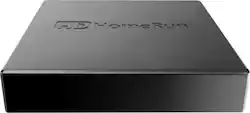
HDHomeRun - CONNECT QUATRO Tuner Free Live OTA TV - Black
- General
- Brand: HDHomeRun
- Model Number: HDHR5-4US
- Product Name: CONNECT QUATRO Tuner Free Live OTA TV
- Color: Black
- Warranty
- Warranty - Parts: 1 year
- Warranty - Labor: 1 year
- Other
- Additional Accessories Included: Power adapter, cat 5e cable
- UPC: 857799005316
Distribute HDTV entertainment throughout your home with this SiliconDust HDHomeRun CONNECT QUATRO TV tuner. It connects to your home internet and lets up to four devices enjoy different over-the-air TV shows at once, providing cost savings over cable subscriptions. This SiliconDust HDHomeRun CONNECT QUATRO TV tuner works with the HDHomeRun DVR for recording live programs.
- Compatible with most smart media devices: Including Amazon Fire TV, Nvidia Shield, iOS, Apple, iPhone, iPad, Windows 10, Sony TVs, PlayStation, Android, Xbox, NAS, Plex, Western Digital, QNAP, Synology, and Asustor devices.
- Use your existing home router: To create your multi-room solution simply plug your device into your home router to stream live and recorded HD content to devices around your home. You can even pause on one device and resume on another.
- Get more entertainment with four OTA tuners: Browse, record and stream up to four live or multiple recorded HDTV shows simultaneously on multiple devices. Add a second HDHomeRun device to increase your number of available tuners.
- Supports Closed Captioning and SAP: Video description (Secondary Audio Program) and Closed Captioning can be turned on or off via the on-screen interface.
- Digital HD antenna required: Designed for users who watch TV with an HD antenna instead of subscribing to cable. HD antenna sold separately.
- DVR capability: The HDHomeRun DVR service, $35 a year subscription allows you to watch live, schedule and record HDTV on your terms. It's a full multi user, multi room, multi device solution.
Whats Included
- Cat 5e cable
- Power adapter
- Quick start guide
- SiliconDust HDHomeRun CONNECT QUATRO Tuner Free Live OTA TV
Product Manuals
A: No, this is just a TV tuner, which outputs to mpeg-2 format. You can accomplish what you want with a few pieces of software. 1.) DVR software, available from HDHR with a premium subscription. 2.) Transcoding software, i.e. Handbrake, to put the resulting recordings in a format readable by the DVD. 3.)DVD burning software to get them on to the discs. Good luck with your research!
A: When you install this device, you have to disconnect your outside antenna from your TV and connect it to this. It is also connected to your ethernet cable and to power. Next you have to down load the HD Homerun app on any of your network connected devices that you want to watch your local channels on. Install it on your computer and run the app. It will scan for local channels and finish the set up of your HD Homerun device. You can also install the app on Apple TV, Android boxes such as Nvidia shield, etc. That will allow you to watch your channels on them. For example, I have HD Homerun app on my desktop, Iphone 8, Apple TV and Nvidia shield. One note,,, this will not record, that is a service that is offered in the app for $35 / yr. but is not required if you just want to view.
A: Best practice here is to stream through the HDHomeRun to a media device which is connected to the TV via HDMI - and use our Free Live TV app or a 3rd party app that will then play to the TV These include FireTV stick or box / Nvidia Shield / Xioami box / AppleTV4 / XboxOne / etc
A: Yes and the same for them for USA signals
A: you'll need dvr software as well as disk storage. silicon dust offers a fee based dvr service or alternatively you could use free software, mythtv, kodi, or windows media server - although the later is no longer bundled with windows 10. google free dvr and the os of your choice and you'll find much to choose from i use mythtv and it works very well - one caveat it does not work well with windows If you're not technically inclined then the dvr offering from silicon dust may be what you're looking for
A: I could not find anything where the hdhomerun dvr record engine was running on a netgear readynas duo.... here is a direct link to the silicon dust nas requirements: https://forum.silicondust.com/forum/viewtopic.php?f=126&t=20595 I have been using a synology nas for over 2 yrs with hdhomerun primes & just recently added the OTA connect. no issues recording to the nas. the hdhomerun dvr app does work well...
Q: What internet speed should I have to use HDHomeRun with three TVs ?
A: The beauty of HDHomeRun is that we work across your internal home network. Internet speeds, download speeds, net neutrality, none of that affects HDHomeRun streaming throughout the home. RF from your antenna in, Connect to your home Router or Switch - The only Internet required is Low Bandwidth connect to our servers for the Guide Data A 100MB router is recommended, but if you have a GigE network you should never his your max as the highest bandwidth channel would be approx 18 to 20 Mbs
A: Using the SiliconDust Quattro with either the SiliconDust DVR service or the Channels DVR service from Fancy Bits (I use this one), you can record OTA broadcasts in HD. The Channels DVR service will also record the SiliconDust Premium TV streaming content. Both of these DVR services require local storage and a paid subscription.
People also viewed
 $76.99The price was $99.99

Today's top picks
 $449.99The price was $829.99
 $2,449.99The price was $3,199.99
 $999.98The price was $1,639.98
 $199.99The price was $249.99
 $1,099.99The price was $1,499.99