Insignia™ - 4-Port USB Hub with USB-C Connection - Black
More Buying Options

Specifications
- Number of USB Port(s)4
- Key Specs
- Number of USB Port(s): 4
- General
- Brand: Insignia™
- Model Number: NS-PCHC4A
- Product Name: 4-Port USB Hub with USB-C Connection
- Color: Black
- Features
- Hub Type: USB hubs (The type of connection, such as Ethernet or USB, used to connect peripheral devices to the hub for shared access.)
- Ports
- Number of USB Port(s): 4
- Port Type(s): USB (USB 2.0 connects external drives, gaming controllers, smartphones, MP3 players and other accessories.USB 3.0 transfers data faster than USB 2.0, but only when used with USB 3.0 devices.USB Type-C provides fast speeds and versatile power, featuring connectors with identical ends that plug in upside down or right side up. Adapters allow for video as well as backward compatibility.Thunderbolt provides ultra-high bandwidth for fast data transfer between devices featuring a Thunderbolt or MiniDisplayPort connection.HDMI allows you to connect a projector or display HD media on your HDTV or monitor.Media card slots allow you to transfer photos from your digital camera or camcorder.)
- Speed
- Rated Speed: 5000 megabits per second (The rate of data that can be transmitted by the networking device.)
- Dimensions
- Product Height: 0.64 inches (The out of box height of the item. Height is measured as the vertical distance from the bottom of the item to the top as it would be primarily used or placed.)
- Product Length: 0.28 inches (The out of box length of the item. Length is measured as the longest dimension of the item.)
- Product Width: 1.35 inches (The out of box width of the item. Width is measured as the horizontal distance from one side of the item to the other as it would be primarily used or placed.)
- Product Weight: 0.1 pounds (The out of box weight of the item.)
- Warranty
- Warranty - Parts: 1 year limited
- Warranty - Labor: 1 year limited
- Other
- UPC: 600603296925
If you’re like many busy people, you have a dozen things going on at once, and working on the computer is no different. You likely need your computer’s USB ports to connect a keyboard or mouse, transfer files and charge devices – it’s no surprise that there aren’t enough ports for everything. This hub helps optimize your workspace by providing four extra USB ports to connect accessories – simply plug it into your computer’s USB-C port. Transfer speeds up to 5 Gbps move files quickly and efficiently. Its compact size makes it perfect for slipping into a purse or backpack. You really can do it all with the Insignia 4-Port USB-C Hub.
- Works with most USB devices: Connect up to 4 USB devices (including smartphones, tablets, flash drives and more) at the same time.
- USB-C connection: Easily connect to your computer’s USB-C port.
- Transfer files quickly: Transfer speeds up to 5 Gbps let you move files quickly and efficiently.
- Take it with you: Small, compact design for convenient transportation.
- System requirements: Works with a Windows 10 or macOS 10.12 and newer computer.
- Black color: Basic black color blends in with many electronics.
Whats Included
- Insignia 4 Port USB-C Hub
Product Manuals
Q: How many devices can I connect to this hub at the same time?
A: You can connect up to 4 USB devices to this hub simultaneously.
Q: Is this hub easy to carry around?
A: Yes, the hub has a small and compact design making it easy to transport.
Q: What type of connection does this hub use to connect to my computer?
A: This hub connects to your computer's USB-C port.
Q: What is the maximum speed for transferring files with this hub?
A: This USB-C hub offers transfer speeds of up to 5 Gbps.
Q: Does this hub work with Windows computers?
A: Yes, this hub is compatible with Windows 10 or macOS 10.12 and newer computers.
Q: Is this a usb-c to USB type-A 3.0?
A: This USB Type C hub has 4 USB Type A 3.0 ports.
Q: Will this work to charge multiple cellphones. I want to plug my devices into one port to charge
A: With this hub you can connect up to 4 USB devices (including smartphones, tablets, flash drives and more) at the same time. Try the wall charger model NS-MPH5A1CW
Q: Does this have thunderbolt 3 support? and does what is the transfer speed?
A: The USB-C end of it will work IN a Thunderbolt 3 port, but all the ports the hub adds are USB-A 3.0 so they can't provide Thunderbolt-anything. Kind regards, good luck!
Compare similar products

If you’re like many busy people, you have a dozen things going on at once, and working on the computer is no different. You likely need your computer’s USB ports to connect a keyboard or mouse, transfer files and charge devices – it’s no surprise that there aren’t enough ports for everything. This hub helps optimize your workspace by providing four extra USB ports to connect accessories – simply plug it into your computer’s USB-C port. Transfer speeds up to 5 Gbps move files quickly and efficiently. Its compact size makes it perfect for slipping into a purse or backpack. You really can do it all with the Insignia 4-Port USB-C Hub.

The USB 3.0 7-Port HUB allows up to seven USB 3.0 devices to be connected simultaneously at a transmission speed of 5 Gbps, while still providing connectivity and support for the older USB 2.0 (480 Mbps) and 1.1 (12 Mbps) devices. It works with high-bandwidth SuperSpeed USB 3.0 devices, such as an external disk drive, high-resolution webcam, multi-channel audio and more. In addition, it supports fast charging for smartphones, tablets and iPad.

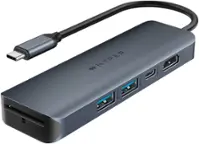
Take your desk setup to the next level. Whether you're gaming, designing, or juggling deadlines, the HyperDrive Flex 5 Port USB-C Hub keeps you seamlessly connected. Enjoy crisp 4K monitor support for sharp visuals while editing, streaming, or multitasking. Power your laptop and other devices simultaneously with the 100W Power Delivery USB-C port, and transfer files in seconds via its high-speed USB ports. With a sleek design crafted from 75% post-consumer recycled plastics, it’s bold, functional tech that complements your style.

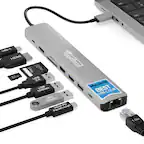
If you’re like many busy people, you have a dozen things going on at once, and working on the computer is no different. There’s a good chance you’re already using all your computer’s ports and wish you had extras to connect new devices. Thankfully, this hub helps optimize your workspace by adding two extra USB ports, an ethernet port, an HDMI port, a USB-C Power Delivery port, and SD and Micro SD slots. Simply plug it into your computer’s USB-C port and start connecting your mouse, keyboard and other accessories. Transfer speeds up to 5 Gbps move files quickly and efficiently and its compact size makes it perfect for slipping into a purse or backpack. Don’t limit your connected devices – enjoy more options with the Insignia 7-Port USB-C Hub.
| Pros for Insignia™ - 4-Port USB Hub with USB-C Connection - Black | |||
|---|---|---|---|
| Overall Performance, USB-C, Ease of use, Connectivity, Size | Overall Performance, Ease of use, Size, Connectivity, USB Ports | Overall Performance, Connectivity, Portability, Port Selection, Power Delivery | Ease of use, USB-C, Overall Performance, Connectivity, Compatibility |
| Cons for Insignia™ - 4-Port USB Hub with USB-C Connection - Black | |||
| Cord Length, Power | Price, Charging | Indicator Light | There were no cons for this product— |
Specs
Reviews
Customers are saying
Customers are enthusiastic about the overall performance, USB-C connectivity, and ease of use of the 4-Port USB Hub. Many appreciate its compact size, reasonable price, and broad compatibility. However, some users have expressed concerns regarding the short cord length and insufficient power delivery. Despite these drawbacks, the hub appears to be a valuable solution for expanding connectivity, especially for devices requiring USB-C ports.
Customer Images
The vast majority of our reviews come from verified purchases. Reviews from customers may include My Best Buy members, employees, and Tech Insider Network members (as tagged). Select reviewers may receive discounted products, promotional considerations or entries into drawings for honest, helpful reviews.
- Rated 5 out of 5 stars
A Multifunctional Marvel - Insignia 4-Port USB-C
The Insignia 4-Port USB-C Hub in sleek black has truly been a game-changer in my daily tech setup. This unassuming little device has added an extra layer of functionality to my laptop, making it an essential part of my workspace. First and foremost, the build quality is impressive. The hub feels robust and durable, capable of withstanding daily use. Its compact design is perfect for on-the-go professionals like myself. It fits snugly into my laptop bag without taking up much space, and the matte black finish gives it a modern and professional look. What sets this hub apart is its versatility. With four USB-C ports, it provides a solution to the common problem of limited ports on modern laptops. Whether you need to connect external drives, a mouse, a keyboard, or any other USB-C compatible device, this hub has you covered. It has seamlessly expanded the connectivity options on my laptop, allowing me to stay productive without constantly swapping cables. The inclusion of a USB-C power pass-through port is a real standout feature. It means I can charge my laptop while using the hub, eliminating the need to choose between connectivity and power. This feature alone has been a game-changer during long workdays or meetings. Setting up the Insignia USB-C Hub is a breeze; it's truly plug-and-play. There are no drivers or complex configurations required. Just connect it to your laptop's USB-C port, and you're ready to roll. It's that simple and user-friendly. In terms of performance, this hub doesn't disappoint. It provides fast and reliable data transfer speeds, ensuring that my external drives and peripherals work seamlessly. I've experienced no lag or drop in performance since incorporating this hub into my setup. The Insignia 4-Port USB-C Hub is a must-have accessory for any laptop user, especially those with USB-C-only laptops. Its exceptional build quality, versatile connectivity options, and the convenience of the power pass-through port make it a standout product. It has genuinely improved my daily workflow, and I can't imagine working without it. Whether you're a professional, a student, or anyone in need of extra connectivity, this hub is worth every penny. Highly recommended!
LazarusG Posted
- Rated 5 out of 5 stars
Works as intended
Works great. If you are using a mac and all of your equipment is USB this is a must. Works beautifully. No issues. Works as intended. Excellent product.
JoelH Posted
- Rated 5 out of 5 stars
Outstanding Four-Port USB-C Hub
The Insignia Four-Port USB-C Hub was an excellent choice for this type of an item. It was really exactly what I was looking for! Plus, it was relatively compact and does not take up too much space at all.
davey Posted