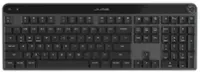
Insignia™ - Full-Size Wireless Ergonomic Membrane Keyboard - Black
Insignia™ - Full-Size Wireless Ergonomic Membrane Keyboard - Black
FREE shipping to
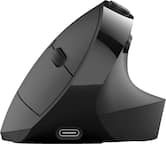
- JLab - JBuds Ergonomic Wireless Mouse - Wireless - Black$39.99
More Buying Options
Related Item

Specifications
- Form FactorErgonomic, Full-sizeConnection TypeWireless
- Key Specs
- Form Factor: Ergonomic, Full-size (The size, arrangement, and physical configuration of the product.)
- Connection Type: Wireless
- General
- Brand: Insignia™
- Model Number: NS-PK4KCB23
- Product Name: Full-Size Wireless Ergonomic Membrane Keyboard
- Color: Black
- Functions
- Form Factor: Ergonomic, Full-size (The size, arrangement, and physical configuration of the product.)
- Connectivity
- Connection Type: Wireless
- Wireless Connectivity: Radio Frequency (RF - 2.4 Ghz/Low Latency) (The manner in which a device sends data to another device over a short distance without the use of wires or cables.)
- Compatibility
- Operating System Compatibility: Windows, Chrome, Mac
- Dimensions
- Product Height: 1.63 inches (The out of box height of the item. Height is measured as the vertical distance from the bottom of the item to the top as it would be primarily used or placed.)
- Product Width: 8.35 inches (The out of box width of the item. Width is measured as the horizontal distance from one side of the item to the other as it would be primarily used or placed.)
- Product Depth: 19.71 inches (The out of box depth of the item. Depth is measured as the distance from the front of the item to the back as it would be primarily used or placed.)
- Product Weight: 2.449 ounces (The out of box weight of the item.)
- Warranty
- Warranty - Parts: 1 year limited
- Warranty - Labor: 1 year limited
- Other
- UPC: 600603303753
Whether you just got a new computer or are simply upgrading your current setup, you can’t go wrong with this Insignia NS-PK4KCB23 Full-Size Wireless Ergonomic Membrane Keyboard. Its plug-and-play technology easily connects to your Windows, macOS or ChromeOS system with a simple USB dongle. An ergonomic design with wrist support makes it a comfortable to use for longer lengths of time. Membrane switch keys provide a smooth typing experience, while a full-size number pad helps you input information more accurately, and multimedia keys keep a variety of functions like audio controls within easy reach.
- Wide-ranging compatibility: Works with Windows 10 and 11, macOS 10.12 and ChromeOS*
- Wireless technology: Uses a 2.4GHz USB dongle to maintain a reliable wireless connection from up to 32.81 ft. (10 m) away.
- Full-sized design: 105-key design features the classic QWERTY layout, number pad and multimedia keys.
- LED indicators: Let you know when the caps lock or number pad functions are on, or when the keyboard is receiving power.
- Ergonomic design: Offers increased comfort and wrist support.
- Membrane switch: Provides a quieter typing experience.
- Plug-and-play support: Easy to set up without the need to download drivers.
Whats Included
- Insignia Full-Size Wireless Ergonomic Membrane Keyboard
Product Manuals
Q: What kind of switch does this keyboard use?
A: This keyboard uses a membrane switch for a quieter typing experience.
Q: Does this keyboard require any special drivers to be installed?
A: No, this keyboard has plug-and-play support, so you can easily set it up without downloading any drivers.
Q: How far away can I use this keyboard wirelessly?
A: This keyboard can maintain a reliable wireless connection from up to 32.81 ft (10 m) away.
Q: Does this keyboard have a number pad?
A: Yes, this is a full-sized keyboard that includes a number pad.
Q: What operating systems is this keyboard compatible with?
A: This keyboard is compatible with Windows 10 and 11, macOS 10.12, and ChromeOS.
Q: Is this keyboard ergonomic?
A: Yes, this keyboard has an ergonomic design with wrist support for increased comfort.
Q: Is this keyboard rechargeable or battery operated?
A: it's a regular aa battery. you could probably use a rechargeable one, but you'd have to remove / charge it separately & and reinsert it into the keyboard
Q: Is the f12 a save as function
A: in ms word f12 is "save as" - in browser it brings up page code
Compare similar products

Whether you just got a new computer or are simply upgrading your current setup, you can’t go wrong with this Insignia NS-PK4KCB23 Full-Size Wireless Ergonomic Membrane Keyboard. Its plug-and-play technology easily connects to your Windows, macOS or ChromeOS system with a simple USB dongle. An ergonomic design with wrist support makes it a comfortable to use for longer lengths of time. Membrane switch keys provide a smooth typing experience, while a full-size number pad helps you input information more accurately, and multimedia keys keep a variety of functions like audio controls within easy reach.
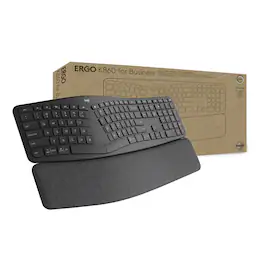
ERGO K860 for Business is a science-driven ergonomic keyboard with a curved, split keyframe and a fluid, ultra-precise typing experience. The included palm rest provides 54% more wrist support and is proven to reduce muscle activity by 21% in the upper trapezius muscle. This keyboard is uniquely designed for hours of comfortable typing.

Type more naturally with ERGO K860 – an advanced ergonomic keyboard that promotes a more relaxed typing posture – reducing wrist bending and offering wrist support. A curved keyframe helps reduce wrist strain, while a pillowed wrist rest keeps your forearms elevated to help prevent excessive bending. This Logitech ERGO keyboard features Perfect Stroke keys for quiet performance and responsiveness, and the 2-year battery life offers long-lasting use.
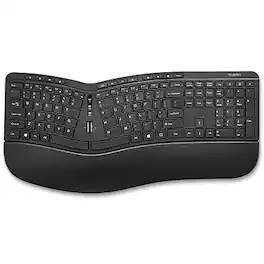
Increase your workday comfort and efficiency with the Staples TECH Wireless Ergonomic Keyboard. Designed for a more natural typing position for you wrists and arms all day long. The ergonomic keyboard features quiet keys for distraction-free typing, plus adjustable tilt legs and built-in wrist rest for extra comfort. This plug and play keyboard gives you lag-free input with the included USB-A dongle. The battery will let you know it needs changing with the low battery indicator. Enjoy bold key characters, a number lock indicator, and a numeric keypad built to withstand millions of keystrokes. The black ergonomic keyboard delivers durability and comfort, all backed by a 1-year limited warranty.
| Pros for Insignia™ - Full-Size Wireless Ergonomic Membrane Keyboard - Black | |||
|---|---|---|---|
| Ergonomics, Ease of use, Keyboard Size, Wireless, Price | There were no pros for this product— | Ergonomics, Ease of use, Wrist Rest, Bluetooth, Key Feel | There were no pros for this product— |
| Cons for Insignia™ - Full-Size Wireless Ergonomic Membrane Keyboard - Black | |||
| Key Response | There were no cons for this product— | Price, Size | There were no cons for this product— |
Specs
Reviews
Customers are saying
Customers express satisfaction with the Full-Size Wireless Ergonomic Membrane Keyboard's ergonomics, finding it helpful for wrist pain. The keyboard size and ease of use are also well-received. However, some customers have expressed concerns about the key response, noting that keys may stick.
Customer Images
The vast majority of our reviews come from verified purchases. Reviews from customers may include My Best Buy members, employees, and Tech Insider Network members (as tagged). Select reviewers may receive discounted products, promotional considerations or entries into drawings for honest, helpful reviews.
- Rated 5 out of 5 stars
So Good I'm Buying Another One!
I'm in the process of setting up a new workspace in my house and I needed a second ergonomic keyboard. My current one was paid for by the company I work for, but I was paying for it this time, so I was looking for more affordable options. I had my doubts when I saw this one at such a low price point, but Best Buy has a great return policy, so I figured there was nothing to lose. Guess what? I love this one so much, I'm stuffing my original keyboard in a drawer and buying another one of these! The slightly lowered keys and gentler tap sounds are super comforting, especially to someone like me who spends a lot of time typing.
Luke Posted
- Rated 2 out of 5 stars
Not longlasting
Purchased this in July 2025, and it’s suddenly stopped working in January 2026.
KaylaL Posted
- Rated 5 out of 5 stars
Nice wireless Keyboard
This isn’t my first time using this type of keyboard. Growing up we had one on our home computer and I absolutely hated it. After 20 plus years and learning how to actually type, I now love this type of keyboard. If you have to look at the keys to see what you’re typing this might not be a good keyboard for you. If you are able to type with without looking at the keys this keyboard is awesome. My hands do not get fatigued while typing on this keyboard. It is very well laid out and I don’t have to move my hands to reach higher up keys. It also includes a very nice palm rest. I’m currently using this keyboard with my tablet just to get use to it. I do plan to take this to work and use on my compute their as its so much nicer than the keyboard my computer has now. It did take me about a day to get use to typing as I’m use to just a flat regular keyboard. It also nice that it’s wireless so no cable to get in the way and keyboard does have a storage spot for the nano receiver. Overall I really like this keyboard and it’s much more comfortable than a regular keyboard.
apalmo Posted