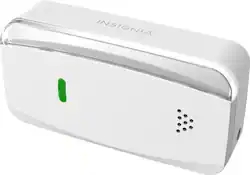
Insignia™ - Wi-Fi Garage Door Controller for Apple® HomeKit™ - White
- Key Specs
- Wireless Connectivity: Wi-Fi (The manner in which a device sends data to another device over a short distance without the use of wires or cables.)
- Works With: Apple Home (Compatible with or able to be connected to other smart devices or applications.)
- Power Source: Plug-in
- Number Of Sensors Included: 1
- General
- Brand: Insignia™
- Model Number: NS-CH1XGO8
- Product Name: Wi-Fi Garage Door Controller for Apple® HomeKit™
- Color: White
- Connectivity
- Wireless: true
- Wireless Connectivity: Wi-Fi (The manner in which a device sends data to another device over a short distance without the use of wires or cables.)
- Product Group(s) Controlled: Garage Door
- Compatibility
- Works With: Apple Home (Compatible with or able to be connected to other smart devices or applications.)
- App Compatible: true (The product can be connected to a program or software application on a mobile device, which then receives collected data from the product.)
- Operating System Compatibility: Apple iOS
- Environmental
- Indoor Or Outdoor Use: Indoor (Indicates the appropriate environment product was designed to be used in.)
- Power
- Power Source: Plug-in
- Dimensions
- Product Height: 2.5 inches (The out of box height of the item. Height is measured as the vertical distance from the bottom of the item to the top as it would be primarily used or placed.)
- Product Width: 1.4 inches (The out of box width of the item. Width is measured as the horizontal distance from one side of the item to the other as it would be primarily used or placed.)
- Product Depth: 5 inches (The out of box depth of the item. Depth is measured as the distance from the front of the item to the back as it would be primarily used or placed.)
- Product Weight: 0.35 pounds (The out of box weight of the item.)
- Included
- Number Of Sensors Included: 1
- Warranty
- Warranty - Parts: 1 year
- Warranty - Labor: 1 year
- Other
- UPC: 600603214615
User your iPhone to open and close your garage door with this Insignia Wi-Fi smart garage door controller. An easy-to-install sensor works with your iPhone to open and close the door, while compatibility with Apple HomeKit lets you integrate this controller into your home automation setup. This Insignia Wi-Fi smart garage door controller includes an LED indicator to let you know when it’s connected to your Wi-Fi network. 
- Compatible with most garage setups: Works in most setups if you have a sectional garage door, a strong Wi-Fi signal in your garage, and your garage door wall control does not have a learn button.
- Works with Apple HomeKit: Controlling this HomeKit-enabled accessory automatically and away from home requires an Apple TV with tvOS 10.1 or later or an iPad with iOS 10.1 or later set up as a home hub.
- Works with Siri: Send voice commands from your device.
- Push and in-app notifications: Inform you when your garage door is opened or closed.
- Wi-Fi connectivity: You must have a strong, 2.4GHz Wi-Fi signal in your garage that uses either WPA or WPA2 security.
A: I have the same issue, the battery in the door sensor keeps draining. If I change that battery everything works. Replace the battery or verify if the door sensor has some charge first. I am trying to see if there is a way to use a AAA or some other battery with it.
A: Some of the routers from Netgear, Asus, Ubiquiti and others have a feature in their advanced or professional settings called "Airtime Fairness" or WMM (WiFi MultiMedia). This is by default turned On and can cause devices with low data rate such as a smart plug or in this case, the Garage Door Controller lose network connection randomly or show "No Response". To resolve this issue, use the Advanced or Professional settings of your WiFI router, typically accessed via the router's Web interface, and turn off or disable the "Airtime Fairness" setting. Another wifi router setting that can sometimes cause connectivity issue for these low bandwidth devices is the QOS (quality of service) setting. Please try turning off that setting as well if connectivity issues persist. See example screen below for Netgear Nighthawk router settings.
A: Yes. Your existing wall panel inside the garage, keypad outside the garage and car remotes are unaffected and would continue to function as they now do. The Insignia Controller connects in parallel with your existing wall switch circuit from the back side of the motor drive unit, adding the smart functionality.
A: I just finished hooking this up to my Genie 2028. Works great. Use the BWC connectors when hooking up (You'll see what I mean when you connect. There are two sets of red/black wires)
Q: Does this product have an "Auto Open" Feature? So if I approach my house it will auto open for me?
A: This product doesn't feature an "Auto Open" feature; however try to use the Home app’s Scenes feature and automation to add a rule so that when you get close to home the Home app/iCloud/Homekit Hub (Apple TV) sends the command to open the door. These automation features are all controlled in HomeKit and the Home app, they are independent from Insignia Garage Door controller.
A: Yes, the Insignia Controller mimics the behavior of your door button on the wall by momentarily closing the door switch circuit. Because of this all your existing remotes, keypad and wall panels work as before.
Q: How many doors can this unit operate?
A: Just one. The package comes with 1 controller and 1 sensor. The controller comes with a wire that connects to the opener motor (plug on one end, pigtail or flat connector on the other), and the sensor mounts onto the door itself, either panel or support strut. You could in theory run a jumper wire from the main setup to a second motor, but then both doors would be in-sync (open or shut), so they could not be controlled individually.
A: No it does not. MyQ works with Amazon key
People also viewed




Today's top picks
 $449.99The price was $829.99
 $2,449.99The price was $3,199.99
 $999.98The price was $1,639.98
 $199.99The price was $249.99
 $1,099.99The price was $1,499.99