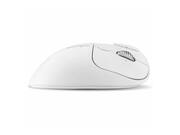
Kensington - Pro Fit™ Ergo TB550 Trackball - Optical - Wireless - Bluetooth/Radio Frequency - 2.40 GHz - Wireless - White
Reviews coming soon
About this product
Kensington Pro Fit Ergo TB550 Trackball - Optical - Wireless - Bluetooth/Radio Frequency - 2.40 GHz - Rechargeable - White - USB Type C - 1600 dpi - Tilt Wheel - 7 Programmable Button(s) -
Wireless Connectivity Options
Bluetooth/Radio Frequency
Dual Wireless (Bluetooth (LE) + 2.4GHz) Connection
Optical
Rechargeable Battery
Wireless
Patented Cleaning System
2.40 GHz
High-Quality Optical Tracking
Rechargeable
- Maximum Sensitivity1600 dots per inchNumber of Buttons (Total)7Connection TypeWireless
Reviews
This product doesn't have any reviews yet.
Compare similar products

Kensington Pro Fit Ergo TB550 Trackball - Optical - Wireless - Bluetooth/Radio Frequency - 2.40 GHz - Rechargeable - White - USB Type C - 1600 dpi - Tilt Wheel - 7 Programmable Button(s) -

Features | PC and Mac CompatibleEffortlessly supports Windows 7 or later (32-bit/64-bit), Windows 11 (64-bit only), and macOS 10.14 or later. Recycled MaterialsThe plastic in this trackball is composed of at least 47% post-consumer recycled (PCR) plastic. *Excludes Printed Circuit Board (PCB) assembly, rechargeable battery and charging cable. Wired + Wireless Triple Connection CapabilityBluetooth®, wireless 2.4GHz Nano receiver, and wired connection options provide maximum flexibility, enabling you to easily work across multiple setups. Rechargeable BatterySupports up to 4 months of productivity with a single charge. Includes USB-A (male) to USB-C® (male) cable for charging and wired connection. Provides USB-A (female) to USB-C® (male) adapter to accommodate different connections. Ambidextrous Design with Low-Profile FootprintThe low-profile design ensures all-day comfort for both right- and left-handed users. The trackball operates in less desk space than a mouse and promotes greater comfort during extended use by minimizing arm and wrist movement. Superior Optical Tracking TechnologyDual sensors accurately track the large 55mm ball, providing highly accurate and responsive tracking with minimal hand and wrist movement. Customization OptionsPlug & play or personalize your experience via Kensington's intuitive and free configuration software - enabling the assignment of functions to up to 8 sets of programmable buttons. This flexibility empowers you to customize your trackball to fit your unique workflow, enhancing productivity and efficiency with just a few clicks.128-bit AES EncryptionGovernment-grade 128-bit AES encryption provides secure wireless connectivity.3-Year Limited WarrantyEnjoy peace of mind knowing you are covered by Kensington with a 3-year limited warranty.

When technology is built around business, something just clicks. Enter the HP 685 Comfort Dual-Mode Mouse. Purposefully designed with programmable buttons, a 4D tilt wheel with fast scroll, and ultra-secure connection to up to three devices, it's ready for virtually any surface.

Minimize movement and maximize comfort with the Logitech ERGO M575S wireless trackball mouse. Thumb control lets you move the cursor without moving your arm, while the sculpted ergonomic design fully supports your hand and keeps your forearm in a more natural position. This wireless ergonomic mouse has been developed by Logi Ergo Lab experts, user-tested and certified by ergonomists to give you 25% less muscle strain in your forearm . The smooth and responsive thumb control can be used anywhere – and since it doesn’t need to be moved, the ERGO M575S is perfect for tight setups and busy desks.
| Pros for Kensington - Pro Fit™ Ergo TB550 Trackball - Optical - Wireless - Bluetooth/Radio Frequency - 2.40 GHz - Wireless - White | |||
|---|---|---|---|
| There were no pros for this product— | There were no pros for this product— | There were no pros for this product— | Ergonomics, Overall Performance, Ease of Use, Connectivity, Battery Life |
| Cons for Kensington - Pro Fit™ Ergo TB550 Trackball - Optical - Wireless - Bluetooth/Radio Frequency - 2.40 GHz - Wireless - White | |||
| There were no cons for this product— | There were no cons for this product— | There were no cons for this product— | Cursor Control |
Specs
Be the first to ask a question.
We’ll try to get your question answered within 24 hours by a Best Buy customer or brand representative.


