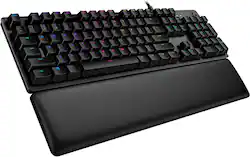
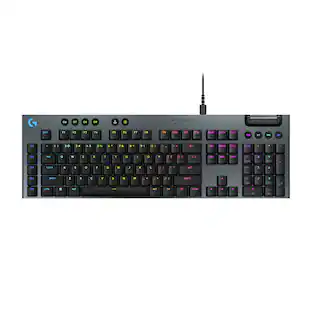
Logitech - G513 Full-size Wired Mechanical GX Brown Tactile Switch Gaming Keyboard with RGB Backlighting - Carbon
Model: 920-009322
SKU: 6397081
This item is no longer available in new condition. See similar items below
- Key Specs
- Lighting Type: RGB
- Form Factor: Full-size (The size, arrangement, and physical configuration of the product.)
- Keyboard Technology: Mechanical (Type of technology that detects a key press.)
- Key Switch Behavior: Tactile (Refers to the mechanisms under the keycaps on a keyboard that enable you to type faster and more precisely. Linear switches move straight up and down without any sound or bump. Tactile switches provide a noticeable bump in the key press, and no sound. Clicky switches provide a bump in the key press and "clicky" sound.)
- Connection Type: Wired
- General
- Brand: Logitech
- Model Number: 920-009322
- Product Name: G513 Carbon Full-size Wired Mechanical GX Brown Tactile Switch Gaming Keyboard with RGB Backlighting
- Color: Carbon
- Features
- Lighting Type: RGB
- Customizable Lighting: true
- Numeric Keypad: true
- Touchpad: false
- Keyboard Type: Gaming, Programmable
- Palm Rest: true
- Spill Resistant: false (Designed to resist some degree of accidental liquid spill. The level of spill-resistance is indicated by the product manufacturer, but the degree of protection may not be guaranteed after normal wear of the product.)
- Foldable: false
- Keycap Material: ABS
- Functions
- Form Factor: Full-size (The size, arrangement, and physical configuration of the product.)
- Keyboard Technology: Mechanical (Type of technology that detects a key press.)
- Dedicated Macro Keys: true (Perform shortcuts of key sequences to carry out commands with a single key. Key sequences may include key strokes, mouse actions, and/or menu actions.)
- Adjustable Tilt Function: true
- Key Switch Type: GX Brown
- Key Switch Behavior: Tactile (Refers to the mechanisms under the keycaps on a keyboard that enable you to type faster and more precisely. Linear switches move straight up and down without any sound or bump. Tactile switches provide a noticeable bump in the key press, and no sound. Clicky switches provide a bump in the key press and "clicky" sound.)
- Multimedia Keys: true
- Number Of Programmable Keys: 0
- Connectivity
- Connection Type: Wired
- Wired Connectivity: USB Type A
- Cable Length: 5.9 feet
- Detachable Cable: false
- Number Of USB Port(s): 1 (The total number of USB ports including all generations and versions.)
- Compatibility
- Operating System Compatibility: Windows
- Plug and Play Operation: true
- System Requirements: Microsoft Windows 7 / 8 / 8.1 / 10 or later; USB port for keyboard, USB port for USB passthrough (The software that a product must have for it to be able to integrate with another product.)
- Dimensions
- Product Height: 1.4 inches (The out of box height of the item. Height is measured as the vertical distance from the bottom of the item to the top as it would be primarily used or placed.)
- Product Width: 17.5 inches (The out of box width of the item. Width is measured as the horizontal distance from one side of the item to the other as it would be primarily used or placed.)
- Product Weight: 38.8 ounces (The out of box weight of the item.)
- Mouse
- Mouse Included: false
- Other
- UPC: 097855151698
G513 is a high performance RGB mechanical gaming keyboard that features advanced technologies in a modern and sleek design. G513 includes full spectrum ~16.8M color RGB per key lighting with LIGHTSYNC technology, choice of mechanical switches, and a memory foam palmrest to deliver utmost comfort. G513 is the perfect blend of performance, advanced technologies and features, and unparalleled build quality and comfort.
- LIGHTSYNC technology: Personalize lighting for each individual key, customize lighting effects, and enjoy in-game integrations from a spectrum of ~16.8M colors with Logitech G HUB.*
- USB pass-through: Convenient USB passthrough port makes it a snap to plug in your mouse, flash drive or phone for direct data transmission or charging.
- GX Brown mechanical switches: Features a completely smooth and consistent keystroke for quick in-game action.
- Multimedia and lighting controls: Media and lighting controls are right at your fingertips. Use FN + F keys to control volume, play and pause, skip track, mute, toggle lighting, enter game mode, etc.
- Aircraft-grade aluminum alloy: Creates a slim, premium look and ensures durability.
- Works with G HUB: Customize lighting, Game mode and macro custom programming with downloadable Logitech G HUB software.
- Premium comfort: Memory foam rest quickly and fully recovers from pressure so every use is as comfortable as the first.
- More sustainable: Certified carbon neutral: the carbon impact of the product and packaging has been reduced to zero.
Whats Included
- Logitech G513 GX Red Carbon Wired Gaming Mechanical Keyboard with RGB Backlighting
- Palmrest
- Gaming keycaps
- Keycap puller
- User documentation
People also viewed
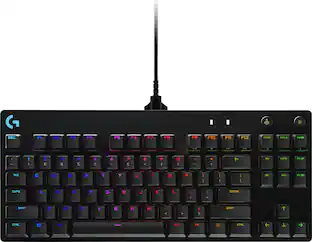 $99.99The price was $119.99
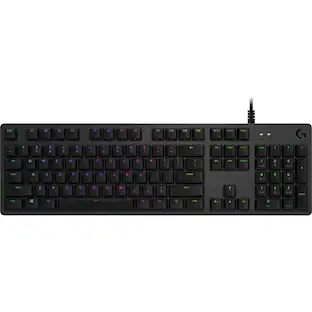 $136.99The price was $142.39
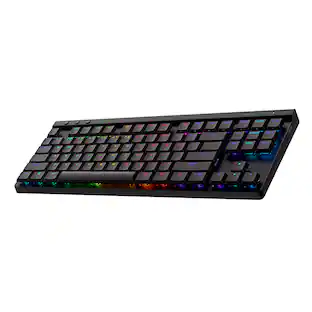 $129.99The price was $159.99
 $129.99The price was $159.99
 $146.99The price was $159.99

Today's top picks
 $449.99The price was $829.99
 $2,449.99The price was $3,199.99
 $999.98The price was $1,639.98
 $199.99The price was $249.99
 $1,099.99The price was $1,499.99