Magic Keyboard with Touch ID and Numeric Keypad for Mac models with Apple silicon (USB-C) - Black Keys - Open Box - Good
- Works like new. Restored to factory settings.
- May have minor scratches or dents.
- May be missing non-essential parts, accessories, or packaging.
More Buying Options
Related Item

About This Item
About Open Box
Reviews
Customers are saying
Customers are enthusiastic about the Magic Keyboard with Touch ID and Numeric Keypad, highlighting its excellent keyboard quality, Touch ID functionality, and sleek design. Many appreciate the amazing battery life, seamless connectivity, and the convenience of the fingerprint reader. The keyboard's ease of use and the good feel of the keys are also well-received, while the USB-C port is valued for its charging and passthrough capabilities. However, some users have noted the lack of adjustability as a potential drawback.
Customer Images
The vast majority of our reviews come from verified purchases. Reviews from customers may include My Best Buy members, employees, and Tech Insider Network members (as tagged). Select reviewers may receive discounted products, promotional considerations or entries into drawings for honest, helpful reviews.
Compare similar products
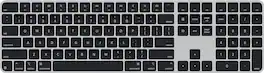
Magic Keyboard is available with Touch ID, providing fast, easy, and secure authentication for logins and purchases. Magic Keyboard with Touch ID and Numeric Keypad delivers a remarkably comfortable and precise typing experience. It features an extended layout, with document navigation controls for quick scrolling and full-size arrow keys, which are great for gaming. The numeric keypad is also ideal for spreadsheets and finance applications. It’s wireless and features a rechargeable battery that will power your keyboard for about a month or more between charges. It pairs automatically with your Mac, so you can get to work right away. It features a USB-C port and includes a woven USB-C Charge Cable that lets you pair and charge by connecting to a USB-C port on your Mac.

Magic Keyboard is now available with Touch ID, providing fast, easy, and secure authentication for logins and purchases.
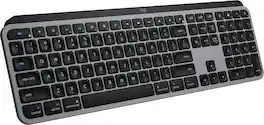
Introducing MX Keys S for Mac — a low-profile wireless keyboard with Mac-specific keys that offers a fast fluid precise typing experience, smart illumination, and customizable, time-saving Smart Actions and matching Space gray and Pale gray finishes that blend perfectly into your Apple setup.

Magic Keyboard with Numeric Keypad features an extended layout, with document navigation controls for quick scrolling and full-size arrow keys for gaming. A scissor mechanism beneath each key allows for increased stability, while optimized key travel and a low profile provide a comfortable and precise typing experience. The numeric keypad is also great for spreadsheets and finance applications. And the built-in, rechargeable battery is incredibly long-lasting, powering your keyboard for about a month or more between charges.
| Pros for Magic Keyboard with Touch ID and Numeric Keypad for Mac models with Apple silicon (USB-C) - Black Keys | |||
|---|---|---|---|
| Keyboard Quality, Battery Life, Touch ID, Design, Ease of Use | There were no pros for this product— | Keyboard Quality, Battery Life, Ease of use, Key Feel, Connectivity | Battery Life, Ease of use, Numeric Keypad, Wireless, Overall Performance |
| Cons for Magic Keyboard with Touch ID and Numeric Keypad for Mac models with Apple silicon (USB-C) - Black Keys | |||
| Adjustability | There were no cons for this product— | Touch ID | Price, Key Travel |