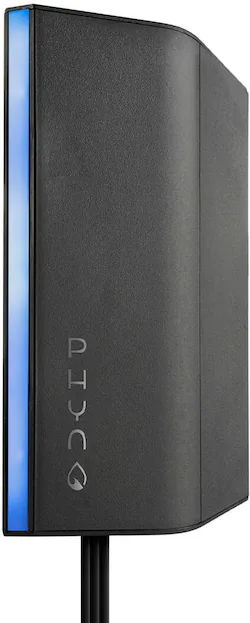
Phyn - Smart Water Assistant - Matte Black
- Key Specs
- Detector Type: Freeze, Water leak
- Sensor Type: Pressure
- Works With: Amazon Alexa, Google Home (Compatible with or able to be connected to other smart devices or applications.)
- Power Source: Plug-in
- Number of Devices Included: 1
- General
- Brand: Phyn
- Model Number: PHYCF001
- Product Name: Smart Water Assistant
- Color: Matte Black
- Detection
- Detector Type: Freeze, Water leak
- Sensor Type: Pressure
- Compatibility
- Works With: Amazon Alexa, Google Home (Compatible with or able to be connected to other smart devices or applications.)
- App Compatible: true (The product can be connected to a program or software application on a mobile device, which then receives collected data from the product.)
- Operating System Compatibility: Android, Apple iOS
- Environmental
- Indoor Or Outdoor Use: Indoor (Indicates the appropriate environment product was designed to be used in.)
- Features
- Placement: Sink
- Power
- Power Source: Plug-in
- Dimensions
- Product Height: 5.19 inches (The out of box height of the item. Height is measured as the vertical distance from the bottom of the item to the top as it would be primarily used or placed.)
- Product Width: 1.38 inches (The out of box width of the item. Width is measured as the horizontal distance from one side of the item to the other as it would be primarily used or placed.)
- Product Depth: 3.71 inches (The out of box depth of the item. Depth is measured as the distance from the front of the item to the back as it would be primarily used or placed.)
- Product Weight: 1 pounds (The out of box weight of the item.)
- Included
- Number of Devices Included: 1
- Mounting Hardware Included: true
- Warranty
- Warranty - Parts: 2 years
- Warranty - Labor: 2 years
- Other
- UPC: 745883782116
Track water use with this Phyn smart water assistant. The included mounting screws and adhesive strip offer easy installation, and the compatible app lets you monitor water consumption and alerts you to leaks. This Phyn smart water assistant automatically learns your plumbing system and is compatible with popular virtual assistants so you can access reports and alerts using voice commands.
- Never worry about hidden leaks again: From drip leaks to catastrophic bursts and everything in between, Phyn gives you the tools to ensure that your home is watertight.
- Real-time leak alerts: SMS or push notifications from the free Phyn app alert you at the first sign of a possible issue and can connect you to a plumber in minutes.
- Diagnostic Plumbing Checks: Turn off water at the main, run a plumbing check, and in minutes you can detect a range of hidden flaws such as poor seals and pinhole leaks in your water system.
- Self-install: You can easily install it under any sink with 3/8" hot- and cold-water lines and a power outlet. No plumber necessary.
- See your water and save: Track your water use daily and monthly, and see how your home compares to others. Over time, Phyn learns your plumbing system and gives you insights into your water use down to each fixture.
- Pre-freeze warnings: Get you notified before freeze conditions set in, providing the precious time to take action and avoid damage from frozen pipes.
- Intelligence in action: Phyn learns about your plumbing system as soon as it's connected and gets to know the unique voice of your fixtures to recognize the subtle difference between a bath filling and a pipe leaking.
- Smart home integrated: Use voice commands to learn about your water use. Phyn works seamlessly with Amazon Alexa, Google Assistant. And with IFTTT you can have Phyn trigger actions with other smart home devices.
- Requirements & compatibility: Phyn Smart Water Assistant needs your home to have a Pressure Regulating Valve (PRV) to perform at its best. Installation requires WiFi and a power outlet under a sink that also has 3/8" hot and cold water connections.
- No subscriptions: The Phyn app and all of its features are free and available to download for iOS and Android.
- Multi-property: Monitor water use and receive leak alerts for up to six properties from one account in the Phyn app.
A: Hello - great question. The product does monitor the entire home's plumbing, as the pipes in a plumbing system are all interconnected. Whether the product will detect irrigation usage and leaks is dependent upon a few things. Phyn works best and is most accurate at detecting usage and leaks if your home has a Pressure Regulating or Reducing Valve (PRV). This is a bell shaped mechanism that is typically located where the water comes into the home. Phyn will pick up all the water usage that comes after the PRV. So, if your irrigation is plumbed before your PRV Phyn will not detect it. If it is plumbed after your PRV Phyn will detect it.
Q: Can this be installed under any sink to get whole house readings or just under the kitchen sink?
A: It can be installed under any sink that has a power outlet nearby.
A: No, the Phny Smart Water Assistant is a monitoring device only. It has no capability to control the water.
People also viewed
 $79.98The price was $139.99






Today's top picks
- $79.98The price was $139.99