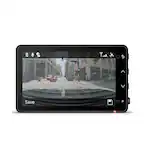
Pioneer - Universal Compatibility Compact dash camera with 1.5K resolution and a 120° wide-angle view - Black
Pioneer - Universal Compatibility Compact dash camera with 1.5K resolution and a 120° wide-angle view - Black
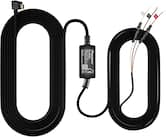
- Pioneer - Dash Cam 11 ft. 2 in. Power Cable Hardwire Kit - Black$19.99
More Buying Options
Related Item

Specifications
- Field of View120 degreesAutomatic Incident DetectionYesG-SensorYesCompatibilityUniversalCamera Mounting LocationWindshieldVehicle Camera TypeDashboard
- Key Specs
- Field of View: 120 degrees
- Automatic Incident Detection: true
- G-Sensor: true
- Compatibility: Universal
- Camera Mounting Location: Windshield
- Vehicle Camera Type: Dashboard
- General
- Brand: Pioneer
- Model Number: VREC-H120SC
- Product Name: Universal Compatibility Compact dash camera with 1.5K resolution and a 120° wide-angle view
- Color: Black
- Vehicle Camera Type: Dashboard
- Recording & Playback
- Field of View: 120 degrees
- Automatic Incident Detection: true
- G-Sensor: true
- Loop-Cycle Recording: TRUE
- GPS Enabled: false
- Camera Power Source: Vehicle battery
- Expandable Memory Compatibility: microSD
- Recording Feature: true
- Compatibility
- Compatibility: Universal
- App Compatible: true (The product can be connected to a program or software application on a mobile device, which then receives collected data from the product.)
- Operating System Compatibility: Android, Apple iOS
- Features
- Integrated Microphone: false
- Display
- Screen Included: false
- Mounting
- Camera Mounting Location: Windshield
- Mount Included: true
- Mount Type: Adhesive
- Input
- Number Of Auxiliary Inputs: 0
- Number of USB Port(s): 0
- Dimensions
- Product Height: 1.92 inches (The out of box height of the item. Height is measured as the vertical distance from the bottom of the item to the top as it would be primarily used or placed.)
- Product Width: 5.16 inches (The out of box width of the item. Width is measured as the horizontal distance from one side of the item to the other as it would be primarily used or placed.)
- Product Depth: 5.76 inches (The out of box depth of the item. Depth is measured as the distance from the front of the item to the back as it would be primarily used or placed.)
- Product Weight: 0.639 pounds (The out of box weight of the item.)
- Warranty
- Warranty - Parts: 1 year
- Warranty - Labor: 1 year
- Other
- UPC: 884938536912
Compact dash camera with 1.5K resolution and a 120 wide-angle view for a clear, wide view of the road. Easy to install and elegantly designed for a seamless fit in any vehicle.
- 1.5K Resolution: Capture every detail with the dash camera’s stunning 1296p (1.5K) resolution, delivering clear footage that makes license plates, road signs, and unexpected moments easy to see—even in challenging lighting conditions.
- Wide Dynamic Range (WDR): This dash camera features Wide Dynamic Range (WDR) which automatically enhances and compensates for "overexposure" and "underexposure" when the brightness changes suddenly, such as at night, or when entering or exiting a tunnel or parking garages.
- Automatic Event Recording: Drive with confidence knowing Pioneer’s built-in G-sensor technology automatically detects sudden impacts or abrupt movements, instantly locking and saving critical footage.
- Wide Viewing angle: See more of the road with the expansive 120° wide-angle lens, designed to capture a broader perspective of your surroundings. From adjacent lanes to roadside activity, this wide field of view helps ensure that no important detail goes unnoticed.
- Optional Parking Mode: Pioneer’s Optional Parking Mode allows the dash camera to capture photos and record video during impact-detection events while parked. With an optional external Hardwire Kit installed (RD-HWK300)
- External Storage Support: Never miss a moment with an included 64GB Micro SD card and support for up to 128GB of external storage.
- Universal Compatibility: Pioneer dash cameras are designed with universal compatibility, ensuring installation and reliable performance across a wide range of vehicle types and models.
- Pioneer ai-sense app: The Pioneer ai-sense app connects seamlessly to your dash camera, putting powerful features in your pocket. From instant playback to secure video storage, confidence is just a tap away.
Whats Included
- Camera
- 1.5A Cigarette charger
- SD Card
Product Manuals
Q: Is it wireless once charged?
A: The VREC-H120SC is not wireless. You need to have the USB cable connected for power.
Q: When does it start and stop recording?
A: When you power the unit off, it will stop recording. Parking & Surveillance Mode requires the optional Pioneer RD-HWK300 to active the parking mode. This will allow it to record while the vehicle is powered off.
Q: Is this only forward-looking?
A: The VREC-H120SC can only face one direction. Typically, it is facing forward. The camera can be swiveled to face backwards too.
A: The VREC-H120SC does not have the Sony Starvis technology. However, night vision is still very good. Please copy/paste this link to do a full comparison. https://usa.pioneer/collections/dash-cameras?view=dashcam
A: most Usb power-in dashcams can be hardwired. I went with FitDvr power module that allowed me to wire the dashcam to the central console near the rearview mirror. I didnt use the Pioneer though as I didnt like the app reliability, You must use the fitdvr kit that is specific to your vehicle (search on big A)
Compare similar products

Compact dash camera with 1.5K resolution and a 120 wide-angle view for a clear, wide view of the road. Easy to install and elegantly designed for a seamless fit in any vehicle.

Big protection comes in small packages. Whether it’s in capturing the broad vistas of a scenic drive, or recording unexpected incidents along the way, the QHD video of the Cobra SC 120 has the power to see what’s ahead, and the size to stay out of your line of sight.

Car Dash Camera with 8MP UHD 4K Video resolution, ADAS enabled, Wide Dynamic Range, 137 Field of View with in-built GPS and Wi-Fi

Stay in the clear with the voice-controlled Garmin Dash Cam Mini 3 dash camera. This ultracompact key-sized dash cam automatically records high-definition 1080p video with a wide 140-degree field of view — and even saves video of detected incidents. The built-in-Garmin Clarity polarizer reduces windshield glare for a clear view. Plus, Garmin Clarity HDR optics enable the camera to capture crisp details, day and night. With a paid Vault subscription and an active Wi-Fi network connection, the secure online Vault automatically stores important saved video clips so you can easily view and share with the Garmin Drive smartphone app. Voice control lets you use spoken commands in English, German, French, Spanish, Italian and Swedish to save video and start or stop audio recording. Some jurisdictions regulate or prohibit use of this device.
| Pros for Pioneer - Universal Compatibility Compact dash camera with 1.5K resolution and a 120° wide-angle view - Black | |||
|---|---|---|---|
| Size, Video Quality, Field of View, Overall Performance, Ease of Use | Size, Video Quality, Ease of use, Resolution, Design | Video Quality, Field of View, Installation Difficulty | Overall Performance, Size, Video Quality, Field of View, Installation |
| Cons for Pioneer - Universal Compatibility Compact dash camera with 1.5K resolution and a 120° wide-angle view - Black | |||
| Connectivity, App Operation | Connectivity, App | Connectivity | Connectivity |
Specs
Reviews
Customers are saying
Customers enjoy the Universal Compatibility Compact dash camera with its small size and sharp video quality. Users find the installation straightforward and appreciate the wide field of view. However, some customers have reported issues with connectivity. The inclusion of accessories is also a positive aspect for some users.
Customer Images
The vast majority of our reviews come from verified purchases. Reviews from customers may include My Best Buy members, employees, and Tech Insider Network members (as tagged). Select reviewers may receive discounted products, promotional considerations or entries into drawings for honest, helpful reviews.
- Rated 5 out of 5 stars
HUGE BENEFITS / Easy Set Up
Super Convenient and Easy set up! So I waited a month to review so I could give honest opinion. This camera is about the size of a golf ball so it can right behind rear view mirror so it's not in the way and the cord easily tucks in headliner and can be ran all the way to power source so that it's not seen at all. Total set up took less than 5 minutes. Once you start/stop vehicle, it automatically turns on or off. Anytime I have to stop quickly or swirve or the camera detects any driving irregularities, it will tell automatically tell you that emergency recording has started. The app is extremely user friendly and the videos are great. I have had no issues or bad experiences with it so far. I am extremely happy I bought this rather than spending more money on something I wouldn't have needed. Thanks Pioneer.
NicholasC Posted
- Rated 3 out of 5 stars
Not bad compare to the price
Very average video quality. Hard to see the other car license plate numbers. Do the job done. I am keeping it since other dash cameras on this price point or even higher have similar quality.
Khairul Posted
- Rated 4 out of 5 stars
Good basic dash cam however app isn't the best
As a parent with two teenage drivers, I find that dash cameras are a major help in navigating some of the situations that teenagers find themselves in. I was looking for an easy plug and play solution to be able to move between two vehicles, which is why I picked up the Pioneer Compact Dash Cam. TL:DR - Overall the Dash cam is meant for plug and play use, and targets users who want a basic peace of mind that a dash cam can offer without all the extra features such as GPS and emergency assist. Accessing the app, changing settings, and reviewing video through the app takes time and patience as you must connect directly to the camera through wifi, which doesn't always connect reliably or stay connected. Pros: Compact, very small footprint Easy plug and play setup with the included 9V power adaptor You can view events and recordings via the app You can turn off the audible alerts that state when settings are changed or when the cam stops recording Cons: Connecting to the camera takes time, must connect directly using wifi every time The hardwire kit is not included, which is required to utilize parking mode feature If you have Andriod Auto or other IoT connections, the cam connection seems to get deprioritized and drops frequently. This happens to me if I don't have the app open and actively using it. In the box is the dash cam, windshield adhesive strip, 64 GB microSD Card, 9v (cigarette) charging adaptor, and paperwork. You'll scan the box to download the Pioneer AI-Sense app, which will then walk you through the complete setup. This takes approximately 10 minutes, including connecting to the camera, formatting the SD card, and making sure settings are optimized for your setup. Using the camera is as expected, once you have placed it on the windshield via the adhesive sticker, you need to ensure that you have power either from the enclosed 9v charging adaptor or by hardwiring the camera into the vehicle fuse box. The hardwire kit is not included, which is fine if you prefer to not have the camera hard wired into the vehicle. Upon driving you'll find that the camera records 1 minute video clips, at the resolution you set, up to 1.5k resolution. App features include turning on/off video and audio recording, video resolution quality (1.5k, 1080p, 720p resolution options), turning on parking mode (if hardwire kit is installed), and adjusting measurement settings. You can also view or download from an event library in 1 minute increments, saved by day with a visible time stamp. The best experience I have with this camera is to connect via the app only when needed, for example, when the teenager advised that someone tried to run her off the road on her way to school, I can look through the recorded events and determine if further action is needed. I can also have her download the events, to send to me or to review from the app later. This will ensure they are available after the SD card fills up and starts writing over the existing events (approximately every 8 hours pending usage and resolution). I don't recommend this camera if you intend to interact with recordings via the app on a daily basis, as that is cumbersome to keep and stay connected to the dash cam. On the flip side, you can remove the microSD card and view events from a computer, which bypasses the frustration from the wifi connection issues.
EngineerMom Posted