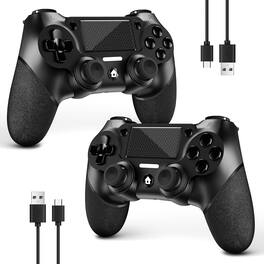
Reds Spade - For Ps4 Controller Wireless Ps4 pro slim pc With Non-slip Grip Of Both Sides And Usb-c Cable - Black
Color
BlackFREE shipping to
Related Item

Specifications
- WirelessNoCompatible Platform(s)Mac
- Key Specs
- Wireless: false
- Compatible Platform(s): Mac
- General
- Brand: Reds Spade
- Product Name: For Ps4 Controller Wireless Ps4 pro slim pc With Non-slip Grip Of Both Sides And Usb-c Cable
- Color: Black
- Features
- Product Type: Controller
- Connectivity
- Wireless: false
- Compatibility
- Compatible Platform(s): Mac
- Warranty
- Warranty - Parts: 1 year
- Other
- UPC: 5402640698619
2 Packing Two controllers are packaged in one box, which is less costly than buying two controllers separately. You can get two different custom designed controllers at the same time, which is very cost-effective.This will bring you a better game experience when you play with your friends, lover, family. Wide Compatibility AceGamer wireless controller compatible with PS4 Pro Slim Windows PC. Attention : Only when connecting for the first time, you must activate the device with the USB cable for the first pairing and connection. After that, the normal wireless connection of Bluetooth can be made, and USB data cable is no longer needed. Note : Connecting to PC(without Bluetooth) needs to install receiver, not included. Function Highlights 360 Refined analog sticks without dead zone, the new touch pad on the face of the game controller offer players precise control. Controller which built-in 6-axis gyro sensor has dual motor vibration, excellent dual shock effect design makes the tactile sense more sensitive. The optimized buttons and triggers, ergonomic design non-slip grips, which offer you fantastic gaming experience. Turbo Setting You can customize any key as a turbo key. First, hold down the share key, then click the turbo key you want to set up successfully. Secondly, you can adjust the turbo frequency. First, hold down the share key, then touch the joystick on the right up and down. There are three gears to adjust in total. To Be AceGamer You can get: 2x AceGamer for ps4 controllers wireless; 1x Charging Cable; 1x User Manual; Professional after-sales service. We focus on the design, production and sales of custom controllers. If you have any questions, please contact us in any time! Connection instructions 1 P4 first connection requires the use of the product s original cable, and host pairing in order to carry out the wireless connection. 2 wireless connection needs to press and hold the HOME and SHARE button 3-5S, and then in the host Bluetooth device can see the Wireless Controller controller name, click on the pairing connection can be. (You can watch our video for detailed operation)
- Black: 2 Packing Two controllers are packaged in one box, which is less costly than buying two controllers separately. You can get two different custom designed controllers at the same time, which is very cost-effective.This will bring you a better game experience when you play with your friends, lover, family. Wide Compatibility AceGamer wireless controller compatible with PS4 Pro Slim Windows
- Black: 2 Packing Two controllers are packaged in one box, which is less costly than buying two controllers separately. You can get two different custom designed controllers at the same time, which is very cost-effective.This will bring you a better game experience when you play with your friends, lover, family. Wide Compatibility AceGamer wireless controller compatible with PS4 Pro Slim Windows
Compare similar products
2 Packing Two controllers are packaged in one box, which is less costly than buying two controllers separately. You can get two different custom designed controllers at the same time, which is very cost-effective.This will bring you a better game experience when you play with your friends, lover, family. Wide Compatibility AceGamer wireless controller compatible with PS4 Pro Slim Windows PC. Attention : Only when connecting for the first time, you must activate the device with the USB cable for the first pairing and connection. After that, the normal wireless connection of Bluetooth can be made, and USB data cable is no longer needed. Note : Connecting to PC(without Bluetooth) needs to install receiver, not included. Function Highlights 360 Refined analog sticks without dead zone, the new touch pad on the face of the game controller offer players precise control. Controller which built-in 6-axis gyro sensor has dual motor vibration, excellent dual shock effect design makes the tactile sense more sensitive. The optimized buttons and triggers, ergonomic design non-slip grips, which offer you fantastic gaming experience. Turbo Setting You can customize any key as a turbo key. First, hold down the share key, then click the turbo key you want to set up successfully. Secondly, you can adjust the turbo frequency. First, hold down the share key, then touch the joystick on the right up and down. There are three gears to adjust in total. To Be AceGamer You can get: 2x AceGamer for ps4 controllers wireless; 1x Charging Cable; 1x User Manual; Professional after-sales service. We focus on the design, production and sales of custom controllers. If you have any questions, please contact us in any time! Connection instructions 1 P4 first connection requires the use of the product s original cable, and host pairing in order to carry out the wireless connection. 2 wireless connection needs to press and hold the HOME and SHARE button 3-5S, and then in the host Bluetooth device can see the Wireless Controller controller name, click on the pairing connection can be. (You can watch our video for detailed operation)
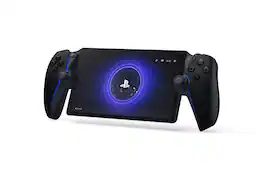
Play your PS5® console over Wi-Fi with console quality controls using PlayStation Portal™ Remote Player. Put Your PS5 in the Palm of Your Hand: PlayStation Portal™ Remote Player gives you access to the games on your PS5® console over a Wi-Fi network, letting you jump into gaming on a gorgeous 8” LCD screen capable of 1080p resolution play at 60fps, all without needing to play on a TV. Play Your Game Collection with Remote Play: PlayStation Portal™ Remote Player can play compatible games you have installed on your PS5® console, including your favorite games for PS5 and PS4. Enjoy Cloud Streaming for PS5® Games with PlayStation Plus®Premium: Stream select titles from the Game Catalog, Classics Catalog, and even select digital PS5® games in Your Library from PlayStation™Store, without needing to wait for downloads. Experience Breathtaking Immersion with DualSense® Wireless Controller Features and 3D Audio: Feel the incredible immersion of haptic feedback and adaptive triggers in supported games, and surround yourself with sound via Tempest 3D AudioTech in supported games when a compatible audio device is connected.
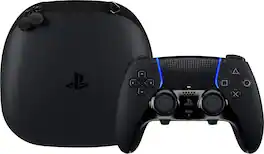
Sharpen your skills in style with the highly customizable DualSense Edge Midnight Black wireless controller. Bring the controller and its components wherever play takes you with the included Midnight Black carrying case.
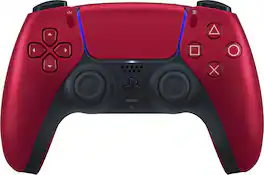
Ignite your gaming sessions with the metallic finish of the Volcanic Red DualSense wireless controller.
| Pros for Reds Spade - For Ps4 Controller Wireless Ps4 pro slim pc With Non-slip Grip Of Both Sides And Usb-c Cable - Black | |||
|---|---|---|---|
| There were no pros for this product— | Overall Performance, Portability, Screen Quality, Battery Life, Comfort | Overall Performance, Feel, Ergonomics, Customization, Button Functionality | Overall Performance, Feel, Color, Design, Ease of use |
| Cons for Reds Spade - For Ps4 Controller Wireless Ps4 pro slim pc With Non-slip Grip Of Both Sides And Usb-c Cable - Black | |||
| There were no cons for this product— | Connectivity, Input Lag, Frame Rate | Stick Drift, Connectivity, Battery Life | Stick Drift, Price, Size, Weight |
Specs



Reviews
This product doesn't have any reviews yet.