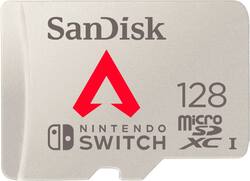
SANDISK - 128GB microSDXC UHS-I Memory Card for Nintendo Switch, Apex Legends
Model: SDSQXAO-128G-AN6ZY
SKU: 6448068
This item is no longer available in new condition. See similar items below
- Key Specs
- Storage Capacity: 128 gigabytes (Measured in megabytes (MB), gigabytes (GB) and terabytes (TB), this is the amount available for storing files, music, movies, photos and more. The total includes the capacity of the hard disk drive and solid state drive if both are included on the computer.)
- Maximum Read Speed: 100 megabytes per second (The greatest speed at which the device can read information; for example, opening files.)
- Maximum Write Speed: 90 megabytes per second (The greatest speed at which the device can write information; for example, saving files.)
- Memory Card Format: microSDXC
- General
- Brand: SANDISK
- Model Number: SDSQXAO-128G-AN6ZY
- Product Name: 128GB microSDXC UHS-I Memory Card for Nintendo Switch, Apex Legends
- Color: White
- Capacity
- Storage Capacity: 128 gigabytes (Measured in megabytes (MB), gigabytes (GB) and terabytes (TB), this is the amount available for storing files, music, movies, photos and more. The total includes the capacity of the hard disk drive and solid state drive if both are included on the computer.)
- Speed
- Maximum Read Speed: 100 megabytes per second (The greatest speed at which the device can read information; for example, opening files.)
- Maximum Write Speed: 90 megabytes per second (The greatest speed at which the device can write information; for example, saving files.)
- SD Bus Mode: UHS-I
- SD Speed Class: Class 10
- UHS Speed Class: U3
- Environmental
- Water Resistant: true (Resists some degree of water penetration.)
- Maximum Operating Temperature: 185 degrees fahrenheit (The highest recommended ambient (surrounding) temperature in which the product can ideally operate stated by the manufacturer. Generally long-term exposure of the product to temperatures more than the maximum can result in ineffective operation.)
- Minimum Operating Temperature: -13 degrees fahrenheit (The lowest recommended ambient (surrounding) temperature in which the product can ideally operate stated by the manufacturer. Generally long-term exposure of the product to temperatures less than the minimum can result in ineffective operation.)
- Shock Resistant: true (Resists some degree of damage from impact.)
- X Ray Resistant: true
- Dimensions
- Product Height: 0.03 inches (The out of box height of the item. Height is measured as the vertical distance from the bottom of the item to the top as it would be primarily used or placed.)
- Product Width: 0.6 inches (The out of box width of the item. Width is measured as the horizontal distance from one side of the item to the other as it would be primarily used or placed.)
- Product Depth: 0.4 inches (The out of box depth of the item. Depth is measured as the distance from the front of the item to the back as it would be primarily used or placed.)
- Product Weight: 0.2 ounces (The out of box weight of the item.)
- Warranty
- Warranty - Parts: Limited lifetime
- Warranty - Labor: Limited lifetime
- Other
- UPC: 619659187187
Get ample space to expand your gaming collection with this SanDisk SDSQXAO-128G-AN6ZY microSDXC memory card for Nintendo Switch and Switch Lite. The 128GB capacity offers plenty of room to store your epic battles, winning run and signature moves for posterity. With read speeds of up to 100MB/sec., this SanDisk microSDXC memory card supports seamless gameplay.
- Compatible with Nintendo Switch and Switch Lite systems: Provides dependable storage as you conquer new levels.
- 4K UHD video ready: Comes with optimized controller technology for saving large image files quickly.
- Durable design for use in harsh environments: Backed by four-proof protection, the memory card can withstand water, high temperatures, airport X-ray machines, and shocks.
- Apex Legends: Have fun with a full-game free digital download of Apex Legends.
- 128GB storage capacity: Add up to 128GB of storage to your Nintendo Switch or Switch Lite system in a matter of seconds, and rest easy knowing you have room for your favorite games.
- Fast data transfer: Features up to 90MB/sec. sustained write speed and up to 100MB/sec. read speed.
Whats Included
- SanDisk 128GB microSDXC UHS-I Memory Card
Product Manuals
Q: Is this for the switch for any games or just apex?
A: Yes for any game
People also viewed
 Clearance$239.99The price was $299.99
Today's top picks
 $199.99The price was $249.99
 $789.99The price was $1,049.99
 $799.99The price was $1,199.99











