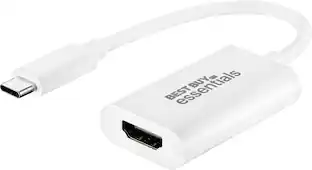
StarTech.com - USB-C to HDMI Adapter - 4K 30Hz, Thunderbolt 3, USB PD
More Buying Options from Marketplace sellers
Related Item

About This Item
- Key Specs
- Connector Type (End 1): USB-C
- Connector Type (End 2): HDMI Type A
- General
- Brand: StarTech.com
- Model Number: CDP2HDUACP
- Product Name: StarTech.com USB-C to HDMI Adapter - 4K 30Hz, Thunderbolt 3, USB PD
- Connectivity
- Cable Type: USB
- Product Type: Adapter
- Connector Type (End 1): USB-C
- Connector Type (End 2): HDMI Type A
- Warranty
- Warranty - Parts: Limited Warranty period (parts): 3 years
- Warranty - Labor: Limited Warranty period (labor): 3 years
- Other
- UPC: 065030866286
StarTech.com CDP2HDUACP USB-C to HDMI Adapter - 4K 30Hz - Thunderbolt 3 Compatible - with Power Delivery (USB PD) - USB C Adapter Converter
- Connect laptop to 4K display and USB device: USB C video adapter adds essential ports connecting your USBC or Thunderbolt 3 laptop to a 4K HDMI display and a USB 3.0 device
Whats Included
- StarTech.com USB-C to HDMI Adapter - 4K 30Hz, Thunderbolt 3, USB PD
Reviews
This product doesn't have any reviews yet.

Compare similar products
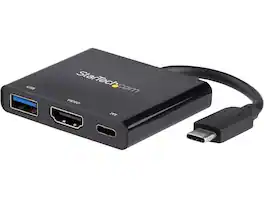
StarTech.com CDP2HDUACP USB-C to HDMI Adapter - 4K 30Hz - Thunderbolt 3 Compatible - with Power Delivery (USB PD) - USB C Adapter Converter

The Thunderbolt 3 (USB-C) to Thunderbolt 2 Adapter lets you connect Thunderbolt and Thunderbolt 2 devices - external hard drives and Thunderbolt displays, for example - to any of the Thunderbolt 3 (USB-C) ports on your MacBook Pro. As a bidirectional adapter, it can also connect new Thunderbolt 3 devices to a Mac with a Thunderbolt or Thunderbolt 2 port.*

Adding multiple screens to your work setup has been shown to dramatically increase productivity. The Plugable USB-C Dual 4K multi HDMI adapter (USBC-6950M) is designed to give you those productivity gains even if your computer doesn’t natively support multiple displays — like base model M1, M2, and M3 Macs. Of course, the multi monitor adapter works just as well with Windows 10 and newer, and ChromeOS 100+ systems, too. At the heart of this HDMI extender for dual monitors is a DisplayLink DL-6950 chipset. You’ll need to download and install the DisplayLink drivers (manual installation on Mac; generally an automatic process on Windows machines), but once you do, you’ll see the benefits this multiple monitor adapter provides. From a single Thunderbolt, USB4, or USB-C port, add two HDMI ports. It’s a simple, straightforward way to connect two monitors to laptop, even to Macs that would otherwise only support one display. It should be noted that HDCP (High-bandwidth Digital Content Protection) is not supported, so this adapter will not display content from streaming platforms like Netflix and Hulu.
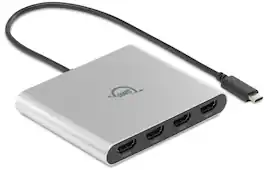
Expanding your visual workspace with up to four 4K UHD displays just got way easier, efficient, and cost-effective with the OWC USB-C Quad HDMI 4K Adapter. All you need is a single Thunderbolt, USB4, or USB-C port on your Mac, PC, or Chromebook to create a dramatically immersive viewing experience. Forget about placing a burden on your notebook’s CPU, interface bandwidth, and battery life with numerous adapters. This portable adapter is the best solution for unlocking a new level of screen real estate while simultaneously charging your computer to boost productivity and elevate your visual experience like never before. No complicated setup, no second-guessing how to expand your screen space…simply plug in this visual upgrade to utilize multiple Ultra-High Definition monitors in your business presentations, creative projects, stock trading, or WFH setup. Powered by cutting-edge DisplayLink Pro technology, this adapter simply delivers a smooth and reliable multi-display experience.Thanks to universal USB-C compatibility, you can use this display expansion solution effortlessly with countless Macs, PCs, and Chromebooks. Whether your computer uses Thunderbolt 3, 4, or 5, USB4, or standard USB-C, this high-performance adapter eliminates the hassle of worrying about ports, cables, or connection types.
| Pros for StarTech.com - USB-C to HDMI Adapter - 4K 30Hz, Thunderbolt 3, USB PD | |||
|---|---|---|---|
| There were no pros for this product— | Compatibility, Overall Performance, Thunderbolt 2, USB-C, Ease of use | There were no pros for this product— | There were no pros for this product— |
| Cons for StarTech.com - USB-C to HDMI Adapter - 4K 30Hz, Thunderbolt 3, USB PD | |||
| There were no cons for this product— | Price, Size | There were no cons for this product— | There were no cons for this product— |
Specs
Explore tech essentials Sponsored
 Memorial Day Deal$45.99The price was $59.99
 Memorial Day Deal$119.99The price was $139.99