Yale - Code Keypad Deadbolt - Black Suede
Color
Black Suede
More Buying Options from Best Buy and Marketplace sellers
Related Item

Highlights
- Key Specs
- Color Finish: Black
- Lock/Unlock Mechanism: Keypad (There are several technologies used by smart locks to manage access, such as biometrics, Bluetooth, or NFC. Some locks allow codes to be entered via a keypad or touchscreen; digital keys can often be sent to multiple authorized devices or temporarily shared with guests.)
- Power Source: Battery-powered
- Installation Type: Replacement
- Wireless Connectivity: None (The manner in which a device sends data to another device over a short distance without the use of wires or cables.)
- General
- Brand: Yale
- Model Number: YED210-NR-BSP
- Product Name: Yale Code Keypad Deadbolt, Black Suede
- Color: Black Suede
- Color Finish: Black
- Features
- Lock/Unlock Mechanism: Keypad (There are several technologies used by smart locks to manage access, such as biometrics, Bluetooth, or NFC. Some locks allow codes to be entered via a keypad or touchscreen; digital keys can often be sent to multiple authorized devices or temporarily shared with guests.)
- Auto Unlock: false (Locks with this feature automatically unlock when certain conditions are met, such as coming within range of a home wireless network or when activated via a mobile app.)
- Number of Keypad Codes Supported: 20 (Multiple keypad codes can be programmed to allow temporary access for guests, deliveries, and more while keeping primary codes secure.)
- Power
- Power Source: Battery-powered
- Rechargeable Battery: false
- Battery Size: AA (The battery size required for operation.)
- Number of Batteries Required: 4
- Batteries Included: false (Indicates whether the product comes with the required batteries for its operation.)
- Compatibility
- Installation Type: Replacement
- App Compatible: false (The product can be connected to a program or software application on a mobile device, which then receives collected data from the product.)
- Wireless Connectivity: None (The manner in which a device sends data to another device over a short distance without the use of wires or cables.)
- Warranty
- Warranty - Parts: Lifetime limited warranty on Finish and Mechanical. Two years on Electronics
- Warranty - Labor: Limited warranty
- Other
- UPC: 081023125123
Meet Yale Code, the non-connected door lock that brings key-free entry to your door an an approachable price point. Ideal for those who are new to electronic locks, or just want an affordable way to upgrade their home, Yale Code has a simple DIY installation process that doesn’t require any professional help, and there’s no app or phone set-up is needed. Create and store up to 20 key-free entry codes directly in the lock itself, and share secure and convenient access with friends, family, housemates, caretakers, and more. The backlit keypad ensures that you can easily read its numbers for entry at any time of day, and the backup key allows all members of your household to choose their preferred way to unlock the door. With its sleek design and low profile, Yale Code looks great on any door while bringing trusted security to your home.
- Security made simpler:: Yale Code adds a key-free entry method to your door, so you can share access and secure your home.
- Beginner-friendly and entry-level:: Yale Code gives you extra security and key-free convenience with added sleekness to your door at an approachable price point.
- No app needed:: Yale Code is a non-connected keypad lock. All functions, such as adding and removing entry codes, setting up Auto-Lock, and adjusting sound settings, occur directly on the lock and can be completed within seconds.
- Sleek style meets security:: Upgrade your door with the sleek, low-profile design of Yale Code which complements all kinds of home decor while still bringing trusted security to your home.
- Key-free entry for all:: Create and store up to 20 entry codes from your lock so friends, family, housemates, and trusted individuals can have secure access when they need it, even if they forget their key.
- Install it on your own:: Yale Code has a DIY installation process that replaces your deadbolt, so no professional help is required to install it. Plus, since it’s battery-operated, there isn’t any wiring required either.
- Security you can rely on:: Yale has been securing homes for over 183 years, so you can count on our expertise to keep your home secure no matter what.
- Protect the people who matter most:: Since Yale Code doesn’t require any technology to use, elderly loved ones and caretakers can have easy key-free access to the door without any technical know-how.
- Easy entry, no matter the hour:: Yale Code’s backlit keypad ensures you’ll be able to read the numbers at any time of day. Plus, you don’t have to worry about them fading or scratching off.
- Simplified access management:: Remove keys from the equation of your rental and instead grant access to guests through your lock’s entry code, and never hide a spare key again.
Whats Included
- Yale Code Keypad Deadbolt, Black Suede
Q: Is an app needed to use this Yale keypad deadbolt?
A: No, this Yale Code keypad lock does not need an app.
Q: Does this deadbolt come with batteries included?
A: No, batteries are not included with this deadbolt.
Q: Does the keypad have a backlight for easy viewing?
A: Yes, the keypad has a backlight for easy viewing at any time of day.
Q: Does this deadbolt require any professional help to install?
A: No, this deadbolt has a DIY installation process that doesn’t require professional help.
Q: Is this Yale deadbolt battery powered?
A: Yes, this Yale deadbolt is battery-powered.
Q: How many batteries are required to operate this deadbolt?
A: This deadbolt requires four AA batteries to operate.
Q: How many entry codes can this keypad deadbolt store?
A: This keypad deadbolt can create and store up to 20 entry codes.
Q: Can you connect to Google home?
A: Unfortunately no. This model is just a standard keypad deadbolt installation. Please search for an Assure 2 model with Wi-Fi or Bluetooth.
Compare similar products

Meet Yale Code, the non-connected door lock that brings key-free entry to your door an an approachable price point. Ideal for those who are new to electronic locks, or just want an affordable way to upgrade their home, Yale Code has a simple DIY installation process that doesn’t require any professional help, and there’s no app or phone set-up is needed. Create and store up to 20 key-free entry codes directly in the lock itself, and share secure and convenient access with friends, family, housemates, caretakers, and more. The backlit keypad ensures that you can easily read its numbers for entry at any time of day, and the backup key allows all members of your household to choose their preferred way to unlock the door. With its sleek design and low profile, Yale Code looks great on any door while bringing trusted security to your home.

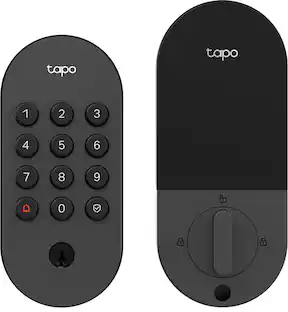
Upgrade your home security with the TP-Link Smart Door Lock — the perfect blend of convenience, control, and peace of mind. Keypad entry or the Tapo app, and manage access from anywhere with remote locking and real-time alerts. With advanced encryption, tamper detection, and auto-lock features, you get enhanced security without sacrificing ease of use. Whether you're home or away, TP-Link puts smarter, safer access at your fingertips.

Embrace a key-free and worry-free lifestyle with Yale's very first retrofit smart lock: the Yale Approach Lock with Wi-Fi. This sleek and modern lock seamlessly integrates with your front door and makes accessing your home simpler and more convenient than ever before. The Yale Approach lock installs on the inside of your door without replacing your existing deadbolt, so no DIY experience is needed, and you can keep your keys. Paired with a Yale Connect, stay in control of your door by sharing virtual keys and locking or unlocking your door-from anywhere. Thanks to the Yale Access app’s Activity Feed, keep tabs on your door at all times and know when friends, family and vacation rental guests come and go. For ultimate peace of mind, Auto-Lock with Doorsense ensures that your door is always locked behind you, giving you one less thing to worry about. Hands full? Let Yale get the door by enabling Auto-Unlock. Pair with the Yale Keypad to unlock even more ways to access your home.

YALE ASSURE LOCK 2 TOUCH. A LOCK AS UNIQUE AS YOU. Make coming home more seamless than ever with the Yale Assure Lock 2 Touch. Thanks to the new biometric keypad, a simple touch of your finger is all it takes. Explore multiple ways to access your home including your fingerprint, entry code on the keypad, hands-free Auto-Unlock, or using the app on your phone (at the door only). For added peace of mind, never worry about locking the door behind you with advanced Auto-Lock and DoorSense. The Yale Assure Lock 2 Touch can be upgraded with a Wi-Fi Smart Module whenever you’re ready, so unlike other smart locks, you won’t have to buy a new one if your smart home needs change.
| Pros for Yale - Code Keypad Deadbolt - Black Suede | |||
|---|---|---|---|
| Installation Ease, Build Quality, Security, Keypad Illumination, Locking Mechanism | Installation Ease, Overall Performance, Connectivity, Battery Life, Button Layout | There were no pros for this product— | Installation Ease, Build Quality, Fingerprint Reader, Appearance, Door Detection |
| Cons for Yale - Code Keypad Deadbolt - Black Suede | |||
| Connectivity | There were no cons for this product— | There were no cons for this product— | Connectivity |
Specs
Reviews
Rating 4.7 out of 5 stars with 99 reviews
- Installation Ease (46)
- Build Quality (19)
- Security (6)
- Keypad Illumination (4)
- Locking Mechanism (3)
- Connectivity (7)
Customer Images
The vast majority of our reviews come from verified purchases. Reviews from customers may include My Best Buy members, employees, and Tech Insider Network members (as tagged). Select reviewers may receive discounted products, promotional considerations or entries into drawings for honest, helpful reviews.
Control, Comfort, Convenience Sponsored
 $44.99The price was $59.99
 $219.99The price was $319.99
 $235.99The price was $249.99