LG - UltraGear 27" IPS QHD 200Hz Gaming Monitor with DisplayHDR 400 (HDMI, DisplayPort) - Black
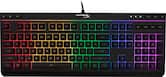 HyperX - Alloy Core Full-size Wired Gaming Membrane Keyboard with RGB Lighting - Black$39.99$54.99
More Buying Options
Related Item

Highlights
- Key Specs
- Refresh Rate: 200Hz (The number of frames per second the device can produce natively without enhancement. Higher rates help produce smooth, seamless pictures.)
- Maximum Resolution: 2560 x 1440 (Maximum resolution refers to the highest number of pixels that a screen can process and display. Higher resolution signals produce more detailed images.)
- Response Time: 1 milliseconds (The speed at which pixels can change colors is called response time. It is measured in milliseconds (ms).)
- Panel Type: IPS (Technology that affects response time and image quality.)
- Synchronization Technology: FreeSync Premium (AMD Adaptive Sync) (Generally, these technologies allow syncing between a computer/console game's frame rate and the device's refresh rate for a smoother display without tearing.)
- Screen Size: 27 inches (Size of the screen, measured diagonally from corner to corner.)
- Display Connector(s): 2 x HDMI, 1 x DisplayPort (The number and type of connectors used to connect to an external display.)
- General
- Brand: LG
- Model Number: 27G610A-B
- Product Name: UltraGear 27" IPS QHD 200Hz Gaming Monitor with DisplayHDR 400 (HDMI, DisplayPort)
- Color: Black
- Operating System Compatibility: Not Applicable
- Display
- Refresh Rate: 200Hz (The number of frames per second the device can produce natively without enhancement. Higher rates help produce smooth, seamless pictures.)
- Maximum Resolution: 2560 x 1440 (Maximum resolution refers to the highest number of pixels that a screen can process and display. Higher resolution signals produce more detailed images.)
- Native Resolution: 2560 x 1440 (Native resolution of a screen refers to its single, fixed resolution. Sometimes screens must scale an image up or down in order to fit the native resolution. This can cause a loss of resolution or detail.)
- Contrast Ratio: 1000:1 (Measured difference between a displayed image's brightest whites and darkest blacks. The larger the first number, the more detail and color that can be displayed.)
- Response Time: 1 milliseconds (The speed at which pixels can change colors is called response time. It is measured in milliseconds (ms).)
- Display Type: LED
- Panel Type: IPS (Technology that affects response time and image quality.)
- Synchronization Technology: FreeSync Premium (AMD Adaptive Sync) (Generally, these technologies allow syncing between a computer/console game's frame rate and the device's refresh rate for a smoother display without tearing.)
- Aspect Ratio: 16:9 (The measurement of the width of a screen compared to the height of a screen, expressed as a ratio.)
- Curved Screen: false
- Brightness: 400 candela per square meter (A measure of the total light output.)
- Screen Size: 27 inches (Size of the screen, measured diagonally from corner to corner.)
- High Dynamic Range (HDR): true (An HDR-compatible 4K TV or other HDR-compatible product displays HDR video content when it's available from sources like 4K Ultra HD Blu-ray Discs and 4K streaming services.)
- High Dynamic Range Format: VESA Certified DisplayHDR 400, HDR 10 (There are a few HDR formats that tell the TV or other HDR-compatible product how to best utilize its capabilities to display HDR content. HDR technology can support one or multiple formats, each with various benefits to picture quality.)
- Horizontal Viewing Angle: 178 degrees (The maximum angle at which the display can be viewed with acceptable visual performance from either side.)
- Vertical Viewing Angle: 178 degrees (The maximum angle at which the display can be viewed with acceptable visual performance from above or below.)
- Color Gamut (Standard RGB): 99 percent
- Connectivity
- Number of HDMI Inputs (Total): 2
- Display Connector(s): 2 x HDMI, 1 x DisplayPort (The number and type of connectors used to connect to an external display.)
- Headphone Jack: true (The device features an interface that allows for the connection of headphones.)
- Compatibility
- Wall Mountable: true (The product is able to be secured to a wall. Some products are designed ready to mount, while others may require additional hardware/accessories for installation.)
- VESA Wall Mount Standard: 100mm x 100mm (VESA wall mount standards refer to the spacing of screw holes built into a TV in order to fit with standard TV wall mounts. These standards are implemented into most TVs and monitors.)
- Features
- Tiltable: true
- Adjustable Stand Height: true
- Built-In Webcam: false
- Integrated Speaker(s): false
- Dimensions
- Product Height With Stand: 21.4 inches
- Product Height Without Stand: 14.4 inches
- Product Width: 24.1 inches (The out of box width of the item. Width is measured as the horizontal distance from one side of the item to the other as it would be primarily used or placed.)
- Product Depth (With Stand): 8.8 inches
- Product Depth Without Stand: 1.9 inches
- Product Weight: 11.7 pounds (The out of box weight of the item.)
- Stand Included: true
- Certifications Listings & Approvals
- ENERGY STAR Certified: false (Devices carrying the ENERGY STAR service mark, such as computer products and peripherals, kitchen appliances, and other products, generally use 20% to 30% less energy than required by federal standards.)
- EPEAT Qualified: false (The Electronic Product Environmental Assessment Tool (EPEAT) was designed to provide an environmental assessment tool for purchasers. In order to qualify for EPEAT, a product must meet all 23 required criteria.)
- Warranty
- Warranty - Parts: 1 Year Parts and Labor
- Warranty - Labor: 1 Year Parts and Labor
- Other
- UPC: 195174134405
Dominate Every Frame with UltraGear. Step up your game with the 27" UltraGear QHD (2560 x 1440) IPS gaming monitor, built for speed, clarity, and precision. VESA DisplayHDR 400 and up to 99% sRGB coverage bring bold color, deeper blacks, and enhanced contrast for breathtaking gameplay visuals. A blazing-fast 200Hz refresh rate and 1ms (GtG) response time keep motion crystal-clear, so every move feels razor sharp. Stay locked in with tear-free performance thanks to AMD FreeSync Premium and NVIDIA G-SYNC compatibility, delivering fluid action across PC and next-gen consoles. Gain the edge with pro-level gaming features like Dynamic Action Sync, Black Stabilizer, FPS Counter, and Crosshair. UltraGear doesn’t stop at performance—it’s built to play nice with your setup. The slim-bezel design maximizes your view, while the height, tilt, swivel, and pivot adjustable stand customizes the screen to your specs. The Switch app transforms your screen into a multitasking hub, letting you split layouts, stream, or launch calls in seconds.
- Vivid Color, Fast Response, Total Control: The 27" UltraGear QHD (2560 x 1440) IPS gaming monitor delivers vivid VESA DisplayHDR 400, ultra-smooth 200Hz speed, and 1ms response time clarity. G-SYNC compatibility & FreeSync Premium Pro keep gameplay tear-free. The sleek, slim design keep you focused and in control.
- QHD Clarity, Bold Colors, and DisplayHDR 400 Brilliance: Bold QHD on a 27” IPS display with up to 99% sRGB color coverage. Experience deeper blacks, vibrant hues, and enhanced contrast with VESA DisplayHDR 400, delivering breathtaking detail and crisp visuals for captivating gaming and entertainment.
- Blazing 200Hz Speed. Every Frame Counts.: Enjoy fluid, crystal-clear gameplay with a fast 200Hz native refresh rate. Minimized motion blur keeps every frame sharp, so you can stay locked in on the action.
- 1ms Response (GtG) for Crisp Gameplay: 1ms Response Time (GtG) keeps fast-paced gameplay sharp by minimizing blur and ghosting. Whether you're tracking enemies or racing to the finish, every frame stays crisp—giving you the edge when it matters most.
- Ultimate Frame Sync: FreeSync Premium & G-SYNC Compatible: Say goodbye to screen tearing and stutter. With AMD FreeSync Premium and NVIDIA G-SYNC compatibility, this UltraGear monitor delivers ultra-smooth, tear-free visuals, giving you perfect frame sync across PC and next-gen console gaming.
- Unlock Your Potential with Advanced Gaming Features: Dynamic Action Sync reduces input lag for real-time response. Black Stabilizer brightens dark scenes to see what's hidden. FPS Counter shows your real-time frame rate. Crosshair enhances precision for deadly accuracy.
- Customize Your Screen View with the Switch App: The Switch app transforms your screen into a multitasking hub for work, gaming, and streaming¹. Effortlessly split the screen into up to 6 sections, customize display layouts, or launch video calls with a single hotkey.
- Battlestation Upgrade Adjustable to Gamer Specs: Go big with the narrow bezel, 27” IPS screen. UltraGear's sleek, slim design offers adjustable height, tilt, swivel and pivot control for your ideal view.
Whats Included
- Monitor
- Power Cable
- DisplayPort Cable
Product Manuals
Disclaimers
- ¹Software installation required. Visit Support on LG.com to download.
A: No it’s not
Q: Is this monitor good for office work, typing letters, excel, word type administrative work?
A: At 27 inches it’s the perfect size. A big screen for visualizing documents and spreadsheets, but a small enough footprint it doesn’t get in the way
Q: Does it come with the HDMI CABLE? Or we should buy another HMDI CABLE to connect it to my computer?
A: It comes with a display port cable only no HDMI cable
Q: Does this monitor support VRR on a ps5? What Display port does this monitor have?
A: It has a display port, two hdmi 2 ports, and a regular hdmi port.
A: Yes it does have the hdmi 2.1 port. I think two of them ports.
Q: Does the monitor swivel up and down?
A: It can tilt up and down, raise and lower, and rotate 90°, but no twisting (rotating) left or right.
Compare similar products

Dominate Every Frame with UltraGear. Step up your game with the 27" UltraGear QHD (2560 x 1440) IPS gaming monitor, built for speed, clarity, and precision. VESA DisplayHDR 400 and up to 99% sRGB coverage bring bold color, deeper blacks, and enhanced contrast for breathtaking gameplay visuals. A blazing-fast 200Hz refresh rate and 1ms (GtG) response time keep motion crystal-clear, so every move feels razor sharp. Stay locked in with tear-free performance thanks to AMD FreeSync Premium and NVIDIA G-SYNC compatibility, delivering fluid action across PC and next-gen consoles. Gain the edge with pro-level gaming features like Dynamic Action Sync, Black Stabilizer, FPS Counter, and Crosshair. UltraGear doesn’t stop at performance—it’s built to play nice with your setup. The slim-bezel design maximizes your view, while the height, tilt, swivel, and pivot adjustable stand customizes the screen to your specs. The Switch app transforms your screen into a multitasking hub, letting you split layouts, stream, or launch calls in seconds.
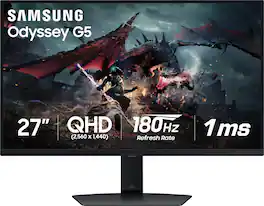
Samsung's Odyssey G50D Gaming Monitor with QHD resolution features incredibly detailed, pin-sharp images. The fast IPS panel delivers clear, vibrant colors and a 178° viewing angle, while the 180Hz refresh rate and 1ms response time (GtG) eliminates lag and enables frames with minimal blur for ultra-smooth gaming action. VESA DisplayHDR 400 offers more clarity, providing dynamic contrast with deeper blacks and brighter whites. AMD FreeSync keeps the monitor and graphics card refresh rate in sync for a seamless experience. Features an ergonomic stand that makes it easy to swivel, tilt, and adjust the height of the monitor, plus Eye Saver mode, which enables more focused gaming with less eye strain, for total comfort even when playing for extended periods of time.

The UltraGear 27GR83Q gaming monitor is a battlestation centerpiece that combines outrageous speed, performance, and loads of gaming-centric features. Gameplay looks amazing on the large 27” QHD (2560 x 1440) IPS display showcasing vivid color and contrast with up to DCI-P3 95% (Typ.) color gamut and VESA DisplayHDR 400. With a super-fast 240Hz refresh rate along NVIDIA G-SYNC compatibility and AMD FreeSync Premium the on-screen action is ultra-responsive and buttery smooth with reduced motion blur and lag. With aesthetic touches like a 3-side virtually borderless design along with tilt, heigh and pivot adjustability, this UltraGear monitor is the gaming screen upgrade you’ve been waiting for.
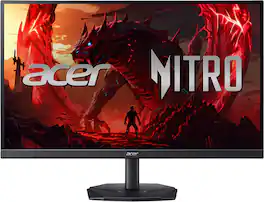
In competitive gaming, every frame matters. Introducing Acer's KGB271U gaming monitor - the WQHD (2560 x 1440) resolution monitor that can keep up with your game play. This AMD FreeSync Premium monitor takes gameplay to the next level of smooth, the game’s frame rate is determined by your graphics card, not the fixed refresh rate of the monitor, giving you a serious competitive edge. Plus, users can enjoy comfortable viewing experience while gaming via flicker-less, low dimming and ComfyView display. The design saves space on your desk and lets you place multiple monitors side by side to build a seamless big-screen display
| Pros for LG - UltraGear 27" IPS QHD 200Hz Gaming Monitor with DisplayHDR 400 (HDMI, DisplayPort) - Black | |||
|---|---|---|---|
| Overall Performance | There were no pros for this product— | Overall Performance, Refresh Rate, Resolution, Price, Screen Size | There were no pros for this product— |
| Cons for LG - UltraGear 27" IPS QHD 200Hz Gaming Monitor with DisplayHDR 400 (HDMI, DisplayPort) - Black | |||
| There were no cons for this product— | There were no cons for this product— | Dead Pixels, Ghosting | There were no cons for this product— |
Specs



Reviews
Customer Images
The vast majority of our reviews come from verified purchases. Reviews from customers may include My Best Buy members, employees, and Tech Insider Network members (as tagged). Select reviewers may receive discounted products, promotional considerations or entries into drawings for honest, helpful reviews.
- Rated 5 out of 5 stars
LG Ultra Gear 27”
Great monitor, upgraded to this from a 60hz acer monitor, I’m running a 5070ti and this monitor compliments the power of the 5070ti very well.
Posted by JacobJ
- Rated 4 out of 5 stars
Entry Level, LG Quality
While this LG UltraGear 27” Gaming Monitor is a basic, an essentially entry-level gaming monitor, it does the job. Visuals are rich; colors true-to-life. The 27” size screen is adequate for my own personal needs, and fits nicely on my desk setup. Overall, this monitor is well made; the stand being especially sturdy. It was easy to setup, too. There is a cord management ‘hole’ on the stand, which is quite handy as a gaming setup can get cluttered with cables, even with all the wireless peripherals and accessories gamers have available to them. This monitor’s screen surface itself appears ‘matte like,’ and in my opinion, doesn’t look as good as more ‘shiny looking’ screen surfaces. However, this type of appearance does cut down on visible glare, especially true if you have RGB lights or a lighted streaming setup on or around your desk. The 27” screen size somehow seems larger than it actually is, and during gameplay it provides a wonderful view of the in-game environment. This UltraGear monitor is highly adjustable. While in ‘landscape position’ the stand can move up and down, swivel side to side, tilt forward and back, and then can also be turned to a vertical position. Basically this monitor is simply “plug and play,” although an HDMI cable is not included. While there are display settings available via the monitor itself, you may need to go into your computer’s Display Settings to adjust the screen resolution, as I did, since the maximum resolution for this monitor is 2560x1400. There is an LG Switch App you can download from LG.com for more display customizations, but it’s not absolutely necessary and the monitor works without having that app. Overall, my impressions are favorable. So far I’m pleased with how this monitor performs. I did notice the fast refresh rate and low latency response during my gameplay sessions. This monitor fits my basic needs, just fine. Though for those seeking a ‘higher-end’ gaming monitor experience, you’re going to want to invest a bit more cost. This model LG UltraGear 27” Gaming Monitor is definitely “entry level.” But for its price point, it’s a good one.
Posted by Janine
- Rated 5 out of 5 stars
Good monitor.
Good monitor for the price. Couldn’t find too many with the same specs at the $200 range. Have not had any issues. Only thing is the display port area is very narrow, so if I want to remove the display port cable that I use, I have to press and pull on the cable but there’s only a small amount of room so I have to use something to press down on the cable. Not too big of a deal though.
Posted by JoseI