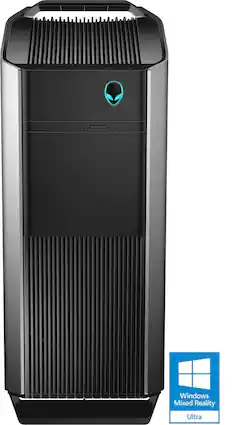
Alienware - Aurora R5 Desktop - Intel Core i7 - 16GB Memory - NVIDIA GeForce GTX 1070 - 256GB Solid State Drive + 1TB Hard Drive - Silver
- Key Specs
- Processor Model: Intel 6th Generation Core i7 (Your computer's processor is like its brain. Working in combination with system memory, the power of the processor determines the complexity of software you can run, how many programs you can have open at the same time, and how fast those programs will run. Most computers feature an AMD, Intel or Snapdragon processor.)
- Storage Type: SSD
- System Memory (RAM): 16 gigabytes (Random-access memory (RAM) is a computing device's short-term data storage, which allows active information to be accessed quickly. The size and type of RAM determines how efficiently the device can handle large amounts of information at one time. For example, gaming or video editing requires more RAM for optimal performance.)
- General
- Product Name: Aurora R5 Desktop - Intel Core i7 - 16GB Memory - NVIDIA GeForce GTX 1070 - 256GB Solid State Drive + 1TB Hard Drive
- Brand: Alienware
- Model Number: AUR5-9714SLV
- Processor
- Processor Brand: Intel
- Processor Model: Intel 6th Generation Core i7 (Your computer's processor is like its brain. Working in combination with system memory, the power of the processor determines the complexity of software you can run, how many programs you can have open at the same time, and how fast those programs will run. Most computers feature an AMD, Intel or Snapdragon processor.)
- Processor Model Number: i7-6700
- Storage
- Storage Type: SSD
- Solid State Drive Capacity: 256 gigabytes (The amount of data that can be stored on the device's solid state drive (SSD). SSD is a flash-based storage with faster speeds than a hard disk drive (HDD).)
- Hard Drive Capacity: 1256 gigabytes (The amount of data that can be stored on the device's mechanical hard drive. Hard disk drives (HDDs) typically have larger capacities than solid state drives (SSDs) but may have slower speeds.)
- Memory
- System Memory (RAM): 16 gigabytes (Random-access memory (RAM) is a computing device's short-term data storage, which allows active information to be accessed quickly. The size and type of RAM determines how efficiently the device can handle large amounts of information at one time. For example, gaming or video editing requires more RAM for optimal performance.)
- Type of Memory (RAM): DDR4 SDRAM (Each type of RAM delivers a different level of speed, bandwidth, energy efficiency and performance.)
- System Memory RAM Speed: 2133 megahertz (How fast the information-storing hardware operates. The faster the RAM, the faster memory can be transferred to other system components. Ultimately, faster RAM improves operational efficiency.)
- System Memory RAM Expandable To: 64 gigabytes (Adding more random-access memory (RAM) to a computer speeds up performance and improves efficiency. Upgrades to memory are limited by the number of expansion slots for additional RAM and existing RAM installed on the device.)
- Compatibility
- Operating System: Windows 10 (The operating system manages all software and hardware, including files, memory and connected devices. Most importantly, it lets you interact with your device and your programs in a visual way; otherwise, you'd be typing computer code to get anything done.)
- Operating System Architecture: 64-bit (An operating system (OS) manages computer hardware, software resources, and programs in conjunction with the system's processor. 64-bit operating systems can handle more data at once than 32-bit systems, resulting in faster speeds, more effiency, and overall improved performance.)
- Expansion
- Number Of Internal 3.5" Bays: 1
- Features
- Audio Technology: 7.1 channel surround
- Size: Standard
- Dimensions
- Product Height: 18.6 inches (The out of box height of the item. Height is measured as the vertical distance from the bottom of the item to the top as it would be primarily used or placed.)
- Product Width: 8.3 inches (The out of box width of the item. Width is measured as the horizontal distance from one side of the item to the other as it would be primarily used or placed.)
- Product Depth: 14.2 inches (The out of box depth of the item. Depth is measured as the distance from the front of the item to the back as it would be primarily used or placed.)
- Certifications Listings & Approvals
- ENERGY STAR Certified: false (Devices carrying the ENERGY STAR service mark, such as computer products and peripherals, kitchen appliances, and other products, generally use 20% to 30% less energy than required by federal standards.)
- EPEAT Qualified: false (The Electronic Product Environmental Assessment Tool (EPEAT) was designed to provide an environmental assessment tool for purchasers. In order to qualify for EPEAT, a product must meet all 23 required criteria.)
- Included
- Keyboard Included: true
- Other
- UPC: 884116253778
 Alienware Aurora R5 Desktop: Designed for VR, the Aurora was engineered to exceed today's virtual reality requirements. And with convenient tool-less access, it also offers easy upgradeability for the next wave of VR. With a VR-ready Alienware PC, you can be the first to experience the future of gaming. Alienware provides a range of systems to bring you the most immersive VR experience imaginable. Additionally, the Aurora offers Oculus or HTC Vive virtual reality configurations, for powerful, immersive VR experiences.
The Alienware Aurora features a meticulous, zero-fat design and is the first of its kind to offer tool-less upgrades to graphics cards, hard drives and memory.
A uniquely designed PSU swing-arm keeps graphics and expansion cards safely secured and easy to upgrade - along with memory modules and up to 5 storage drives - thanks to tool-less accessibility.
- Windows 10 operating system: Windows 10 brings back the Start Menu from Windows 7 and introduces new features, like the Edge Web browser that lets you markup Web pages on your screen. Learn more ›
- 6th Gen Intel® Core™ i7-6700 processor: Powerful quad-core processing performance. Intel Turbo Boost Technology delivers dynamic extra power when you need it, while increasing energy efficiency when you don't.
- 16GB system memory for intense multitasking and gaming: Reams of high-bandwidth DDR4 RAM to smoothly run your graphics-heavy PC games and video-editing applications, as well as numerous programs and browser tabs all at once.
- DVD/CD burner: Reads and writes to a variety of media formats, including DVD+R/RW, DVD-R/RW and CD-R/RW.
- 1TB hard drive and 256GB solid state drive (SSD) for a blend of storage space and speed: The hard drive provides ample storage, while the SSD delivers faster start-up times and data access.
- NVIDIA GeForce GTX 1070 graphics: Driven by 8GB GDDR5 dedicated video memory to quickly render high-quality images for videos and games.
- Windows Mixed Reality Ultra Ready: Push your gaming and VR exhilaration to the limit with Windows Mixed Reality Ultra. This PC is compatible with Windows Mixed Reality headsets.Learn more ›
- SuperSpeed 10Gbs USB 3.1 Type-C: Reversible USB port that delivers incredible ultra-fast data transfer speeds.
- 7 USB 3.0 ports maximize the latest high-speed devices: Also includes 6 USB 2.0 ports to connect more accessories and peripherals. The USB 3.0 ports are backward-compatible with USB 2.0 devices (at 2.0 speeds).
- Killer wireless and wired networking: Killer Game Networking LAN also lets you plug into wired 10/100/1000 networks.
- Bluetooth 4.2 interface syncs with compatible devices: Wirelessly transfer photos, music and other media between the desktop and your Bluetooth-enabled cell phone or MP3 player, or connect Bluetooth wireless accessories.
- Additional ports: Microphone and headphone jacks. Subwoofer port.
Whats Included
- Alienware Aurora R5
- Keyboard
Q: How many watts is the power supply and what can it support? What type of motherboard is it?
A: According to techradar.com it is an 850W power supply: http://www.techradar.com/reviews/pc-mac/pc-mac-desktops/alienware-aurora-r5-1323301/review. When I opened the case I did not notice the power supply. The motherboard is not a big name brand; it is labeled alienware so I do not know who makes the board. I would note that it is very easy to replace a hard drive so I removed the 1T drive and replaced it with a 3T drive. The OS is on the SSD so there is no worry about reinstalling the system. In addition, I would note there are two slots on the bottom of the chassis that allows you to install two additional SSD's, but that is not in the specs. There are only two main issues with this computer, the DVD drive is a thin drive made from plastic so you cannot replace the internal DVD drive with any store bought drive, nor is there another slot for another DVD drive. The second issue is that the cooler is partially obstructed according to reports on various sites. Inside the case, the internals are cramped but you can get to the video board and hard drive. The bios is UEFI with a secure boot and I had difficulty getting into the bios using the F2 key but you can use win 10 options for recovery to get in to the bios. You will have to turn off the secure boot option if you want to boot from a dvd or USB. If you can live with the quirks, then it is worth having a very fast computer.
Q: Can I swap the graphics card in the future ?
A: Yes of course. The unit I purchased has the Nvidia GTX 1070 which is awesome in itself! You can even double it up in an SLI configuration - which this card is meant to do. The default power supply in the Aurora R5 is 600w. So if you upgrade to dual video cards, you need to factor in power requirements for the cards. If it's just one card, then it should be fine without upgrading the PSU. The good thing about the GTX 1070, it only consumes 170w, so pairing it would still be fine with the 600w PSU.
A: Yes, as long as you have a modern TV, you can connect this computer to your TV. It has 1 usable HDMI port on the back. It has 2 HDMI ports and a mini, but one of the ports and the mini are in the area for the on board video card and no the nice high speed one, so I assume they would not work (just going by what my IT BF told me). They may work, but I have not tried them. Also, I initially hooked mine up to a 20 inch TV that I have but switched back to a monitor because my TV did not have high enough of a refresh rate and for some reason would shut off any time the computer's screen went black, but that was an issue with the TV not the monitor. I have had mine for about a month and thus far it is a great computer.
Q: What is the power supply of this computer? And how many watts ?
A: I have just checked with dell and they said it has 460W PSU and air cooled chassis
Q: Does it come with WiFi built in?
A: Yes the WIFI is built in, and the speeds achieved for upload and download are 56Mps, which is the same as using a wired connection. So any slowness is from my internet connection.
Q: Windows instaled on ssd or hdd
A: Windows is installed on the SSD drive. And the computer boots up very fast! You will want to install all large games on the HDD drive. Remember, not all programs allow you to do this but most do...
Q: Why is my Aurora R5 restarting on its own?? I have only had the computer a few weeks
A: I have the same issue and am wondering if you ended up returning your computer to the store and maybe I bought it! I am experiencing the exact same issue and the Geek Squad had no answer.
Q: Is there HDMI inputs ? Does not appear in photos
A: Only one HDMI output on the Nvidia GTX 1070 graphics card. Just like this image: http://hothardware.com/ContentImages/Article/2471/content/small_nvidia-geforce-gtx-1070-5.JPG














