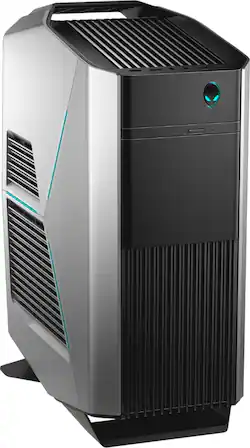
Alienware - Aurora R7 Gaming Desktop - Intel Core i7-8700 - 16GB Memory - NVIDIA GTX 1070 - 1TB HDD + Intel Optane Memory
- Key Specs
- Processor Model: Intel 8th Generation Core i7 (Your computer's processor is like its brain. Working in combination with system memory, the power of the processor determines the complexity of software you can run, how many programs you can have open at the same time, and how fast those programs will run. Most computers feature an AMD, Intel or Snapdragon processor.)
- Storage Type: HDD
- Total Storage Capacity: 1000 gigabytes
- System Memory (RAM): 16 gigabytes (Random-access memory (RAM) is a computing device's short-term data storage, which allows active information to be accessed quickly. The size and type of RAM determines how efficiently the device can handle large amounts of information at one time. For example, gaming or video editing requires more RAM for optimal performance.)
- General
- Product Name: Aurora R7 Gaming Desktop - Intel Core i7-8700 - 16GB Memory - NVIDIA GTX 1070 - 1TB HDD + Intel Optane Memory
- Brand: Alienware
- Model Number: AWAUR7-7999SLV-PUS
- Processor
- Processor Brand: Intel
- Processor Model: Intel 8th Generation Core i7 (Your computer's processor is like its brain. Working in combination with system memory, the power of the processor determines the complexity of software you can run, how many programs you can have open at the same time, and how fast those programs will run. Most computers feature an AMD, Intel or Snapdragon processor.)
- Processor Model Number: Intel Core i7-8700
- Storage
- Storage Type: HDD
- Total Storage Capacity: 1000 gigabytes
- Hard Drive Capacity: 1000 gigabytes (The amount of data that can be stored on the device's mechanical hard drive. Hard disk drives (HDDs) typically have larger capacities than solid state drives (SSDs) but may have slower speeds.)
- Hard Drive RPM: 7200 revolutions per minute (A hard drive's data is stored on disks, or platters, that spin while transferring information to the host system. The higher the RPM, the faster the hard drive's performance.)
- Memory
- System Memory (RAM): 16 gigabytes (Random-access memory (RAM) is a computing device's short-term data storage, which allows active information to be accessed quickly. The size and type of RAM determines how efficiently the device can handle large amounts of information at one time. For example, gaming or video editing requires more RAM for optimal performance.)
- Type of Memory (RAM): DDR4 SDRAM (Each type of RAM delivers a different level of speed, bandwidth, energy efficiency and performance.)
- System Memory RAM Expandable To: 64 gigabytes (Adding more random-access memory (RAM) to a computer speeds up performance and improves efficiency. Upgrades to memory are limited by the number of expansion slots for additional RAM and existing RAM installed on the device.)
- Compatibility
- Operating System: Windows 10 Home (The operating system manages all software and hardware, including files, memory and connected devices. Most importantly, it lets you interact with your device and your programs in a visual way; otherwise, you'd be typing computer code to get anything done.)
- Operating System Architecture: 64-bit (An operating system (OS) manages computer hardware, software resources, and programs in conjunction with the system's processor. 64-bit operating systems can handle more data at once than 32-bit systems, resulting in faster speeds, more effiency, and overall improved performance.)
- Connectivity
- Ethernet Card: 10/100/1000 (Also known as an Ethernet adapter, this card plugs into a computer's motherboard and enables it to access an Ethernet network. Ethernet data transmission speeds are measured in Mbps (megabits per second) and Gbps (gigabits per second). For example, a 10/100 Ethernet port transmits 10 and 100 Mbps, while a 10/100/1000 Ethernet port transmits 10 and 100 Mbps and has a maximum speed of 1000 Mbps (1 Gbps).)
- Expansion
- Number Of Internal 3.5" Bays: 1
- Features
- Audio Technology: 7.1 channel surround
- Dimensions
- Product Height: 18.6 inches (The out of box height of the item. Height is measured as the vertical distance from the bottom of the item to the top as it would be primarily used or placed.)
- Product Width: 8.3 inches (The out of box width of the item. Width is measured as the horizontal distance from one side of the item to the other as it would be primarily used or placed.)
- Product Depth: 14.2 inches (The out of box depth of the item. Depth is measured as the distance from the front of the item to the back as it would be primarily used or placed.)
- Certifications Listings & Approvals
- ENERGY STAR Certified: false (Devices carrying the ENERGY STAR service mark, such as computer products and peripherals, kitchen appliances, and other products, generally use 20% to 30% less energy than required by federal standards.)
- EPEAT Qualified: false (The Electronic Product Environmental Assessment Tool (EPEAT) was designed to provide an environmental assessment tool for purchasers. In order to qualify for EPEAT, a product must meet all 23 required criteria.)
- Included
- Keyboard Included: true
- Other
- UPC: 884116276999
Enjoy high-quality graphics and fast performance with this Dell Alienware Aurora desktop. Its 16GB of Intel Optane memory is expandable to 64GB, providing plenty of room for future expansion, and the 1TB hard drive delivers ample file storage space. This Dell Alienware Aurora desktop has an NVIDIA GeForce 1070 graphics card for smooth rendering of 3D images.
- Windows 10 operating system: Windows 10 brings back the Start Menu from Windows 7 and introduces new features, like the Edge Web browser that lets you markup Web pages on your screen. Learn more ›
- 8th Gen Intel® Core™ i7-8700 processor: Powerful six-core, twelve-way processing performance. Intel Turbo Boost Technology delivers dynamic extra power when you need it, while increasing energy efficiency when you don't.
- 16GB system memory for intense multitasking and gaming: Reams of high-bandwidth DDR4 RAM to smoothly run your graphics-heavy PC games and video-editing applications, as well as numerous programs and browser tabs all at once.
- DVD/CD burner: Reads and writes to a variety of media formats, including DVD+R/RW, DVD-R/RW and CD-R/RW.
- 1TB hard drive + Intel Optane Memory: Holds your extensive collection of digital photos, music, games, and videos. Intel Optane Memory is designed to reduce performance bottlenecks and accelerate hard disk drives (HDD).
- NVIDIA GeForce GTX 1070 graphics: Driven by 8GB GDDR5 dedicated video memory to quickly render high-quality images for videos and games.
- 7 SuperSpeed 10Gbs USB 3.1 ports: Ultra-fast data connections to transfer large files rapidly.
- 6 USB 2.0 ports: Quick plug-and-play connectivity for your devices and accessories.
- Killer wireless and wired networking: Killer Wireless-AC 1535 wireless LAN connects to both wireless frequencies (802.11a/b/g/n/ac) for the fastest available signal. Killer Game Networking LAN also lets you plug into wired 10/100/1000 networks.
- Bluetooth 4.1 interface syncs with compatible devices: Wirelessly transfer photos, music and other media between the desktop and your Bluetooth-enabled cell phone or MP3 player, or connect Bluetooth wireless accessories.
- Additional ports: Microphone and headphone jacks. Subwoofer port.
Whats Included
- Alienware Aurora R7 Gaming Desktop - Intel Core i7-8700 - 16GB Memory - NVIDIA GTX 1070 - 1TB HDD + Intel Optane Memory
- Keyboard
Product Manuals
Q: How many watts is the power supply and does this particular configuration have liquid cooling?
A: liquid cooling yes 460 watt power supply
A: There are two empty SSD tool-less bays in the bottom of the PC. Squeeze the blue tabs to slide the bracket out, install SSD in bracket (no screws required), insert new SSD. Purchase a SATA ribbon cable 1.5ft to 2ft long. This computer will accommodate cables that are straight or that have a 90 degree bend, but I like the bend. Plug them into the motherboard in SATA slots 2+3. Note: Slot 0 will already be populated with a hard drive running your OS (operating system) and that may be paired to a 16GB Optane module. Slot 1 will be your slim DVD writer. Don't mess with SATA 0 or 1 it unless you are willing to research the process of disabling Optane with Intel RST, cloning your image to the SSD using software, possibly re-enabling Optane if prerequisites are met, and formatting the original drives for data (or you can remove it and set it aside as an OS backup and install a larger 3.5" HD in its place - I did a 3.5" 4TB data drive). The BIOS will want to default boot to slot 0, so if you leave the original and cloned drives both installed with Windows 10 and you want to use the new SSD as an OS drive without formatting the original windows partition, move the SSD cable on the motherboard to slot 0. After installing the drive and booting to WIndows, in Windows Search type "disk management" (do not type the quotes) - create and format disk partitions - press enter - find the new unallocated disk -probably disk 2 or 3, right click in the unallocated space and create a new simple volume. Assign a drive letter and voila - you have a drive that can be used. The size of the drive you pick should probably match the size of the partition you are cloning from for simplicity. You get a tit-for-tat partition cloning that way. You can go go smaller with the SSD but if you do, try utilizing a 3.5" Hard Drive drive for photos, videos, and music as to not clutter your 250GB SSD which will already be swimming with a rather large OS and applications. Remember, SSDs don't like to be utilized much past 80% capacity (leaving 20% of the drive unallocated ensures you maintain a healthier drive). SSDs will work when full, but they have garbage collecting algorithms that move blocks of data around in the free space. Spinning platter drives should be utilized even less because the cylinder velocity varies about 50% between the outside (beginning) of the drive to the inside (end) of the drive. Personally for this R7, I raided two 500GB SSD's to run my OS and Games, I have a 3.5" data drive for storage and OS backups, and an external USB 3.0 backup drive basically mirroring what is on the data drive. You should try to maintain backup integrity where the OS/application drive and data drive are separate entities, and each entity is backed up. As a result of my choice, I cannot use the m.2 slot for Optane module because it only accelerates an OS drive, and Optane does not support raid configuration, but my payoff with raid 0 SSDs is over 1000GB/sec read/write throughput vs the stock throughput in the 150MB/sec range with a hard disk or 550MB/sec with a single SSD. I avoid the raid-0 naysaying issues by having multiple OS backups, and not placing critical documents or pictures on the raided drives - if I do, say in order to edit a large video as quickly as possible, I wait to wipe the original source media from the cameras SD card until the files make it into my data and backup drive. Hope this helps.
Q: Can this run netflix and youtube?
A: Yes, and even at the same time.
Q: I WAS WONDERING IF THIS COMPUTER CAN SUPPORT 3 MONITORS FOR GAMING ?
A: Yes. It has 1 HDMI and 3 display ports. Depending on settings (4k, 2k,1080p) should be able to run 3 monitors.
Q: Can it outperform the PlayStation 4 Pro? If so, can it outperform the Xbox One X?
A: Absolutely brother!! LOL... You have to be kidding right?... This is a Powerhouse beast and absolutely without a doubt blows away the PS4 Pro and/or the Xbox One X !! I'm talking light years Beyond brother!!!! :~)
Q: It has 16GB of Ram, what is the configuration? Is it 1 x 16GB, 2 x 8GB or 4 x 4GB? Thanks
A: it is 2 x 8 2666
Q: What’s the average FPS if you played pubg?
A: gpu.userbenchmark.com states that, on average, the gtx 1070 can get 74.4 FPS at 1080p on max settings.
Q: does it have a m.2 nvme slot, and hdmi out port?
A: It does have a M.2 slot, however, it is currently being used by the intel optane memory, so you would have to remove that if you wanted to add an M.2 SSD. There is 2 HDMI outputs, 1 from the system, and 1 from the graphics card.