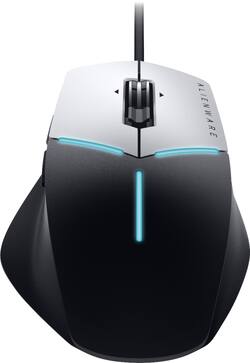
Alienware - AW558 Advanced Wired Optical Gaming Mouse with RGB Lighting - Wired - Black/silver
- Key Specs
- Maximum Sensitivity: 5000 dots per inch (Mouse sensitivity is measured in dots per inch (DPI). The higher the DPI, the more sensitive the mouse is and may be more useful for high-density pixel screens. Lower DPI typically means more precision and accuracy in mouse movement.)
- Number of Buttons (Total): 9
- Connection Type: Wired
- General
- Product Name: AW558 Advanced Wired Optical Gaming Mouse with RGB Lighting
- Brand: Alienware
- System Requirements: Windows 10 (The software that a product must have for it to be able to integrate with another product.)
- Model Number: AW558
- Color: Black/silver
- Color Category: Multi
- Features
- Mouse Type: Gaming
- Performance
- Mouse Operation: Button(s)
- Handedness: Ambidextrous
- Tracking Method: Optical (There are several types of computer mice, optical and laser being among the most common. Optical mice detect less detail and provide more precise and accurate movement. Laser mice detect more detail and can be used on a wider variety of surfaces, but are more sensitive to small movements.)
- Maximum Sensitivity: 5000 dots per inch (Mouse sensitivity is measured in dots per inch (DPI). The higher the DPI, the more sensitive the mouse is and may be more useful for high-density pixel screens. Lower DPI typically means more precision and accuracy in mouse movement.)
- Number of Buttons (Total): 9
- Number of Programmable Buttons: 9
- Connectivity
- Connection Type: Wired
- Wired Connectivity: USB Type A
- Operating System Compatibility: Windows
- Power
- Mouse Power Source: Wired
- Dimensions
- Product Height: 5.12 inches (The out of box height of the item. Height is measured as the vertical distance from the bottom of the item to the top as it would be primarily used or placed.)
- Product Length: 1.57 inches (The out of box length of the item. Length is measured as the longest dimension of the item.)
- Product Width: 3.67 inches (The out of box width of the item. Width is measured as the horizontal distance from one side of the item to the other as it would be primarily used or placed.)
- Product Weight: 0.26 grams (The out of box weight of the item.)
- Warranty
- Manufacturer's Warranty - Parts: 1 year
- Manufacturer's Warranty - Labor: 1 year
- Other
- UPC: 884116284178
Navigate your desktop accurately with this Dell Alienware Advanced gaming mouse. It tracks up to 5000 dpi for optimal sensitivity with three customizable settings, and it has programmable buttons for accessing frequently used programs. This wireless Dell Alienware Advanced gaming mouse has adjustable RGB lighting accents to enhance your gaming experience.
- AlienFX lighting effects: Enhance your gaming experience with AlienFX - an RGB lighting system designed to bring you closer to the worlds you play in with dynamic lighting effects.
- Optical technology: LED lights scan the surface beneath the mouse to detect movement with a fair amount of accuracy, suitable for everyday computing and browsing.
- 9 programmable buttons: Let you map out game commands and multicommand macros for personalized control.
- Maximum of 5000 dpi: Lets you find the perfect sensitivity.
- Wired connection: This mouse connects to your computer using an USB port.
- Compatible with most versions of Windows: Works with most PCs.
Whats Included
- Alienware AW558 Advanced Wired Optical Gaming Mouse with RGB Lighting
- Owner's manual
Q: Can you download the program on a mac? If so, how?
A: No, you cannot download this program on a Mac.
Q: Whats the difference between this mouse and the other one? Also can i use this for my laptop?
A: If you use the apple mouse with the macbook laptop, it will sync automatically within the system. If you get a different mouse you need to make sure that you can get the laptop to see it. Which means- you may need to have a bluetooth plug to go into the laptop (which may be tricky, or make sure you find one that is compatible. The pad is quite good to use so if you can get away from using the mouse it's ok. I can't answer what non-apple mouse would work with the laptop as I looked about and realized the logistics of working around the system would be not worth my time.






















