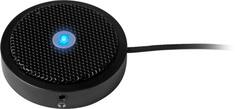
Aluratek - Omnidirectional USB Microphone With Mute Button - Black
- Key Specs
- Polar Pattern: Omnidirectional
- Output(s): USB-A
- Microphone Type: Boundary microphones
- Wireless: false
- General
- Product Name: Omnidirectional USB Microphone With Mute Button
- Brand: Aluratek
- Model Number: AUM01F
- Color: Black
- Audio
- Polar Pattern: Omnidirectional
- Output(s): USB-A
- Features
- Microphone Type: Boundary microphones
- Wireless: false
- Mute Function: true
- Other
- UPC: 812658014892
Aluratek’s USB Microphone with Mute Button provides you with clear and professional sound with 360 degree audio pick-up for podcasting, video conferencing, game streaming, YouTube productions and more. The microphone features a built-in mute button on top so you can easily mute and unmute the mic as needed. Setting up the mic is extremely easy. Simply connect the microphone to a USB port on your PC or Mac computer to start recording live audio. Compatible with Windows and Mac OS.
- Broadcast Quality Sound: Features 360 degree audio pick-up for clear and crisp broadcast quality sound. Great for podcasting, video conferencing, game streaming, YouTube productions and more.
- Easy Mute Button: Simply press the button on top of the unit to mute (red light) and unmute (blue light) the microphone.
- USB Plug-n-Play: No need to install drivers or software. Get up and running quickly by simply connecting the microphone to a USB port on your PC or Mac computer to start recording live audio. Compatible with Windows, Mac OS, iOS, Android and Chrome.
Whats Included
- Omnidirectional USB Microphone With Mute Button
A: I had the same issue. The microphone hijacks both the microphone and speaker resources on the computer. Go to your audio settings and deselect the microphone as the speaker resource. Select whatever speaker you normally use instead.
Q: What the radius distance of sound pick up?
A: I verified it is usable for video conferencing at least 10 feet in any direction.
Q: Is this microphone compatible with a Samsung tablet for recording?
A: I do not think so. According to our tech specs the basic system requirement are USB 2.0 port, OS Support:= Win XP / 7 / 8 / 10 and Mac OS 10.1 or above. There is no support for iOS or Android at this time.
Q: Does it have a USB type A or does it come in USB type C too?
A: Just usb type A
A: Just like any mic, you do not see volume controls on professional mics. Audio Technica, AKG, Sony, and on do not put volume control on a mic. The volume is controlled by either an audio mixer, interface, or software on the computer. Windows or Mac OS allow you to control audio volume through their settings software or you can use a DAW or other software.
Q: will this mic through the usb port access the computer to instigate a command?
A: As long as the software you use allows you to access the audio INPUT and change to the mic driver then YES you can do this.
Q: It appears the USB cable comes with this. How long is the cable?
A: About 2.5 feet. It's meant to sit close to the computer or directly in front for best recording results.