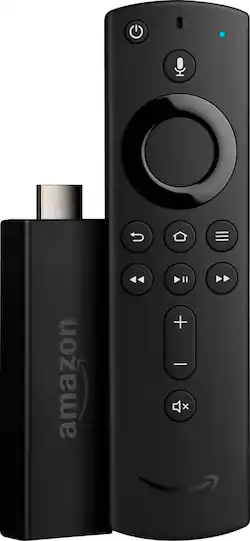
Amazon - Fire TV Stick with all-new Alexa Voice Remote Streaming Media Player - Black
- Key Specs
- Voice Assistant Built-in: Amazon Alexa (A digital assistant built into the device that uses voice commands to answer questions and control smart devices.)
- Featured Streaming Services: Apple TV+, Disney+, Hulu, Netflix, Prime Video, STARZ, YouTube (Streaming services and other programs are available on this device. Keep in mind, there may be more services supported than just those shown here.)
- Maximum Supported Resolution: 1080p
- Operating System Compatibility: Not Applicable
- Remote Control Included: true
- Processor Model: MediaTek MT8127A (Your computer's processor is like its brain. Working in combination with system memory, the power of the processor determines the complexity of software you can run, how many programs you can have open at the same time, and how fast those programs will run. Most computers feature an AMD, Intel or Snapdragon processor.)
- Power Source: AC adapter
- Media Card Slot: false
- Works With: Amazon Alexa (Compatible with or able to be connected to other smart devices or applications.)
- General
- Product Name: Fire TV Stick with all-new Alexa Voice Remote Streaming Media Player
- Brand: Amazon
- TV Compatibility: Most TVs with HDMI input
- Model Number: B0791TX5P5
- Color: Black
- Compatibility
- Voice Assistant Built-in: Amazon Alexa (A digital assistant built into the device that uses voice commands to answer questions and control smart devices.)
- App Compatible: true (The product can be connected to a program or software application on a mobile device, which then receives collected data from the product.)
- Bluetooth Enabled: true (The device is capable of communicating with another device via Bluetooth, provided they are within the required range of each other. A Bluetooth-enabled device must also be the same Bluetooth version or higher than the accessory it is intended to pair with.)
- Compatible Wireless Standard(s): Wireless A, Wireless AC, Wireless B, Wireless G, Wireless N (The wireless networking standard(s) the device is backwards compatible with. This includes networking protocols based on the IEEE 802.11 standard (alphabetically ascending) and the Wi-Fi Alliance standard (numerically ascending), both of which provide high-throughput wireless local area networks (WLANs). Devices designed to work with specific standard(s) will be backwards compatible with previous versions but may not run at optimal performance when using earlier iterations.)
- Playable Formats: AAC-LC, AC3, BMP, FLAC, GIF, H.264, H.265, JPEG, MP3, PCM, PNG, Vorbis
- Interface(s): HDMI, Micro-USB (Refers to the types of connections that devices use to interact and communicate with each other.)
- Works With: Amazon Alexa (Compatible with or able to be connected to other smart devices or applications.)
- Features
- Smart Capable: true (Smart, or smart-capable devices are able to connect directly to your home network in order to stream content from the Internet, run Internet-based apps, or connect to other smart devices.)
- Remote Control Type: Voice control
- Remote Control Features: IR device control
- Other
- UPC: 841667194431
The Amazon FireTV Stick now includes the all-new Alexa Voice Remote. With the all-new Alexa Voice Remote, press and ask to easily find your favorite movies and TV episodes, plus live news and sports. Use the dedicated power, volume, and mute buttons to control your TV, sound bar, and receiver. Experience tens of thousands of channels, apps, and Alexa skills, plus browse millions of websites like YouTube, Facebook, and Reddit using Firefox or Silk. Just plug Fire TV Stick into your HDTV and start streaming in minutes.
- Stream on the big screen with the all-new Alexa Voice Remote: Just plug Fire TV Stick into your HDTV, and start streaming in minutes.
- Even better with Prime: Prime membership unlocks a world of entertainment on Prime Video with exclusive and award-winning Prime Originals, popular movies and TV, live events, sports, and more.
- Smart home: View live camera feeds on your TV or control lights, thermostats, and other compatible smart home devices with your Alexa Voice Remote. Just ask.
- Simple to set up and use: Plug Fire TV Stick into your HDTV, plug into the wall outlet, connect to the Internet, and enjoy.
- No cable or satellite? No problem: Watch live TV and sports with subscriptions to YouTube TV, Hulu with Live TV, Sling, and others.
Whats Included
- Amazon Fire TV Stick Streaming Media Player
- Alexa Voice Remote (2nd Gen)
- USB cable and power adapter
- HDMI extender cable
- Two AAA batteries
- Owner's manual
Q: How do set up firestick without alexa?
A: It is easy to set it up without Alexa. There are super easy step by step directions on screen. I had no trouble, and I am a 60+ Grammy, who is electronically challenged! Also, if you happen to get Alexa at a later date, easy to pair the two!
A: As long as you have an HDMI port on your tv and Internet/Wifi. TV does not need to be a smart TV
Q: Will I be able to watch Netflix with this fire stick on a non smart TV?
A: Yes. This is precisely why we bought this product. We were using a wifi DVD player to watch Netflix on a non smart TV, but the interface was cumbersome. This makes the process much easier. You can watch Netflix, YouTube, and many other streaming services (as long as your TV has an HDMI input)
Q: I have 3 tv's I'm assuming ill need 3 fire sticks? Thank you
A: You’ll need three unless you want to keep unpluging the Fire Stick and move it to the next TV. That would also mean only one TV could be used at at time.
A: It is programmable to one Fire Stick at a time. But you can swap between sticks. You can simply hold the home button down for 10 seconds and it will pair to that stick. It will show you a text confirmation on the screen.
A: My teenager got ours going without any help in about 3 minutes.
Q: Will the fire stick enable Close Captioning?
A: Yes. I use mine. Press the center circle while movie is on. Then press the bottom edge of it to scroll down to the bottom area and then the right edge to go across to cc then to the cc on off switch. Afterward press the the curled arrow to return movie. Some movies do not have cc
Q: How to get my local channels
A: We subscribed to Direct TV now for local channels. There is a cost, but way cheaper than a standard cable or Direct TV account.