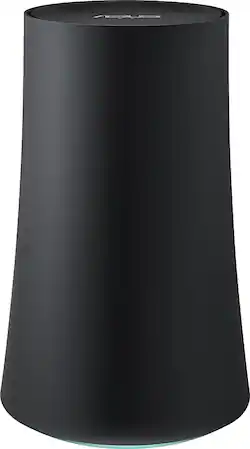
ASUS - OnHub Wireless-AC Router with NAT Firewall - Slate Gray
- General
- Product Name: OnHub Wireless-AC Router with NAT Firewall
- Brand: ASUS
- Model Number: SRT-AC1900
- Security
- Firewall Type: NAT (The method the firewall uses to filter and process data to increase network security, primarily by blocking malicious traffic requests while allowing legitimate traffic through.)
- Security Features: Hardware security engine
- Network
- Ethernet Standard: 10/100/1000 (Each standard is a variation of the IEEE 802.3 set of computer networking technologies known as Ethernet. New versions evolved to include higher bandwidth, different physical media, and other new and improved features. Standards are often denoted by speeds (in Megabits per second). For example, a 10/100/1000 Ethernet port transmits at 10 Mbps, 100 Mbps, and 1000 Mbps (1 Gbps).)
- Number of Antennas: 7
- Frequency Band: 2.4 GHz, 5.0 GHz (Bands may be grouped into categories such as low- and high-band VHF (Very High Frequency), low- and high-band UHF (Ultra High Frequency), or certain frequency channels (measured in MHz or GHz). Generally, higher frequencies transmit information faster but have shorter range than lower frequencies.)
- Wireless Networking Standard: Wi-Fi 5 (The wireless networking standard used by the device. Each iteration of the standard developed by the Wi-Fi Alliance corresponds to an existing IEEE 802.11 protocol; for example, standard 802.11ac (or AC) is termed Wi-Fi 5. Refers specifically to the standard the device is designed to use, but ultimately determines product interoperability and backward compatibility including previous versions.)
- Wireless Standard: AC (The wireless networking protocol used by the device. Each iteration of the protocol is based on the 802.11 standard developed by the Institute of Electrical and Electronics Engineers (IEEE) Standards Association. Denoted by letters following 802.11 (802.11a, 802.11ac, etc.), each version, published in alphabetical order, encompasses all previous versions.)
- Number of 2.4Ghz Streams: 1 (A router's streams are like lanes on a highway. The more streams a router has, the less traffic congestion. Because the 2.4 GHz band is used to transmit wireless signals to a wide variety of devices, there is often high amounts of traffic on that stream. But with multiple streams, each can be designated to a specific device for optimal performance. For example, if one 2.4 GHz stream is assigned to one device, such as a desktop computer, it leaves the remaining streams open for guest users, devices that use more data, or devices with specific band compatibility.)
- Number of 5.0Ghz Streams: 1 (A router's streams are like lanes on a highway. The more streams a router has, the less traffic congestion. The 5.0 GHz band provides high speed, short-range data transmission and typically has less traffic than the 2.4 GHz band. With multiple streams, each can be designated to a specific device for optimal performance. For example, if one 5.0 GHz stream is assigned to one device, such as a streaming media player, it leaves the remaining streams open for guest users, devices that need less data, or devices with specific band compatibility.)
- Certifications Listings & Approvals
- ENERGY STAR Certified: false (Devices carrying the ENERGY STAR service mark, such as computer products and peripherals, kitchen appliances, and other products, generally use 20% to 30% less energy than required by federal standards.)
- Features
- Wireless: true
- Ports
- Number Of WAN Ports: 1 (Number of devices able to be connected to the Wide Area Network (WAN). This type of port may simply be labeled "Internet," and it allows the device to share its internet connection with all devices connected to it via LAN ports.)
- Port Type(s): USB (USB 2.0 connects external drives, gaming controllers, smartphones, MP3 players and other accessories.USB 3.0 transfers data faster than USB 2.0, but only when used with USB 3.0 devices.USB Type-C provides fast speeds and versatile power, featuring connectors with identical ends that plug in upside down or right side up. Adapters allow for video as well as backward compatibility.Thunderbolt provides ultra-high bandwidth for fast data transfer between devices featuring a Thunderbolt or MiniDisplayPort connection.HDMI allows you to connect a projector or display HD media on your HDTV or monitor.Media card slots allow you to transfer photos from your digital camera or camcorder.)
- Speed
- Gigabit Ethernet Speed: true (Supports the gigabit Ethernet networking standard, which has a data rate of at least one gigabit per second, or 1,000 Mbps.)
- Compatibility
- Bluetooth Enabled: true (The device is capable of communicating with another device via Bluetooth, provided they are within the required range of each other. A Bluetooth-enabled device must also be the same Bluetooth version or higher than the accessory it is intended to pair with.)
- Warranty
- Manufacturer's Warranty - Parts: 2 years
- Manufacturer's Warranty - Labor: 2 years
- Other
- UPC: 889349107027
This Asus OnHub SRT-AC1900 wireless router features easy setup with the Google On app and wave controls for simple bandwidth prioritization and connection adjustments. The NAT firewall guards your personal information against hackers and eavesdroppers.
- Wireless-AC technology: With 7 high-performance internal antennas for a stable connection.
- Up to 1900 Mbps data transfer speed: Offers efficient operation.
- Compatible with 802.15.4 networks: Also features Bluetooth 4.0 connectivity for easy pairing with compatible devices.
- Supports easy streaming and fast downloads: So you can enjoy surfing the Web. Wave controls let you use hand gestures to prioritize bandwidth to a particular device.
- Built in LAN and WAN Ethernet ports: Plus a USB 3.0 port for connecting wired devices.
- Proximity sensor: Automatically detects nearby devices.
- LED display: Makes it easy to check the status of your connection.
- NAT firewall: Protects your private information.
- Plug-and-play installation: With easy setup using the Google On app.
Whats Included
- OnHub Wireless-AC Router with NAT Firewall
- Owner's manual
A: Yes, you will need a modem. I don't know about Century Link, but I have a recent Motorola and it works very reliably. I restart it once in a while because it's suggested, but hasn't frozen yet. Think of the two this way: the MoDem (modulate-demodulate) converts the signal in the cable or whatever to a signal your computer can understand. If you wanted a single, hard-wired connection, you wouldn't need a router because it outputs to one Ethernet port. The router allows you connect multiple devices to the one router, whether wired or wireless. There are routers (and switches, but I won't get into that) that are only wired, for situations where there are multiple wired computers connected to one port. Hope that helps.
A: If it's another google router that is your original router the new one can be placed anywhere within signal to create "mesh" and extend the network.
Q: How many ethernet out plugs?
A: There are actually 2 ethernet ports on the device. The first is the WAN connection (to cable modem/Internet). The second is the LAN connection behind the firewall. So there is 1 ethernet out - if you need more you can chain a switch behind the LAN port.
Q: Does the router provide parental control?
A: Not yet, but it can turn "off" internet to devices during certain times at night or dinner.
Q: I have wireless Ethernet Service and do not use a cable modem. Will this product work with that.
A: This device requires and Ethernet input to provide Internet Access. An option would be to use a Netgear WNCE2001 to connect to the wireless Ethernet and provide the wired connection the onhub needs.
Q: Does the USB port support use of Air Card 4G modem
A: No, the USB port is for making USB peripherals accessible over your home network i.e. printer or external HDD. You should look at Cradlepoint routers.
Q: Do we still need a modem if we get hub?
A: The Onhub requires an ethernet input in order to provide Internet connectivity
A: That's a tricky question. your speeds depend on 4 things: 1- The amount of speed you pay your provider (1MB/s; 10MB/s; 50MB/s; etc.) 2- Your modem needs to be compatible with your speeds. If you have high-speed internet but an old modem, you might not get the full speed. 3- Your router. OnHub is a good option for a high-speed internt. If you pay for high speed, you have a good new modem, but your internet is still slow, your router might be the problem. 4- Your device. If you have an old computer or even a new one with a slower internet card, you will not get the full internet. I'll give you an example. I pay Comcast to have 60MB/s. I was getting 14MB/s. I bought a new modem (not the one they rent to you, I bought my own, it is worth it!), and I bought onHub. Now, I get a solid 87MB/s. The internet was there, the only problem was my router and modem that were throttling my speed.














