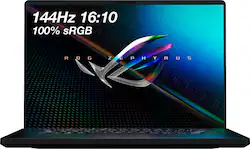
ASUS - ROG 16" WUXGA 144Hz Gaming Laptop - Intel Core i7 - 16GB Memory - NVIDIA GeForce RTX 3050 Ti - 512GB SSD
- Key Specs
- Screen Size: 16 inches (Size of the screen, measured diagonally from corner to corner.)
- Screen Resolution: 1920 x 1200 (WUXGA) (Screens come in a range of resolutions (measured in pixels, horizontal x vertical). The higher the resolution, the greater the picture quality.)
- Touch Screen: false (Touch-screen devices make navigating more intuitive. Using a touch-screen display, you can do things such as tap to select, hold and drag to move items, swipe to scroll, and pinch to zoom.)
- Refresh Rate: 144Hz (The number of frames per second the device can produce natively without enhancement. Higher rates help produce smooth, seamless pictures.)
- Processor Model: Intel 11th Generation Core i7 (Your computer's processor is like its brain. Working in combination with system memory, the power of the processor determines the complexity of software you can run, how many programs you can have open at the same time, and how fast those programs will run. Most computers feature an AMD, Intel or Snapdragon processor.)
- Storage Type: SSD
- Total Storage Capacity: 512 gigabytes
- System Memory (RAM): 16 gigabytes (Random-access memory (RAM) is a computing device's short-term data storage, which allows active information to be accessed quickly. The size and type of RAM determines how efficiently the device can handle large amounts of information at one time. For example, gaming or video editing requires more RAM for optimal performance.)
- Graphics: NVIDIA GeForce RTX 3050 Ti (Often referred to as a "graphics processing unit" (GPU), this device is responsible for displaying image content and decoding/encoding video content in programs and games.)
- Display Connector(s): 1 x HDMI (The number and type of connectors used to connect to an external display.)
- Backlit Keyboard: true (Integrated lights allow for visibility of the keys in low-light conditions.)
- General
- Product Name: ROG 16" WUXGA 144Hz Gaming Laptop - Intel Core i7 - 16GB Memory - NVIDIA GeForce RTX 3050 Ti - 512GB SSD
- Brand: ASUS
- Model Number: GU603HE-211.ZM16
- Year of Release: 2021
- Display
- Screen Size: 16 inches (Size of the screen, measured diagonally from corner to corner.)
- Screen Resolution: 1920 x 1200 (WUXGA) (Screens come in a range of resolutions (measured in pixels, horizontal x vertical). The higher the resolution, the greater the picture quality.)
- Touch Screen: false (Touch-screen devices make navigating more intuitive. Using a touch-screen display, you can do things such as tap to select, hold and drag to move items, swipe to scroll, and pinch to zoom.)
- Refresh Rate: 144Hz (The number of frames per second the device can produce natively without enhancement. Higher rates help produce smooth, seamless pictures.)
- Processor
- Processor Brand: Intel
- Processor Model: Intel 11th Generation Core i7 (Your computer's processor is like its brain. Working in combination with system memory, the power of the processor determines the complexity of software you can run, how many programs you can have open at the same time, and how fast those programs will run. Most computers feature an AMD, Intel or Snapdragon processor.)
- Processor Model Number: 11800H
- Storage
- Storage Type: SSD
- Total Storage Capacity: 512 gigabytes
- Solid State Drive Capacity: 512 gigabytes (The amount of data that can be stored on the device's solid state drive (SSD). SSD is a flash-based storage with faster speeds than a hard disk drive (HDD).)
- Memory
- System Memory (RAM): 16 gigabytes (Random-access memory (RAM) is a computing device's short-term data storage, which allows active information to be accessed quickly. The size and type of RAM determines how efficiently the device can handle large amounts of information at one time. For example, gaming or video editing requires more RAM for optimal performance.)
- Type of Memory (RAM): DDR4 SDRAM (Each type of RAM delivers a different level of speed, bandwidth, energy efficiency and performance.)
- Graphics
- Graphics Type: Dedicated (Dedicated graphics uses a separate graphics card for processing video images. Because it does not use memory from the system's RAM, there is no extra burden on the CPU and graphics are processed more efficiently. Integrated graphics shares system RAM to process video images.)
- GPU Brand: NVIDIA
- Graphics: NVIDIA GeForce RTX 3050 Ti (Often referred to as a "graphics processing unit" (GPU), this device is responsible for displaying image content and decoding/encoding video content in programs and games.)
- Advanced Graphics Rendering Technique(s): DLSS (Deep Learning Super Sampling), Ray tracing (Imaging technology designed to improve graphics rendering.)
- GPU Video Memory (RAM): 4 gigabytes (Random-access memory (RAM) is a GPU’s, or graphics cards, short-term data storage, which allows active information to be accessed quickly. The size and type of RAM determines how efficiently the GPU can handle large amounts of information at one time. For example, larger amounts of RAM for gaming or video editing increases performance.)
- Compatibility
- Operating System: Windows 11 Home (The operating system manages all software and hardware, including files, memory and connected devices. Most importantly, it lets you interact with your device and your programs in a visual way; otherwise, you'd be typing computer code to get anything done.)
- Connectivity
- Display Connector(s): 1 x HDMI (The number and type of connectors used to connect to an external display.)
- Camera
- Front-Facing Camera: true
- Features
- Backlit Keyboard: true (Integrated lights allow for visibility of the keys in low-light conditions.)
- Dimensions
- Product Weight: 4.19 pounds (The out of box weight of the item.)
- Certifications Listings & Approvals
- ENERGY STAR Certified: true (Devices carrying the ENERGY STAR service mark, such as computer products and peripherals, kitchen appliances, and other products, generally use 20% to 30% less energy than required by federal standards.)
- EPEAT Qualified: false (The Electronic Product Environmental Assessment Tool (EPEAT) was designed to provide an environmental assessment tool for purchasers. In order to qualify for EPEAT, a product must meet all 23 required criteria.)
- Other
- UPC: 195553151948
ASUS ROG Gaming Laptop. Enjoy everyday gaming with this ASUS notebook PC. The 11th Gen Intel Core i7 processor and 16GB of RAM let you run graphics-heavy games smoothly, while the potent NVIDIA GeForce RTX 3050 Ti graphics produce high-quality visuals on the new fast 16-inch 144hz WUXGA display. This ASUS notebook PC has 512GB SSD that shortens load times and offers ample storage.
- Windows 11 Operating System: Windows 11 has all the power and security of Windows 10 with a redesigned and refreshed look. It also comes with new tools, sounds, and apps. Every detail has been considered. All of it comes together to bring you a refreshing experience on your PC.
- 16" WUXGA display with 144Hz refresh rate: The ultra bright 500nits display with 1920 x 1200 resolution. Swift 144hz refresh rate with 3ms response time. Energy-efficient LED backlight.
- 16GB dual channel system memory for intense multitasking and gaming: Reams of high-bandwidth Dual Channel memory to smoothly run your graphics-heavy PC games and video-editing applications, as well as numerous programs and browser tabs all at once.
- 512GB Solid State Drive (PCI-e): Save files fast and store more data. With massive amounts of storage and advanced communication power, PCI-e SSDs are great for major gaming applications, multiple servers, daily backups, and more.
- NVIDIA GeForce RTX 3050 Ti graphics: Backed by 4GB GDDR6 dedicated video memory for an ultrafast, advanced GPU to fuel your games.
- Virtual Reality Ready: This computer has the required specs to run Virtual Reality hardware and software and is compatible with Oculus Rift, HTC Vive, and Windows Mixed Reality Ultra.
- Six speakers powered by Dolby Atmos technology: Lush Dolby Atmos audio from six speakers with force cancelling woofers put you in the center of the action.
- Weighs 4.19 lbs. and measures 0.78" thin: Thin and light for maximum portability, featuring a 16" screen size and omitting the DVD/CD drive to achieve the compact form factor. 4-cell lithium-ion battery.
- HDMI output expands your viewing options: Connect to an HDTV or high-def monitor to set up two screens side by side or just see more of the big picture.
- Wireless connectivity (WiFi 6 - 802.11 ax): Flexible, dual-band connectivity with greater reliability thanks to two data streams and antennas. Connect to a Wi-Fi router to experience GB Wi-Fi speeds nearly 3X faster vs. standard Wi-Fi 5 with improved responsiveness for even more devices.
- One-zone RGB Keyboard Backlight: Allows you to enjoy comfortable and accurate typing, even in dim lighting.
- Basic software package included: 30-days trial of Microsoft Office 365
- Two-Way AI Noise Cancelation with 3D Mic. Array: Two-Way AI Noise Cancelation clarifies upstream and downstream audio, filtering out unwanted noise to make voice communication clearer.
- Built-in fingerprint reader: Streamlines security settings for quick, typo-free access.
- Thunderbolt port for connecting advanced monitors and external drives: This single interface supports both high-speed data and high-definition video - plus Power over Cable for bus-powered devices - ideal for digital content creators.
- Built-in HD webcam: Makes it easy to video chat with family and friends or teleconference with colleagues over Skype or other popular applications.
A: It is the 3050ti, as stated on the Asus website. Plus there is no 3060ti mobile GPU that exists.
Q: Can i increase the RAM from 16 GB to 32 GB? Is there slot for additional RAM?
A: There is 8GB soldered on and a slot with an 8GB stick installed in the memory slot. So if you replace the 8 GB stick with a 32 GB stick, you can achieve a maximum of 40GB.
A: I couldn't find the answer to this in the manual or online so I decided to test it myself. There are two M.2 slots on the motherboard. The first is labeled PCIE and the 2nd is labeled PCIE/SATA. The PCIE slot is PCIe 4.0 and the PCIE/SATA slot is PCIe 3.0. The way I figured this out was to put a Sabrent Rocket PCIe 4.0 NVMe drive in slot 2 then in slot 1. In slot 1, I read a peak performance of 6994 MB/s (see attached). That benchmark is only achievable with PCIe 4.0. Slot 2 had a peak performance of about 3500 MB/s which is consistent with PCIe 3.0.
A: It goes up to 512nits of brightness and has 100% coverage of SRGB, 88% of Adobe RGB, and 98% P3. I doubt more models will be released.
Q: Is this anti reflective matt screen or glossy ? good for outdoor use ? Screen nits ?
A: Matte screen, Good for outdoors and about 500-525nits.
A: Hey! So it does have two USB-A ports. But for some reason they can be a little bit difficult to plug into at first. It might even feel like you are forcing it. One of the ports is on the right side of the laptop and it’s the last port closest to the bottom of the keyboard. The other port is on the left side of the laptop to the right of the Ethernet port. I’ve also attached pictures with both circled.
Q: How much video memory on graphics?
A: 4 Gbs of VRAM a little bit lower than the 3060 version of this
A: Yes this unit can handle editing. Please check the requirements for the software you intend to use and cross-check with the unit's specifications. We also recommend our ProArt models as they are designed for such activities.