ASUS - Vivobook 14 14" FHD Laptop - Intel Core i3-1315U with 8GB Memory - 128GB SSD - Quiet Blue
Operating System
Windows 11 Home in S Mode- Microsoft - Office 365 Personal (1 Person) (12-Month Subscription) - Activation Required - Windows, Mac OS, Apple iOS, Android [Digital]$99.99
![Microsoft - Office 365 Personal (1 Person) (12-Month Subscription) - Activation Required - Windows, Mac OS, Apple iOS, Android [Digital]](https://pisces.bbystatic.com/image2/BestBuy_US/images/products/f55bc6d1-a018-476a-9201-7699fcbccd95.jpg;maxHeight=160;maxWidth=166)
More Buying Options
Highlights
- Key Specs
- Screen Type: IPS
- Screen Size: 14 inches (Size of the screen, measured diagonally from corner to corner.)
- Screen Resolution: 1920 x 1080 (Full HD) (Screens come in a range of resolutions (measured in pixels, horizontal x vertical). The higher the resolution, the greater the picture quality.)
- Touch Screen: false (Touch-screen devices make navigating more intuitive. Using a touch-screen display, you can do things such as tap to select, hold and drag to move items, swipe to scroll, and pinch to zoom.)
- Refresh Rate: 60Hz (The number of frames per second the device can produce natively without enhancement. Higher rates help produce smooth, seamless pictures.)
- Brightness: 250 nits (A measure of the total light output.)
- Processor Model: Intel 13th Generation Core i3 (Your computer's processor is like its brain. Working in combination with system memory, the power of the processor determines the complexity of software you can run, how many programs you can have open at the same time, and how fast those programs will run. Most computers feature an AMD, Intel or Snapdragon processor.)
- CPU Base Clock Frequency: 1.2 gigahertz (Actual central processing unit (CPU) speed may vary by device configuration and design. The average rate at which the processor is able to execute tasks under normal operating conditions as asserted by the manufacturer.)
- Storage Type: SSD
- Total Storage Capacity: 128 gigabytes
- System Memory (RAM): 8 gigabytes (Random-access memory (RAM) is a computing device's short-term data storage, which allows active information to be accessed quickly. The size and type of RAM determines how efficiently the device can handle large amounts of information at one time. For example, gaming or video editing requires more RAM for optimal performance.)
- Graphics: Intel UHD Graphics (Often referred to as a "graphics processing unit" (GPU), this device is responsible for displaying image content and decoding/encoding video content in programs and games.)
- Display Connector(s): 1 x HDMI 1.4 (The number and type of connectors used to connect to an external display.)
- Battery Life (up to): 8 hours (Battery life will vary depending on the product configuration, product model, applications loaded on the product, power management setting of the product and the product features used by the customer. As with all batteries, the maximum capacity of this battery will decrease with time and usage.)
- Battery Chemistry: Lithium-ion
- 2-in-1 Design: false (A laptop and a tablet combined in one lightweight, portable device. Sometimes referred to as "convertible" or "hybrid" laptops, these devices deliver the processing power and keyboard of a laptop. When you're ready to play, either detach the screen or fold your 2-in-1 into tablet mode to comfortably watch movies, play games, read an e-book and more.)
- Backlit Keyboard: false (Integrated lights allow for visibility of the keys in low-light conditions.)
- General
- Brand: ASUS
- Model Number: X1404VA-V14.I38128
- Product Name: Vivobook 14 14" FHD Laptop - Intel Core i3-1315U with 8GB Memory - 128GB SSD
- Color: Quiet Blue
- Year of Release: 2025
- Display
- Display Type: LED
- Screen Type: IPS
- Screen Size: 14 inches (Size of the screen, measured diagonally from corner to corner.)
- Screen Resolution: 1920 x 1080 (Full HD) (Screens come in a range of resolutions (measured in pixels, horizontal x vertical). The higher the resolution, the greater the picture quality.)
- Touch Screen: false (Touch-screen devices make navigating more intuitive. Using a touch-screen display, you can do things such as tap to select, hold and drag to move items, swipe to scroll, and pinch to zoom.)
- Refresh Rate: 60Hz (The number of frames per second the device can produce natively without enhancement. Higher rates help produce smooth, seamless pictures.)
- Display Surface: Anti-glare
- Brightness: 250 nits (A measure of the total light output.)
- Processor
- Processor Brand: Intel
- Processor Model: Intel 13th Generation Core i3 (Your computer's processor is like its brain. Working in combination with system memory, the power of the processor determines the complexity of software you can run, how many programs you can have open at the same time, and how fast those programs will run. Most computers feature an AMD, Intel or Snapdragon processor.)
- Processor Model Number: 1315U
- CPU Base Clock Frequency: 1.2 gigahertz (Actual central processing unit (CPU) speed may vary by device configuration and design. The average rate at which the processor is able to execute tasks under normal operating conditions as asserted by the manufacturer.)
- CPU Boost Clock Frequency: 4.5 gigahertz (Actual central processing unit (CPU) speed may vary by device configuration and design. The maximum rate at which the processor is able to execute tasks, typically only used for a short period of time as needed. This rate may temporarily boost the processor's performance, but may result in overheating, shutdown, or damage to equipment if sustained.)
- Number of CPU Cores: 6-core (A core, or "brain" of a CPU, allows it to receive and execute instructions. Each core can work independently or together to perform parallel operations.)
- Number of CPU Threads: 8 (Generally, the more threads, the faster and more responsive the operating system.)
- Unlocked Processor: false
- Neural Processing Unit (NPU): false (Whether the product comes with an integrated neural processing unit (NPU) that performs computations for AI (artificial intelligence) functions to increase proficiency of the CPU and reduce power consumption.)
- Storage
- Storage Type: SSD
- Total Storage Capacity: 128 gigabytes
- Solid State Drive Capacity: 128 gigabytes (The amount of data that can be stored on the device's solid state drive (SSD). SSD is a flash-based storage with faster speeds than a hard disk drive (HDD).)
- Solid State Drive Interface: PCIe 3.0 (Connects the solid state drive to the host system. PCI and SATA interfaces are the most common; PCI interfaces are typically faster, but SATA interfaces are compatible with a wider range of systems.)
- Memory
- System Memory (RAM): 8 gigabytes (Random-access memory (RAM) is a computing device's short-term data storage, which allows active information to be accessed quickly. The size and type of RAM determines how efficiently the device can handle large amounts of information at one time. For example, gaming or video editing requires more RAM for optimal performance.)
- Type of Memory (RAM): DDR4 (Each type of RAM delivers a different level of speed, bandwidth, energy efficiency and performance.)
- System Memory RAM Speed: 3200 megahertz (How fast the information-storing hardware operates. The faster the RAM, the faster memory can be transferred to other system components. Ultimately, faster RAM improves operational efficiency.)
- Number Of Memory Slots: 1
- Number of Memory Sticks Included: 1
- Graphics
- Graphics Type: Integrated (Dedicated graphics uses a separate graphics card for processing video images. Because it does not use memory from the system's RAM, there is no extra burden on the CPU and graphics are processed more efficiently. Integrated graphics shares system RAM to process video images.)
- GPU Brand: Intel
- Graphics: Intel UHD Graphics (Often referred to as a "graphics processing unit" (GPU), this device is responsible for displaying image content and decoding/encoding video content in programs and games.)
- Compatibility
- Operating System: Windows 11 Home in S Mode (The operating system manages all software and hardware, including files, memory and connected devices. Most importantly, it lets you interact with your device and your programs in a visual way; otherwise, you'd be typing computer code to get anything done.)
- Connectivity
- Display Connector(s): 1 x HDMI 1.4 (The number and type of connectors used to connect to an external display.)
- Number of HDMI Outputs (Total): 1
- USB Ports: 1 x USB-A 2.0, 2 x USB-A 3.2, 1 x USB-C 3.2 (The number and type of USB ports the product has.)
- Number of USB Ports (Total): 4
- Headphone Jack: true (The device features an interface that allows for the connection of headphones.)
- Microphone Input: true (The device features an input for connecting an external microphone.)
- Wireless Connectivity: Wi-Fi, Bluetooth (The manner in which a device sends data to another device over a short distance without the use of wires or cables.)
- Wireless Standard: AX (The wireless networking protocol used by the device. Each iteration of the protocol is based on the 802.11 standard developed by the Institute of Electrical and Electronics Engineers (IEEE) Standards Association. Denoted by letters following 802.11 (802.11a, 802.11ac, etc.), each version, published in alphabetical order, encompasses all previous versions.)
- Wireless Networking Standard: Wi-Fi 6E (The wireless networking standard used by the device. Each iteration of the standard developed by the Wi-Fi Alliance corresponds to an existing IEEE 802.11 protocol; for example, standard 802.11ac (or AC) is termed Wi-Fi 5. Refers specifically to the standard the device is designed to use, but ultimately determines product interoperability and backward compatibility including previous versions.)
- Cooling
- CPU Cooling System: Air
- GPU Cooling System: Air
- Power
- Power Supply Input: DC Jack
- Power Supply Maximum Wattage: 45 watts
- Battery Life (up to): 8 hours (Battery life will vary depending on the product configuration, product model, applications loaded on the product, power management setting of the product and the product features used by the customer. As with all batteries, the maximum capacity of this battery will decrease with time and usage.)
- Battery Cells: 3-cell
- Battery Chemistry: Lithium-ion
- Camera
- Front-Facing Camera: true
- Front Facing Camera Video Resolution: 720p (Refers to the number of pixels, both horizontally and vertically, used by the camera facing the user to capture video. The higher the resolution the finer the video detail that can be seen.)
- Built-In Microphone: true
- Features
- 2-in-1 Design: false (A laptop and a tablet combined in one lightweight, portable device. Sometimes referred to as "convertible" or "hybrid" laptops, these devices deliver the processing power and keyboard of a laptop. When you're ready to play, either detach the screen or fold your 2-in-1 into tablet mode to comfortably watch movies, play games, read an e-book and more.)
- Backlit Keyboard: false (Integrated lights allow for visibility of the keys in low-light conditions.)
- Touchpad Type: Precision
- Audio Technology: SonicMaster
- Casing Material: Plastic
- Dimensions
- Product Height: 0.7 inches (The out of box height of the item. Height is measured as the vertical distance from the bottom of the item to the top as it would be primarily used or placed.)
- Product Width: 12.79 inches (The out of box width of the item. Width is measured as the horizontal distance from one side of the item to the other as it would be primarily used or placed.)
- Product Depth: 8.42 inches (The out of box depth of the item. Depth is measured as the distance from the front of the item to the back as it would be primarily used or placed.)
- Product Weight: 3.09 pounds (The out of box weight of the item.)
- Certifications Listings & Approvals
- ENERGY STAR Certified: true (Devices carrying the ENERGY STAR service mark, such as computer products and peripherals, kitchen appliances, and other products, generally use 20% to 30% less energy than required by federal standards.)
- EPEAT Qualified: true (The Electronic Product Environmental Assessment Tool (EPEAT) was designed to provide an environmental assessment tool for purchasers. In order to qualify for EPEAT, a product must meet all 23 required criteria.)
- EPEAT Level: Silver (The Electronic Product Environmental Assessment Tool (EPEAT) was designed to provide an environmental assessment tool for purchasers. In order to qualify for EPEAT, a product must meet all 23 required criteria. Products are rated Bronze, Silver or Gold based on how many of 28 optional criteria they meet (below 50%, 50%, 75%).)
- Included
- Included Software: myASUS
- Numeric Keypad: false
- Warranty
- Warranty - Parts: 1 year
- Warranty - Labor: 1 year
- Other
- UPC: 199291148536
Turn everyday tasks into something special with Vivobook 14, your essential tool for getting things done easier, anywhere. It’s completely user-friendly too, with its 180° lay-flat hinge and physical webcam shield. Make all your days more enjoyable with Vivobook 14!
- Microsoft Copilot: Make complex tasks simple. Get answers, generate images, summarize texts, and more! Unleash your creativity with the power of intelligent assistance
- Sharp 14-inch FHD Display: Enjoy vivid visuals in detailed 1920 x 1080 resolution (16:9) with brilliant colors and a smooth 60Hz refresh rate
- Speedy Intel Core i3-1315U Processor: With the latest platform technologies for everyday applications, easy connectivity and performance optimization, the Intel® Core™ i3-1315U processor enables productivity and play with 6 cores and 8 threads
- Intel UHD Graphics: Clear, integrated graphics for all of your everyday needs from day to night
- Fast Productivity with 8GB of Memory: Experience reliable performance and fast loading
- 128GB of Standard Storage: Save necessary files and data
- Wi-Fi 6E and Bluetooth 5.3: Connect all of your devices, anywhere and anytime
- Up to 8 Hours of Battery Life: Get more for your productivity. Built with an efficient battery¹ and FastCharge technology. Fully recharge in just 1 hour and 20 minutes
- Chiclet Keyboard with NumberPad: Vivobook 14 features a NumberPad for easier number crunching. To activate the NumberPad, tap the NumberPad icon at the top right corner. To deactivate, tap the NumberPad icon again. To adjust the brightness of the NumberPad, tap the top left triangle icon. To activate the Calculator app, swipe in any direction from the triangle icon. Use the same motion from the triangle icon to exit the Calculator app
- HD Front Camera with Webcam Shield: Look great with a 720p HD camera compatible with Windows Studio Effects and Windows Hello. With a built-in webcam shield, easily slide over the lens cover
- Speakers Tuned by SonicMaster: Experience immersive sound whether you're playing your music, watching a movie with friends or on calls
- Ports: 1 USB 3.2 Gen 1 Type-C | 1 USB 2.0 Type-A | 2 USB 3.2 Gen 1 Type-A | HDMI 1.4 | Combo Audio Jack
Whats Included
- X1404VA-V14.I38128 Laptop
- Power Cord
- Quick Start Guide
- Warranty Card
Disclaimers
- 1. Tested by ASUS using local 1080p video playback. Battery life will vary depending on various factors including product model, configuration, loaded applications, features, use, wireless functionality, and power management settings. The maximum capacity of the battery will naturally decrease with time and usage
Q: Do I need anti-virus for these product
A: undefined
Q: Can you install Microsoft Office on this laptop?
A: Yes, you can install Microsoft Office. If you are using the Windows S mode model, you would need to install the applications through the Microsoft Store.
A: No it is not
A: There isn't the same compatibility across devices as with apple. So if you use that feature to sync between phone and tablet you might be frustrated. The picture is also less crisp. But depending on what you're doing that may not matter-it doesn't for me
Q: Does this unit have a backlit keyboard Is there a dependability rating?
A: No backlit keyboard
Q: is there a warranty on this product and how long? Who to contact for warranty?
A: One year parts and labor (industry standard). If something goes wrong within the return window for BB, I would suggest contacting them, since it would probably be in the category of "right out of the box." Beyond that time, you contact Asus. BTW, this information is ALWAYS provided in the packing of a computer.
A: I purchased the computer new I took the back off remove the 256 gigabyte drive and then with Acronis true image software I made an image of the drive to a 4 TB ssd and put the 4 TB drive back in the computer. Turned it on and it booted up into S mode. I logged into the Microsoft store and switched it out of S mode to Windows home mode. The switch is free. if I want to switch back to S mode, I can always put the original 256 GB drive back in and start fresh again. I don’t recommend s mode. It will not run most applications. Acronis true image software is key to duplicating these drives with the window security and licensing on it.
A: Can expand the memory up to 40gb by addin a 32gh simm. Can also add a 16GB for a total of 24. Can add 8 gb for a total of 16 gb. The 16 gb option is dual channel memory access
Compare similar products

Turn everyday tasks into something special with Vivobook 14, your essential tool for getting things done easier, anywhere. It’s completely user-friendly too, with its 180° lay-flat hinge and physical webcam shield. Make all your days more enjoyable with Vivobook 14!
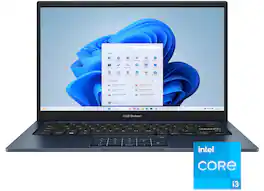
Turn everyday tasks into something special with Vivobook 14, your essential tool for getting things done easier, anywhere. It’s completely user-friendly too, with its 180° lay-flat hinge and physical webcam shield. Make all your days more enjoyable with Vivobook 14!

The IdeaPad Slim 3i is smart and made for heavy on-the-go users from libraries and cafes to airport terminals, with a lightweight and thin profile that's 10% slimmer than the previous generation yet still military-grade rugged. Get the important stuff done on the go with powerful 13th Gen Intel Core i3 processors, the adaptive performance of Smart Power, and full-function Type-C port while you learn, work, and stream on a Full HD display with up to 88% AAR.

Turn everyday tasks into something special with Vivobook 14, your essential tool for getting things done easier, anywhere. It’s completely user-friendly too, with its 180° lay-flat hinge and physical webcam shield. Make all your days more enjoyable with Vivobook 14!
| Pros for ASUS - Vivobook 14 14" FHD Laptop - Intel Core i3-1315U with 8GB Memory - 128GB SSD - Quiet Blue | |||
|---|---|---|---|
| Performance, Speed | There were no pros for this product— | Overall Performance, Portability, Processor Speed, Battery Life, Weight | There were no pros for this product— |
| Cons for ASUS - Vivobook 14 14" FHD Laptop - Intel Core i3-1315U with 8GB Memory - 128GB SSD - Quiet Blue | |||
| There were no cons for this product— | There were no cons for this product— | Screen Quality, Storage Capacity | There were no cons for this product— |
Specs
Reviews
Customer Images
The vast majority of our reviews come from verified purchases. Reviews from customers may include My Best Buy members, employees, and Tech Insider Network members (as tagged). Select reviewers may receive discounted products, promotional considerations or entries into drawings for honest, helpful reviews.
- Rated 4 out of 5 stars
ASUS Vivobook was too good of a deal to pass up
This ASUS Vivobook was an amazing find and excellent value during the sale. The screen is awesome. It is very bright with great colors. The anti-glare screen is very effective. The keyboard feels great. The laptop is very sturdy and has no noticeable flex on the frame or screen. The anti-microbial treatment is a nice bonus. No touch screen but the track pad works very well and doubles as number keys if needed. The computer is very fast and loads the apps and web pages lightning fast. I use an 8th generation i7 laptop along with this unit and I notice the 13th generation i3 is just quicker and has no lag while loading images and videos. If you find this on sale, buy it. Don't hesitate. The only thing I would improve is the wattage output of the speakers. They are fine and clear. I use an external BT speaker to make up for it.
Posted by KelGoNite
- Rated 5 out of 5 stars
Easy and Reliable Performance
Handles everyday things like web browsing, homework, and video chats without any slowdown. The display is clear and looks nice for its size, and apps open quickly for basic tasks. It’s light enough to toss in a bag and runs quietly while you work. A good option if you want a straightforward laptop that’s easy to use.
Posted by Jack
- Rated 5 out of 5 stars
great computer
Purchased for school. Works great and is fast. Recommended.
Posted by Mu11