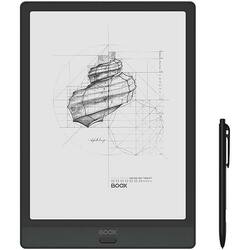
BOOX - Note3 E-Reader - 10.3" - 64GB - Black
- Key Specs
- Screen Size: 10.3 inches (Size of the screen, measured diagonally from corner to corner.)
- Audiobook Enabled: true
- General
- Product Name: Note3 E-Reader - 10.3" - 64GB
- Brand: BOOX
- Model Number: OPC0748R
- Model Family: BOOX Note3
- Display
- Screen Size: 10.3 inches (Size of the screen, measured diagonally from corner to corner.)
- Screen Display: Black and white
- Adjustable Brightness: true
- Adjustable Font Size: true
- Compatibility
- Supported Media Formats: BMP, CHM, DJVU, DOC, EPUB, FB2, HTML, JPG, MOBI, PNG, PPT, RTF, TXT
- Connectivity
- Compatible Wireless Standard(s): Wireless-AC, Wireless-B, Wireless-G, Wireless-N (The wireless networking standard(s) the device is backwards compatible with. This includes networking protocols based on the IEEE 802.11 standard (alphabetically ascending) and the Wi-Fi Alliance standard (numerically ascending), both of which provide high-throughput wireless local area networks (WLANs). Devices designed to work with specific standard(s) will be backwards compatible with previous versions but may not run at optimal performance when using earlier iterations.)
- Interface(s): USB Type C (Refers to the types of connections that devices use to interact and communicate with each other.)
- Power
- Charging Interface(s): USB Type C (The connection for transmitting power to charge the device.)
- Battery Capacity: 4300.0 milliampere hours (The amount of energy stored in the battery.)
- Features
- Audiobook Enabled: true
- Other
- UPC: 6949710304296
Read documents or books and take notes with this 10.3-inch ONYX BOOX Note3 tablet. MOON Light 2 technology helps enhance visibility in low-light areas and reduce blue light for more comfortable viewing, while the multitouch screen offers increased control. This ONYX BOOX Note3 tablet features an eight-core processor and 4GBs of RAM for smooth performance, and 64GBs of memory provides ample storage space.
- Mobius flexible screen: The flexible screen with AG glass flat cover lens offers real handwriting feel and glare-free view.
- Adjustable front light: Helps you clearly see the content whether you work and study in the misty dawn, dusk, or night.
- A5-size files: Read and annotate documents with ease, and save much scrolling effort.
- Split view: Upon splitting the big screen, you turn Note3 into a robust device that provides a larger space for all kinds of tasks.
- Take notes with power tools: Create organized notes with help of a lasso tool, templates, pencil, insert pictures, and area eraser.
- Android operating system: Allows you to install various apps and run two applications on one display to double your efficiency.
- 10.3" screen with 1872 x 1404 resolution: E-ink touch screen that reads like real paper even in bright sunlight.
- 4GB system memory for basic multitasking: Adequate high-bandwidth RAM to smoothly run multiple applications and browser tabs at the same time.
- 64GB internal storage: Store your books, apps, music, movies, photos and more.
- Octa-core processor: The right combination of fast performance and power efficiency. It allows rapid multitasking, delivers smooth response, and unleashes stunning graphics.
- Content formats supported: Include PDF (reflowable), PPT, EPUB, TXT, DJVU, HTML, RTF, FB2, DOC, MOBI, CHM, PNG, JPG, TIFF, BMP, WAV, and MP3 formats.
- Wi-Fi connectivity: You can browse and buy new books and magazines wirelessly.
- Bluetooth 5.0 connection: Enjoy seamless wireless connectivity with Bluetooth.
- Long-lasting battery: A single battery charge lasts weeks, not hours.
Whats Included
- BOOX Note3 E-Reader - 10.3" - 64GB
- Stylus pen
- USB-C cable
- Screen protector
- Owner's manual
Q: Do you have to purchase an Adobe Suite type product to open and edit PDF files/documents?
A: With Neoreader However, you can take notes on top of the text You can add textboxes on the text You can modify the font size, to embolden the text, change the typeface, enhance the dark color of text, modify the line spacing, paragraph spacing, top/bottom margins, and left/right margins You can split view and have the screen showing two pages instead of one, you can have in one view one document open and in the other view a different document, you can have on one view the document and on the other view a blank notepad for taking notes, etc These sort of features When you long-press and drag through a sentence, you can highlight it in different tones, underline it , translate the selected text into another language, find more information about a selected word into the Wiktionary, have the Text-to-Speach feature on, etc These are the sort of features that can be used
Q: Does it convert script to text ?
A: I bought this unit because of poor eyesight. I have a Samsung galaxy tab s6 tablet but after 15-20 minutes of reading my eyes hurt. I am pleased with the purchase of Boox E ink. My eyes are now resting do not get tired. Of course, the work of all E ink tablets is specific, you have to get used to because of the screen update, but you save your eyes. Sorry for my English. Good luck to you!
A: The Stylus’ depicted may not be the exact model because they update from time to time so the photo represents the likeness. You may indeed revived a faulty stylus which if happens in future, please let us know as soon as you can.
Q: Can you upload documents to it to fill out, have signed etc.?
A: Yes.... You can upload PDF forms for example, then write on top of it, save it and transfer it again to your laptop or upload it to the cloud
A: When opening an EPUB eBook with the pre-installed App, NeoReader, there is the option of Text-to-Speech. There is a button (looks like a headset) that you can access from the NeoReader menu
A: 1) Qualcomm Snapdragon 636 processor, 433 Mbps , Cache 1.8. 2) Android 10. 3)Google play store can be set to auto update.
Q: Can you upload script to typed word documents
A: BOOX allows you to convert handwritten notes into text (typed words) through the AI conversion feature. Afterwards, you can interact with the converted notes by exporting them as a PDF or TXT file, or to share them as PDF or TXT via a QR code, via email, or other options that BOOX offer. If our answer is not solving your doubts, please elaborate a bit more your question.
Q: Is it compatible with Apple IOS?
A: Boox e-ink tablets are Android devices. They can run some of the same apps but ones designated for an Android systems.



















