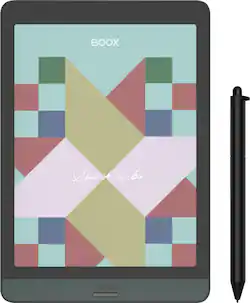
BOOX - Nova3 Color E-Reader - 7.8" - 32GB - Black
- Key Specs
- Screen Size: 7.8 inches (Size of the screen, measured diagonally from corner to corner.)
- Screen Resolution: 1920 x 1440 (Screens come in a range of resolutions (measured in pixels, horizontal x vertical). The higher the resolution, the greater the picture quality.)
- Processor Model: Upgraded Octa-core (Your computer's processor is like its brain. Working in combination with system memory, the power of the processor determines the complexity of software you can run, how many programs you can have open at the same time, and how fast those programs will run. Most computers feature an AMD, Intel or Snapdragon processor.)
- Total Storage Capacity: 32 gigabytes
- Operating System: Android 10 (The operating system manages all software and hardware, including files, memory and connected devices. Most importantly, it lets you interact with your device and your programs in a visual way; otherwise, you'd be typing computer code to get anything done.)
- General
- Product Name: Nova3 Color E-Reader - 7.8" - 32GB
- Brand: BOOX
- Model Number: OPC0764R
- Year of Release: 2021
- Display
- Screen Size: 7.8 inches (Size of the screen, measured diagonally from corner to corner.)
- Screen Resolution: 1920 x 1440 (Screens come in a range of resolutions (measured in pixels, horizontal x vertical). The higher the resolution, the greater the picture quality.)
- Processor
- Processor Model: Upgraded Octa-core (Your computer's processor is like its brain. Working in combination with system memory, the power of the processor determines the complexity of software you can run, how many programs you can have open at the same time, and how fast those programs will run. Most computers feature an AMD, Intel or Snapdragon processor.)
- Storage
- Total Storage Capacity: 32 gigabytes
- Memory
- System Memory (RAM): 3 gigabytes (Random-access memory (RAM) is a computing device's short-term data storage, which allows active information to be accessed quickly. The size and type of RAM determines how efficiently the device can handle large amounts of information at one time. For example, gaming or video editing requires more RAM for optimal performance.)
- Type of Memory (RAM): LPDDR4X (Each type of RAM delivers a different level of speed, bandwidth, energy efficiency and performance.)
- Compatibility
- Operating System: Android 10 (The operating system manages all software and hardware, including files, memory and connected devices. Most importantly, it lets you interact with your device and your programs in a visual way; otherwise, you'd be typing computer code to get anything done.)
- Operating System Compatibility: Android
- Power
- Charging Interface(s): USB Type C (The connection for transmitting power to charge the device.)
- Camera
- Front-Facing Camera: false
- Rear-Facing Camera: false
- Built-In Microphone: true
- Certifications Listings & Approvals
- ENERGY STAR Certified: false (Devices carrying the ENERGY STAR service mark, such as computer products and peripherals, kitchen appliances, and other products, generally use 20% to 30% less energy than required by federal standards.)
- Included
- Stylus Included: true
- Other
- UPC: 6949710304357
Colorful. Writable. Portable
- Kaleido Plus, the latest color ePaper screen: The new Kaleido Plus is the latest 3rd generation of E Ink’s Color ePaper screen. It can display up to 3 times better color performance than its previous versions. BOOX Nova3 Color can show soft 4,096 colors with better saturation and less color shift.
- Made better by BOOX original algorithm: With BOOX color algorithm, you can enjoy the most out of the color E Ink screen when doing any task and experience the easy-to-view display.
- Color performance under your thumb: With BOOX Display Control system, you can effortlessly slide the separate toolbar to make delicate adjustments to the color contrast, saturation and brightness.
- Turn amazing ideas into colorful marks: The colorful note-taking system offers more color and graphic options. You can do things like jot down notes, record lessons and meetings for audio playback, search hand-writing notes, jump to the key points directly and convert all the texts into typed notes.
- Create masterworks on flexible canvas: Release your creativity in BOOX Notes app. You can customize your drawing's size, disable palm recognition and use the lasso to move patterns. Then meticulously color your sketches with the stylus with 4,096 levels of pressure sensitivity.
- Sync and view on any end: Creating vivid works is just a beginning. You can sync your notes and doodles in the background, then view them anytime on mobile and PC.
- Your work station on the go: Bring the lightweight Nova3 Color and kick off your work anywhere with the features and apps you need. With ample storage of 3G+32G, loads of built-in and third-party apps and a writing stylus, you’re all set for a prolific day.
- Share books, notes and files directly: Tap the Share button, and choose a destination: Bluetooth, Email or other third-party apps. Nova3 Color with the improved system makes sharing easy as a breeze.
Whats Included
- Tablet
- Stylus pen
- USB-C Cable
- Screen Protector Film
- Quick Start Guide
- Warranty Card
Q: can you transfer the hand written notes to document format .doc or docx?
A: Thanks for reaching out. You can only export your handwritten notes in PNG (Single page), Bitmap PDF, or Vector PDF. When it comes to converted handwritten notes into text, you can export them as PNG, PDF, and TXT
A: Best Buy is a Boox authorized reseller with products shipping from a North American Authorized distributor. Boox brand is available world wide so make sure you are purchasing from an authorized reseller in your region for bets results.
A: Hello and thanks for reaching out. The Nova 3 Color comes with The Standard (Non-Magnetic) triangle pen that has the erase function and capability. The Nova case is sold separately on BBY.com.
Q: can I write on PDF on BOOX Nove 3
A: Yes...You can take notes on top of different file formats such as PDF, EPUB, or MOBI