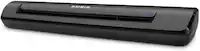
Brother - ADS-1800W Compact Wireless Duplex Desktop Scanner with Single Pass Double-Sided Scanning - White
 Brother - MFC-L2820DW Wireless Black-and-White Refresh Subscription Eligible All-In-One Laser Printer, Great for Home Offices - Gray$264.98
More Buying Options
Specifications
- NetworkingWirelessScan (Color) Speed30 copies per minuteScan MethodSingle passDuplex Scan FunctionYes
- Key Specs
- Networking: Wireless
- Scan (Color) Speed: 30 copies per minute (The number of color pages able to be scanned per minute.)
- Scan Method: Single pass
- Duplex Scan Function: true
- General
- Brand: Brother
- Model Number: ADS-1800W
- Product Name: ADS-1800W Compact Wireless Duplex Desktop Scanner with Single Pass Double-Sided Scanning
- Color: White
- Connectivity
- Scanner Connectivity: USB 3.0
- Minimum System Requirements: Windows 10, 11; macOS v11.x/12.x/13.x
- Dimensions
- Product Height: 3.3 inches (The out of box height of the item. Height is measured as the vertical distance from the bottom of the item to the top as it would be primarily used or placed.)
- Product Width: 11.3 inches (The out of box width of the item. Width is measured as the horizontal distance from one side of the item to the other as it would be primarily used or placed.)
- Maximum Document Length: 14 inches
- Maximum Document Width: 8.5 inches
- Product Weight: 3.1 pounds (The out of box weight of the item.)
- Features
- Automatic Document Feeder Capacity: 20 sheets
- Automatic Document Feeder Included: true
- Scanner Type: Sheetfed, Business Card, Document, Portable, Receipt Scanners
- Transparency Scanning: false (This function supports scanning of transparent media, such as film slides or negatives.)
- Scanner Resolution: Up to 600 x 600 (Refers to the number of pixels/dots, both horizontally and vertically, of the image produced by the scanner. Generally, the higher the resolution, the sharper and cleaner the produced image.)
- Memory Card Slot: false
- Document Size: Letter, Legal, Executive, Memo
- File Format(s): TIFF, JPEG
- Image Scanner Type: Dual CIS
- Grayscale Depth: 8-bit (256 colors) (Refers to the number of bits used to define each pixel in the captured image, which determines the number of tones, or levels, that can be represented. Generally, the greater the bit depth, the better the image quality.)
- Scanner Info
- Scan (Monochromatic) Speed: 30 copies per minute (The number of monochromatic grayscale pages able to be scanned per minute.)
- Scanner Bit Depth: 48 (Refers to the number of bits used to define each pixel in the captured image and determines the number of colors or tones that can be represented. Generally, the greater the bit depth, the better the image quality.)
- Included
- Included Software: Brother iPrint&Scan (Desktop) (Windows / Mac); Kofax PaperPort 14SE (Windows); Kofax Power PDF (Windows / Mac); Brother Mobile Connect (iOS & Android); Presto! BizCard (Windows / Mac); BR-Receipts; Image Folio (Windows / Mac)
- Certifications Listings & Approvals
- ENERGY STAR Certified: true (Devices carrying the ENERGY STAR service mark, such as computer products and peripherals, kitchen appliances, and other products, generally use 20% to 30% less energy than required by federal standards.)
- TWAIN Compliant: true (Products with this label are compliant with standards set by the TWAIN Working Group for regulating communication between software and digital imaging devices. Devices that are TWAIN compliant are compatible for use with each other without requiring additional software, even if they have different capabilities.)
- Warranty
- Warranty - Parts: 1 year
- Warranty - Labor: Not applicable
- Other
- UPC: 012502674245
Scan documents your way, when and where you want with the Brother ADS-1800W. It’s like a virtual assistant for your small office or home office, helping you scan with ease from almost anywhere when connected to your scanner over a Wi-Fi connection. Scan photos and documents directly to your mobile device and share or save via the Brother Mobile Connect App(1), and automate your workflows using the 2.8” color touchscreen. Easy to use and affordable, the Brother ADS-1800W Compact Desktop helps you organize and digitize your documents, photos, and so much more. With fast scanning speeds up to 30 pages per minute(2) (ppm), a large 20-page automatic document feeder(3), and easy single-pass double-sided scanning capabilities, this scanner delivers precise black and white or color scans at a sharp 600 x 600ppi. Compact and lightweight, the Brother ADS-1800W is ready to work where you are, whether you’re scanning photos, organizing your library of business cards, digitizing your receipts, or scanning contracts. Plus, it’s powered directly through your computer or laptop via an included USB-C cable, meaning fewer messy cords and plugs in your way. Perfect for daily or occasional scanning, the Brother ADS-1800W handles multiple document sizes, and features a handy card slot for easy scanning of ID cards, business cards, and even credit cards. It also comes bundled with robust software(1) to manage files, create, and edit PDFs, and automate workflows for the ultimate in convenience. It’s so simple to use, you’ll never know how you organized yourself without it.
- Fast multi-page scanning: Scanning speeds of up to 30ppm(2) with single-pass double-sided scanning, and a capacity of up to 20 pages in the automatic document feeder(3).
- Scan from almost anywhere to multiple destinations: When you use the Brother Mobile Connect App(1), you can scan almost anything from almost everywhere, and save directly to your computer or the cloud(4) when connected to your scanner over a Wi-Fi connection.
- Enhanced productivity with the 2.8" color touchscreen: The easy to use 2.8" color touchscreen helps you simply scan to preset destinations, easily automating your workflow and saving you time and stress.
- Versatile and efficient: Scans multiple document types and sizes – paper or plastic – as small as 2" x 2.76" and includes a convenient card slot to quickly scan business cards, IDs, and even credit cards.
- Flexible scan options: Use the automatic document feeder to scan multiple pages up to 8.5” x 14”, or scan a single page as long as 197”.
- Windows, Mac, and Linux-compatible: With TWAIN, WIA, ICA, and SANE drivers.
- Ultra-portable, compact footprint: Lightweight space-saving design is ideal for use at work or home, and easily moved from office to home office, to anywhere you travel.
- Bundled software increases productivity and efficiency: Packaged with 7 vital apps to enhance your images, create documents with readable text, easily scan and organize business cards and contacts, create, annotate and edit PDFs, and create custom workflows for simple organization(1).
- Brother at your side support: Backed by Brother with a 1-year limited warranty and free online, call, or live chat support for the life of your scanner.
Whats Included
- ADS-1800W Compact Wireless Duplex Desktop Scanner
- USB Type C 3.2 Cable
- Quick Setup Guide
- Product Safety Guide
- Warranty Sheet
Q: Can I scan documents wirelessly with this scanner?
A: Yes, you can scan wirelessly using the Brother Mobile Connect App and a Wi-Fi connection.
Q: Is this scanner compatible with both Windows and Mac computers?
A: Yes, this scanner is compatible with Windows, Mac, and Linux operating systems.
Q: How fast can this scanner scan documents?
A: The Brother ADS-1800W scanner boasts a scanning speed of up to 30 pages per minute.
Q: How many pages can the automatic document feeder hold?
A: The automatic document feeder has a capacity of 20 pages.
Q: What is the maximum document size this scanner can handle?
A: The scanner can handle documents up to 8.5 inches wide and 14 inches long using the automatic document feeder.
Q: Does this scanner have a touchscreen?
A: Yes, it has a 2.8-inch color touchscreen for easy operation.
A: The Brother ADS1800W will power on either with the USB connection to a computer, or the optional AC Adapter. The Wireless scanning refers to the machine's ability to connect to a network without needing to be hard-wired/cabled into that network.
Q: Can I scan a photo with this machine?
A: Yes, the Brother ADS1800W does support photo scanning.
Compare similar products
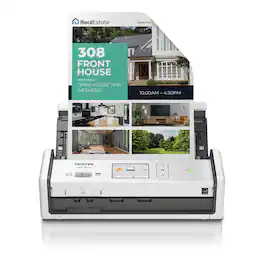
Scan documents your way, when and where you want with the Brother ADS-1800W. It’s like a virtual assistant for your small office or home office, helping you scan with ease from almost anywhere when connected to your scanner over a Wi-Fi connection. Scan photos and documents directly to your mobile device and share or save via the Brother Mobile Connect App(1), and automate your workflows using the 2.8” color touchscreen. Easy to use and affordable, the Brother ADS-1800W Compact Desktop helps you organize and digitize your documents, photos, and so much more. With fast scanning speeds up to 30 pages per minute(2) (ppm), a large 20-page automatic document feeder(3), and easy single-pass double-sided scanning capabilities, this scanner delivers precise black and white or color scans at a sharp 600 x 600ppi. Compact and lightweight, the Brother ADS-1800W is ready to work where you are, whether you’re scanning photos, organizing your library of business cards, digitizing your receipts, or scanning contracts. Plus, it’s powered directly through your computer or laptop via an included USB-C cable, meaning fewer messy cords and plugs in your way. Perfect for daily or occasional scanning, the Brother ADS-1800W handles multiple document sizes, and features a handy card slot for easy scanning of ID cards, business cards, and even credit cards. It also comes bundled with robust software(1) to manage files, create, and edit PDFs, and automate workflows for the ultimate in convenience. It’s so simple to use, you’ll never know how you organized yourself without it.
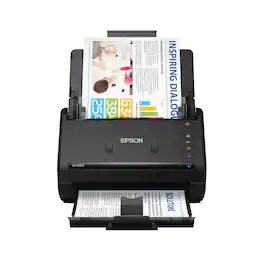
Get organized fast with the WorkForce ES-400 II duplex desktop document scanner. This reliable, easy-to-use performer speeds through scans up to 35 ppm/70 ipm1, capturing both sides of each sheet in one pass. Its 50-sheet Auto Document Feeder allows you to breeze through stacks of documents of varying sizes. Intuitive Epson ScanSmart Software2 means you can easily preview, email and upload your scans. The included TWAIN driver ensures compatibility with most document management software. Scan to cloud storage accounts2 or searchable PDFs. Color and image adjustment features such as auto crop, dirt detection, staple protection and paper-skew correction help ensure remarkable image quality, whatever the scan.
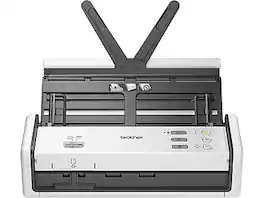
Whether you’re at home, at the office, or working from the coffee shop, you can scan and organize almost anything when connected to your Brother ADS-1350W scanner over a Wi-Fi connection. This compact and portable scanner is perfect for daily or occasional use, easily handling a wide variety of document sizes. Scan single pages as long as 197", or multiple pages up to 8.5" x 14" with the 20-page automatic document feeder(1). It even includes a handy card slot for simple scanning of ID cards, business cards, or plastic cards of all kinds. Digitize your documents and images in record time, with fast scanning speeds up to 30 pages per minute (ppm)(2), and single-pass double-sided scanning capabilities. Directly powered from your computer via an included USB-C cable, the Brother ADS-1350W is compatible with Windows, Mac®, and Linux® operating systems, offering TWAIN, WIA, ICA, and SANE drivers. It’s also ENERGY STAR 3.0 and EPEAT SILVER certified, with energy-efficient options like Sleep Mode. It’s so simple to use, you’ll ask yourself how you ever stayed organized without it.
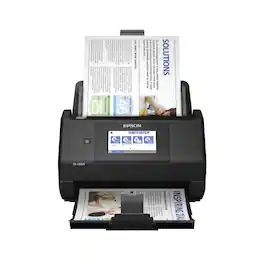
Get organized — quickly and easily — with the WorkForce ES-580W wireless duplex desktop document scanner. This reliable performer makes it easy to scan to your smartphone, tablet or online storage account1 from your desktop or your mobile device. You can even scan directly to a USB memory drive without using a computer. A 4.3" touchscreen enables quick, effortless navigation, while a 100-sheet Auto Document Feeder allows you to breeze through stacks of documents. Scan pages at up to 35 ppm/70 ipm2, capturing both sides in one pass. Intuitive Epson ScanSmart Software1 means you can easily preview, email and upload your scans. The included TWAIN driver ensures compatibility with most document management software. Wirelessly scan to cloud storage accounts1, create searchable PDFs, and get remarkable image quality with Epson Image Processing Technology.
| Pros for Brother - ADS-1800W Compact Wireless Duplex Desktop Scanner with Single Pass Double-Sided Scanning - White | |||
|---|---|---|---|
| There were no pros for this product— | Ease of use, Size, Overall Performance, Speed, Scan Quality | There were no pros for this product— | Ease of use, Overall Performance, Size, Scan Speed, Touchscreen |
| Cons for Brother - ADS-1800W Compact Wireless Duplex Desktop Scanner with Single Pass Double-Sided Scanning - White | |||
| There were no cons for this product— | Paper Handling, Wireless | There were no cons for this product— | Paper Handling, Price, Jamming |
Specs
Reviews
Customer Images
The vast majority of our reviews come from verified purchases. Reviews from customers may include My Best Buy members, employees, and Tech Insider Network members (as tagged). Select reviewers may receive discounted products, promotional considerations or entries into drawings for honest, helpful reviews.
- Rated 5 out of 5 stars
Great printer
This printer was so easy to setup and the print quality is very good
Posted by Momofthree
- Rated 5 out of 5 stars
Nice and Compact
I like this scanner because you can used it as a stand alone device. You don't need to connect it to a computer. You can save your file on a USB flash drive just plug it on back of the machine. If you connect it to WiFi you can send it to the cloud without a computer. It has a nice little touch screen to send it to the cloud.
Posted by Dude
- Rated 5 out of 5 stars
Excellent scanner
Very compact and efficient. Easy to install. Comes with scanning programs.
Posted by RaymondJ