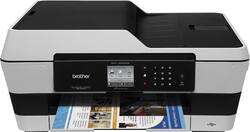
Brother - MFC-J6520DW Wireless All-In-One Printer - Gray
- Key Specs
- Mobile Device Printing: true
- Networking: Wired, Wireless
- Printer Type: All In One
- ISO Color Print Speed: 20 pages per minute (The number of color pages able to be printed per minute in the device's default single-side mode, as tested by the International Standards Organization (ISO).)
- ISO Mono Print Speed: 22 pages per minute (The number of black ink (grayscale) pages able to be printed per minute in the device's default single-side mode, as tested by the International Standards Organization (ISO).)
- General
- Product Name: MFC-J6520DW Wireless All-In-One Printer
- Brand: Brother
- Model Number: MFC-J6520DW
- Connectivity
- Printer Connectivity: USB
- Minimum System Requirements: PC: Windows XP Home, XP Professional, Vista, 7, 8, Server 2003, Server 2003 R2, Server 2008, Server 2008 R2 or Server 2012, Mac: OS X 10.6.x, 10.7.x or 10.8.x
- Dimension
- Product Height: 21.8 inches (The out of box height of the item. Height is measured as the vertical distance from the bottom of the item to the top as it would be primarily used or placed.)
- Product Width: 17 inches (The out of box width of the item. Width is measured as the horizontal distance from one side of the item to the other as it would be primarily used or placed.)
- Product Weight: 31.5 pounds (The out of box weight of the item.)
- Feature
- Portable: false
- Automatic Reduction/Enlargement: true
- Tray Capacity: 250
- Duty Cycle: Up to 25,000 (The maximum number of pages per month that the device can produce without failing, as specified by the manufacturer.)
- Regulatory & Listing
- EPEAT Qualified: false (The Electronic Product Environmental Assessment Tool (EPEAT) was designed to provide an environmental assessment tool for purchasers. In order to qualify for EPEAT, a product must meet all 23 required criteria.)
- Scanner Info
- Scanner Type: Flatbed
- Scanner Resolution: Up to 2400 x 1200 (Refers to the number of pixels/dots, both horizontally and vertically, of the image produced by the scanner. Generally, the higher the resolution, the sharper and cleaner the produced image.)
- Fax Info
- Integrated Fax: true
- Ink
- Compatible Cartridges: LC103BK/C/M/Y
- Ink Subscription Service Available: false (The printer monitors ink usage and alerts the subscription provider when levels are low. A purchased subscription provides refills of ink based on usage.)
- Number Of Cartridges Required: 4
- Memory
- Internal Memory: true (Built-in memory circuits for data storage.)
- Memory Card Slot: true
- Paper Info
- Automatic Document Feeder Capacity: 35 sheets
- Maximum Document Length: 17 inches
- Maximum Document Width: 11 inches
- Supported Paper Sizes: 11" x 17"
- Paper Handling: Up to 250 sheets
- Performance
- Printer Resolution (Black): Up to 6000 x 1200 (Refers to the number of pixels/dots, both horizontally and vertically, of the image produced by the printer in black ink. Generally, the higher the resolution, the sharper and cleaner the produced image.)
- Printer Resolution (Color): Up to 6000 x 1200 (Refers to the number of pixels/dots, both horizontally and vertically, of the image produced by the printer in colored ink. Generally, the higher the resolution, the sharper and cleaner the produced image.)
- Copier Info
- Copier Resolution (Black): Up to 2400 x 1200 (Refers to the number of pixels/dots, both horizontally and vertically, of the image produced by the copier in black ink. Generally, the higher the resolution, the sharper and cleaner the produced image.)
- Copier Resolution (Color): Up to 2400 x 1200 (Refers to the number of pixels/dots, both horizontally and vertically, of the image produced by the copier in colored ink. Generally, the higher the resolution, the sharper and cleaner the produced image.)
- Warranty
- Manufacturer's Warranty - Parts: 2 years
- Manufacturer's Warranty - Labor: 2 years limited
- Other
- UPC: 012502635734
Generate vivid, detailed prints quickly with this Brother MFC-J6520DW all-in-one printer, which features print speeds up to 35 ISO ppm* in black and up to 27 ISO ppm* in color for speedy creation of documents.
- Prints up to 35 ISO ppm* in black, up to 27 ISO ppm* in color: To generate documents quickly.
- 4-in-1 functionality: Prints, copies, scans and faxes for convenience.
- Built-in wireless LAN (802.11b/g/n): Ensures speedy data transfer from a wireless connection. Built-in Ethernet interface allows simple wired network connectivity.
- Up to 6000 x 1200 dpi resolution: For crisp, detailed prints.
- Support for media up to 11" x 17": Makes it easy to print oversize documents.
- Wireless mobile printing: With select devices enables easy PC-free printing.
- Copies up to 12 cpm* in black, up to 9 cpm* in color: For rapid copying.
- Copy resolution up to 1200 x 2400 dpi: For clear, clean copies.
- CIS scanner with ADF (auto document feeder): Reproduces images with up to 2400 x 1200 dpi optical resolution. Flatbed scanner delivers up to 2400 x 2400 dpi optical resolution. Interpolated scan resolution up to 19,200 x 19,200.
- High-speed black-and-white fax: With a 200-page fax memory and 33.6 Kbps transmission speed meets your office needs.
- 2.7" touch-screen display: Simplifies use.
- 35-sheet ADF: Along with a 250-sheet paper input capacity enables unattended faxing, scanning and copying of multiple-page documents.
- USB port: Provides simple connection to your PC or Mac.
Whats Included
- CD-ROMs
- High-yield black, cyan ink cartridges
- High-yield magenta, yellow ink cartridges
- MFC-J6520DW Wireless All-In-One Printer
- Owner's manual
- Phone line cord
Q: can you scan 11 x 17 size documents?
A: Yes - that was one of the features that made this printer decision easy.
Q: Is it compatible with Windows 10?
A: Yes, this printer is compatible with Windows 10.
Q: What size photos can be done on this printer?
A: This item prints up to 11 inches by 17 inches.
Q: Is it compatible with an iMac?
A: The printer works with an iMac.
Q: Can this printer scan muti page double sided documents? Or do I need to copy the other side first?
A: No, the Brother - Mfc-j6520dw Wireless All-in-one Printer does not support duplex scanning.
A: undefined
A: I am answering my own question. I bought this model and files work great with wifi. But for SCANNING I hooked up a USB cord- printer to Apple laptop >system preferences >scan and print > scan > an error message came up AND a message from Apple also came up. It reads would I like to download an app to join with this printer > click accept > wait about 2 minutes for the download > try to scan a picture and it should work > remove the USB cord > try to scan again > everything should work fine with the wifi ( I set up the wifi with wizard setup previously). I am going to keep the USB cable as backup in case the wifi ever stops working. My laptop is an OS X El Capitan 10.11.6 So far everything works great.
A: This printer is compatible with Mac OS X 10.6, 10.7 and 10.8.