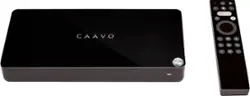
Caavo - Control Center: Entertainment Hub and Universal Remote with Voice Control - Black
- Key Specs
- Works With: Amazon Alexa, Google Assistant (Compatible with or able to be connected to other smart devices or applications.)
- General
- Product Name: Control Center: Entertainment Hub and Universal Remote with Voice Control
- Brand: Caavo
- Model Number: HDRX4BL
- Color: Black
- Connectivity
- Product Group(s) Controlled: Whole Home
- Compatibility
- Works With: Amazon Alexa, Google Assistant (Compatible with or able to be connected to other smart devices or applications.)
- App Compatible: true (The product can be connected to a program or software application on a mobile device, which then receives collected data from the product.)
- Operating System Compatibility: Apple iOS
- Environmental
- Indoor Or Outdoor Use: Indoor (Indicates the appropriate environment product was designed to be used in.)
- Dimensions
- Product Height: 5.9 inches (The out of box height of the item. Height is measured as the vertical distance from the bottom of the item to the top as it would be primarily used or placed.)
- Product Width: 10.35 inches (The out of box width of the item. Width is measured as the horizontal distance from one side of the item to the other as it would be primarily used or placed.)
- Product Depth: 1.37 inches (The out of box depth of the item. Depth is measured as the distance from the front of the item to the back as it would be primarily used or placed.)
- Product Weight: 2.2 pounds (The out of box weight of the item.)
- Other
- UPC: 859662007205
Simplify your TV experience with this Caavo control center. The main unit’s four HDMI inputs let you connect cable and media boxes and game consoles, so you can switch between components easily and search for content in one place. Operate this Caavo control center hands-free via Amazon Alexa, Google Voice, the included voice-activated remote, or the Caavo mobile app (iOS).
- Compatible with most major devices: Apple TV, Roku, Amazon Fire TV, Nvidia Shield, Google Chromecast, PlayStation 4, Xbox One, Nintendo Switch, TiVo, Amazon Alexa, Google Home, Xfinity, DISH, DirecTV, Bose, Denon, Insignia, LG, Pioneer, Samsung, Sonos, Sony, Vizio, Hisense and more.
- Control everything connected to your TV with the sound of your voice: Unite everything that's connected to your TV in one place, with one search across all your content and one remote to control it all. Just ask, relax and enjoy.
- One search. Get straight to the show. Just ask: Search across all your content at once with one search: if you've connected Xfinity, Apple TV, Roku, and Fire TV, Control Center will display the content offered on all of those devices in a single, organized, list.
- One place. Discover something great to watch: Use Control Center to manage all your content in one place: Live TV, DVR, DVD/Blu-Ray and streaming services. It has a centralized content library and a series of on-screen guides to make it easier to find something or discover something new.
- One control. No more multiple remotes. Control it all with one: Get straight to what you want to watch with the included universal remote control. Just say "Watch Game of Thrones" and it will take you straight there without having to navigate through multiple devices & services.
- Connect up to four devices: Control Center manages your entire entertainment experience: cable/satellite, streaming devices, gaming consoles - even soundbars. Just connect everything to Control Center and hook it up to your TV. Control Center makes it simple.
- Works with Google Home and Alexa: Use with smart home assistants. For Google Voice or Amazon Alexa supported services, use your voice to command Control Center to power on, search for shows and movies, control volume, play content and all other basic remote control functions.
- Supports your sound system: Connect an audio video receiver (AVR) or soundbar including Sonos, Yamaha, Denon and more to finally put an end to multiple remotes.
- Watch in 4K HDR: Control Center supports shows and movies in 4K HDR and UHD, and completes the experience with immersive sound from Dolby Atmos.
- Service Plan Required: Free 45-Day trial included, then choose $3.99/month, $39.99/year or Lifetime Service for $129.99.
- Sonos Controls on Your TV: Connect Control Center with your Sonos system for a new way to manage the music playing in your home. Using your TV, you can skip to the next song, pause, and play music on any Sonos speaker throughout your home.
Whats Included
- Caavo Control Center: Entertainment Hub and Universal Remote with Voice Control
Product Manuals
Q: What does this do that the Logitech Harmony Hub and Echo can't do paired together for free?
A: This device does similar things, but the remote seems easier to use and voice search on remote searches web, amazon, netflix for content.Also can search plex. I had been using harmony and this is simpler to use and only need the remote. They need to add live tv streaming apps( youtube tv, hulu live tv, sling, etc) beyond the cable boxes to change the tv channel with voice remote. For cable works great, but not for others. They need to find a way to hook local over the air tv. as well. So far this has passed the easy to use for our house members. . Hd home run support would be good for apps on fire stick as well.
Q: Will this unit pass thru a 3D signal from a 3D blu Ray player?
A: Control Center currently does not support 3D signals.
A: You are correct. The Control Center you are considering says that it includes a built-in lifetime service plan. That means that you will not need to pay for another one in order to enjoy all the features of our product. Keep in mind that you will be asked for a credit card during setup (since that is part of the process) however you can rest assured that the card will not be charged.
A: Yes, Control Center responds to voice commands using the microphone button on our remote control or via a linked Alexa device. Please check out our support website and browse our knowledgebase articles for supported commands. You should be able to change channels, search for shows, and switch devices all with your voice. Spectrum cable is a supported STB as long as it is a recent unit with HDMI output. Samsung Smart TVs are also supported and seamless with respect to power control and volume control. Beyond that, you will be able to navigate manually (via TV Mode) the TV Menus to get to the Smart TV apps. There are also no deeplinking or search results with Smart TV apps. If you have an external streaming device (like a Roku or AppleTV), then Control Center will be able to search and deeplink into the apps on those devices for an even better experience. You will need a service plan to use the advanced features of Control Center (like voice control, voice searching, etc). Without a service plan, Control Center will behave like a manual universal remote and switcher. You will also need subscriptions to your favorite streaming apps (such as netflix, prime, hulu, etc).
A: That sounds about right. I was running all the devices and my Sony avr to the Cavo then to the TV. If you go to their website it will walk you through set up with a avr. Sounds like you are pretty into audio and this device honestly is for some one that just wants to plug straight to TV. Look into a Harmony (I know it takes longer and is fickle at times), but believe you will be.much happier. I tried the Cavo for a week and switched back. Even the family would rather put up with the quirks of the Harmony.
Q: Can you plug a USB drive directly into this and use it to play videos from the drive?
A: I'm not sure about this but I will offer other comments that you should consider. I've returned the unit. I bet it works pretty nicely if your components are detected by the system but mine were not. I needed to contact customer support for help and it is woefully inadequate. One time I tried contacting their chat line during regular hours and nobody picked up. They refuse to provide a support phone number so if one is having a problem, they prevent you from calling them by design. Responses to emails can take days. When I see this kind of support while a company is trying to win business, I dread the thought of contacting them if there is a problem once one has committed to keeping the product. This was supposed to make my life easier by having a universal control for all of my components but it did not perform as advertised. My life is too complicated to have to deal with such inadequate customer support from a company, hence, I returned it. For me, this unpleasant experience is now past history.
Q: Will this replace xxfinity box? Does it have recording functionality.
A: No. This product has absolutely no recording capabilities. It's a HDMI switch. You can connect up to 4 HDMI devices to it and then connect the device to your TV. It's remote control unit will replace (to a certain extent) your other remote control units so you can use the same remote to navigate Xbox/Playstation, Roku, Fire TV, Nvidia Shield, Blu-Ray player etc.
Q: Does this box come with Kodi?
A: No it does not. Control Center does not have apps installed on it. Rather, Control Center will manage and interact with many devices that do have apps on them (such as a Roku, Firestick, AppleTV, etc). You could connect a Kodi device to Control Center via HDMI however Control Center will not deeplink, search for contents, or interact with any of the apps on the Kodi. With Control Center, you would be able to switch over to the Kodi box and have it display on your TV however you would still need to use your Kodi remote beyond that.




















