Chromecast with Google TV (4K) - Snow
Series
4K$7.99 shipping to
Related Item

Specifications
- Featured Streaming ServicesYouTube TV, Netflix, Prime Video, SpotifyMaximum Supported Resolution2160p (4K)High Dynamic Range (HDR)YesHeadphone/Headset ConnectivityBluetoothOperating System CompatibilityAndroid TVRemote Control IncludedYes
- Key Specs
- Featured Streaming Services: YouTube TV, Netflix, Prime Video, Spotify (Streaming services and other programs are available on this device. Keep in mind, there may be more services supported than just those shown here.)
- Maximum Supported Resolution: 2160p (4K)
- High Dynamic Range (HDR): true (An HDR-compatible 4K TV or other HDR-compatible product displays HDR video content when it's available from sources like 4K Ultra HD Blu-ray Discs and 4K streaming services.)
- Headphone/Headset Connectivity: Bluetooth
- Operating System Compatibility: Android TV
- Remote Control Included: true
- Storage Type: Internal
- Storage Capacity: 8 gigabytes (Measured in megabytes (MB), gigabytes (GB) and terabytes (TB), this is the amount available for storing files, music, movies, photos and more. The total includes the capacity of the hard disk drive and solid state drive if both are included on the computer.)
- Processor Model: Quad Core A53 1.8 GHz (Your computer's processor is like its brain. Working in combination with system memory, the power of the processor determines the complexity of software you can run, how many programs you can have open at the same time, and how fast those programs will run. Most computers feature an AMD, Intel or Snapdragon processor.)
- Power Source: Battery-powered
- Works With: Google Assistant, Nest (Compatible with or able to be connected to other smart devices or applications.)
- Voice Assistant Built-in: Google Assistant (A digital assistant built into the device that uses voice commands to answer questions and control smart devices.)
- General
- Brand: Google
- Model Number: GA01919-US
- Product Name: Chromecast with Google TV (4K)
- Color: Snow
- Series: 4K (Part of a group of the same product type with similar features.)
- Features
- Smart Capable: true (Smart, or smart-capable devices are able to connect directly to your home network in order to stream content from the Internet, run Internet-based apps, or connect to other smart devices.)
- Remote Control Type: Voice control
- Remote Control Features: Voice Activated, Standard, IR device control
- Screen Mirroring: true (Casts the screen of one device onto another wirelessly, using a common protocol (typically Bluetooth).)
- Compatibility
- App Compatible: true (The product can be connected to a program or software application on a mobile device, which then receives collected data from the product.)
- Bluetooth Enabled: true (The device is capable of communicating with another device via Bluetooth, provided they are within the required range of each other. A Bluetooth-enabled device must also be the same Bluetooth version or higher than the accessory it is intended to pair with.)
- Compatible Wireless Standard(s): Wireless AC (The wireless networking standard(s) the device is backwards compatible with. This includes networking protocols based on the IEEE 802.11 standard (alphabetically ascending) and the Wi-Fi Alliance standard (numerically ascending), both of which provide high-throughput wireless local area networks (WLANs). Devices designed to work with specific standard(s) will be backwards compatible with previous versions but may not run at optimal performance when using earlier iterations.)
- Playable Formats: BMP, GIF, JPEG, JPEG
- Interface(s): HDMI (Refers to the types of connections that devices use to interact and communicate with each other.)
- Works With: Google Assistant, Nest (Compatible with or able to be connected to other smart devices or applications.)
- Voice Assistant Built-in: Google Assistant (A digital assistant built into the device that uses voice commands to answer questions and control smart devices.)
- Audio
- High Resolution Audio: true (Hear music the way musicians and sound technicians intended it to be heard. Products that support hi-res audio deliver audio signals with a dynamic range and bandwidth far greater than that of a standard CD so you'll be able to enjoy pure music with outstanding sound quality. The device supports high-resolution audio signals, which more closely resemble the quality of music as it was originally recorded, with more texture and detail than can be heard via typical music streaming services or CDs.)
- Surround Sound Supported: Dolby Digital, Dolby Digital Plus, Dolby Atmos (Surround sound systems use multiple audio channels and speakers to create an immersive sound experience for the listener. There are also various proprietary technologies that imitate this kind of sound via a device's built-in speakers or soundbar.)
- Display
- High Dynamic Range Format: HDR 10, HDR 10+, Dolby Vision (There are a few HDR formats that tell the TV or other HDR-compatible product how to best utilize its capabilities to display HDR content. HDR technology can support one or multiple formats, each with various benefits to picture quality.)
- Power
- Rechargeable Battery: false
- Battery Size: AAA (The battery size required for operation.)
- Number of Batteries Required: 2
- Number Of Batteries Included: 2
- Other
- UPC: 193575007229
Chromecast with Google TV (4K) brings you the entertainment you love, in up to 4K HDR.¹ Get personal recommendations based on your subscriptions, viewing history, and content you own – all in one place. No more jumping between apps to decide what to watch. And use the remote to search with your voice.²
- All you can watch.: Enjoy the entertainment you love, including live TV, in up to 4K HDR.³ Discover over 700,000 movies and TV episodes. And cast directly from your phone or tablet to the TV.
- It’s all about you.: Get personal recommendations based on your subscriptions, viewing history, and content you own – all in one place. It displays the shows you’ve been watching across services and suggests new ones – no more jumping from app to app to figure out what to watch. Use the included voice remote and ask Google to find movies, shows, or music. Also search based on mood, genre, and more.
- Not just entertaining, helpful.: Ask Google to dim the lights, adjust the temperature,⁴ or see who’s at the front door,⁵ without getting up from the couch. Can’t find the remote? You can control the TV by speaking into any Google Assistant-enabled device.⁶
- Stream on.: Get fast streaming, and enjoy a crystal clear picture up to 4K and brighter colors with HDR.³
- It’s easy to install.: Just plug Chromecast into your TV’s HDMI port, connect to Wi-Fi, and start streaming. Or for hard-to-reach spots, use the optional Ethernet adapter to connect directly to your router.
- Use your voice.: Press the Google Assistant⁷ button on the remote and ask to search for specific shows, or by mood, genre, actress, and more. Talk to Google and say, “What should I watch?” And use the remote to control the volume, switch inputs, play music, and get answers on-screen.
- Family friendly.: Create a kids profile to access a fun collection of movies and shows for the family. Pick from a selection of playful avatars and themes, set parental controls to restrict what streaming services are shown, limit watching time, and set a bedtime.
- Watch live TV.: You can browse live TV from broadcast, cable, and sports networks on YouTube TV and Sling TV.⁸
- Search for the future.: When you see an interesting show or movie on TV or in a Google search, add it to your watchlist to view later.⁹
- Pump up the sound.: Group Chromecast with your Google speakers or displays to fill your home with sound. Then control them just by using your voice or the app.
- You’re in control.: Use your phone to control your TV. Find something great to watch even when the couch has eaten your remote. And use your phone’s keyboard to quickly type complicated passwords, movie names, or search terms.
- Your photos on TV.: Enjoy a slideshow of your pictures from your Google Photos library right on your TV.
- Entertainment for everyone.: Everyone in your home can create a personalized profile on Google TV. Your profile has recommendations just for you, based on what you’ve watched and what interests you. Get easy access to the watchlist and library you’ve curated, and help from your account’s Google Assistant.
- All you can watch.: Enjoy the entertainment you love, including live TV, in up to 4K HDR.³ Discover over 700,000 movies and TV episodes. And cast directly from your phone or tablet to the TV.
- It’s all about you.: Get personal recommendations based on your subscriptions, viewing history, and content you own – all in one place. It displays the shows you’ve been watching across services and suggests new ones – no more jumping from app to app to figure out what to watch. Use the included voice remote and ask Google to find movies, shows, or music. Also search based on mood, genre, and more.
- Not just entertaining, helpful.: Ask Google to dim the lights, adjust the temperature,⁴ or see who’s at the front door,⁵ without getting up from the couch. Can’t find the remote? You can control the TV by speaking into any Google Assistant-enabled device.⁶
- Stream on.: Get fast streaming, and enjoy a crystal clear picture up to 4K and brighter colors with HDR.³
- It’s easy to install.: Just plug Chromecast into your TV’s HDMI port, connect to Wi-Fi, and start streaming. Or for hard-to-reach spots, use the optional Ethernet adapter to connect directly to your router.
- Use your voice.: Press the Google Assistant⁷ button on the remote and ask to search for specific shows, or by mood, genre, actress, and more. Talk to Google and say, “What should I watch?” And use the remote to control the volume, switch inputs, play music, and get answers on-screen.
- Family friendly.: Create a kids profile to access a fun collection of movies and shows for the family. Pick from a selection of playful avatars and themes, set parental controls to restrict what streaming services are shown, limit watching time, and set a bedtime.
- Watch live TV.: You can browse live TV from broadcast, cable, and sports networks on YouTube TV and Sling TV.⁸
- Search for the future.: When you see an interesting show or movie on TV or in a Google search, add it to your watchlist to view later.⁹
- Pump up the sound.: Group Chromecast with your Google speakers or displays to fill your home with sound. Then control them just by using your voice or the app.
- You’re in control.: Use your phone to control your TV. Find something great to watch even when the couch has eaten your remote. And use your phone’s keyboard to quickly type complicated passwords, movie names, or search terms.
- Your photos on TV.: Enjoy a slideshow of your pictures from your Google Photos library right on your TV.
- Entertainment for everyone.: Everyone in your home can create a personalized profile on Google TV. Your profile has recommendations just for you, based on what you’ve watched and what interests you. Get easy access to the watchlist and library you’ve curated, and help from your account’s Google Assistant.
Whats Included
- Chromecast
- Voice remote
- Power cable
- Power adapter
- Chromecast
- Voice remote
- Power cable
- Power adapter
Disclaimers
- ¹ Chromecast with Google TV requires a TV with an HDMI port, a Wi-Fi network, a Google Account, a nearby electrical outlet, and a compatible mobile device. Minimum OS requirements are available at g.co/cast/req. To view content in 4K, a 4K-capable TV and reliable broadband internet connection are also required.
- ² Google Assistant may be required for full functionality.
- ³ To view content in 4K, a 4K-capable TV and reliable broadband internet connection are also required.
- ⁴ Requires compatible smart devices.
- ⁵ Compatible with Nest Doorbell (wired) only.
- ⁶ Requires Google Home app for device setup.
- ⁷ Google Assistant may be required for full functionality.
- ⁸ Subscription services may be required.
- ⁹ Requires broadband internet. Subscription services may be required. Services not available in all countries or regions, and are subject to change. Watchlisting is service-dependent.
- ¹ Chromecast with Google TV requires a TV with an HDMI port, a Wi-Fi network, a Google Account, a nearby electrical outlet, and a compatible mobile device. Minimum OS requirements are available at g.co/cast/req. To view content in 4K, a 4K-capable TV and reliable broadband internet connection are also required.
- ² Google Assistant may be required for full functionality.
- ³ To view content in 4K, a 4K-capable TV and reliable broadband internet connection are also required.
- ⁴ Requires compatible smart devices.
- ⁵ Compatible with Nest Doorbell (wired) only.
- ⁶ Requires Google Home app for device setup.
- ⁷ Google Assistant may be required for full functionality.
- ⁸ Subscription services may be required.
- ⁹ Requires broadband internet. Subscription services may be required. Services not available in all countries or regions, and are subject to change. Watchlisting is service-dependent.
Q: Do you need a separate device to cast with?
A: No. Its not like other Chromecast devices where you cast from a phone or computer. Google TV has its own interface where you add all your apps. All you need is the Google Home App on phone for the initial setup.
A: If your TV has a USB 3 it will work, other wise it won't. USB 2 will give a wall outlet error, 1 -1.4 amp will give a boot loop, 1.5+ will work
Q: Is there a version of this which works with Apple devices?
A: We have three iPhones and to ipads in the house. It functions just like any other Chromecast for devices connecting to it. So yes Apple devices work with the Casting feature. The Google TV feature is explicitly for TV sets and the experience is like AppleTV in that regard. But the nice part about this product is you get both.
Q: Can I utilize both chromecast and Roku on same screen?
A: If your Television has two unused HDMI ports, you may attach a Chromecast and Roku player on the same screen; one device per HDMI port. You can watch content on the screen one streaming player at a time, but 99% of TVs do not allow the user to watch content from two streaming players at once. It's like asking if you can utilize a Blu-Ray player and a Roku at the same time; you can use them one at a time, but you can't watch both devices at once. Honestly, most people don't need to have two streaming players on one TV. If you are new to streaming players, either one is great unless you want to watch HBO Max. In that case, Chromecast can show HBO Max, not Roku. Roku does have ads on its screen, but they are not that bothersome. The voice assistant on Chromecast is definitely better than the one on Roku. I personally use Roku, and it fulfills my expectations already. If you have a Roku TV, the Chromecast will work with Roku TV. Just attach the Chromecast to the Roku TV via an HDMI port.
A: Yes the main device does need to be plugged into a power supply that is plugged into the wall that has a 5 foot cord included. The included batteries are for the remote only. The plug is a little large so if on a power strip you may need to skip the plug next to it. The main reason for this is to get unrestricted power that the back of your TV might or might not offer on a USB. Some TV's do not supply power to the USB outlets when the TV is off and the power output can also very so to make sure the unit is always powered they have you plug into a wall outlet so you can ask any Google Assistant device around the house to play something on the TV and it would Turn ON the TV and play. Here is how it works you say to a Google Hub or Google Assistant device "Hey Google play Fargo on Livingroom TV" Google will say back "Here's is Fargo on Netflix on Livingroom TV". What will happen is the TV will turn ON (because it gets info over the HDMI to not only turn the ON the TV if it is Off but also change to the correct HDMI input that the device it plugged into) and the show Fargo will start playing on Netflix Living room TV. I should say wile all this works great in some areas there a still a number of problems. If you want to watch the newer Fargo on Hulu, not the older Fargo on Netflix you would have to say "Hey Google play Fargo on Hulu on Livingroom TV". This should be the end of story but the new 2020 Google Chromecast with Google TV does not respond on Hulu to play but only brings up the show and you would then have to walk across the room pull out the remote select Play to play the show Fargo on Hulu. This is not true for the now discontinued Google Chromecast Ultra 4k, that device will play Fargo on Hulu all by voice, in part because that device did not come with a remote. But back to your point the older Chromecast Ultra 4k also is designed to be plugged into a wall outlet for the same reason, to work even if the TV is Off. Some of the dongles like Roku plug into the back of the TV but will not always turn the TV on if it has been off for a wile.
Q: Does it have a browser? Can I surf the web?
A: There's no browser built in though you can download browsers from Google Play store. Few of them are optimized for Android TV. Even so, the experience is not great because of limited input control. I'd rather use browser of cellphone and cast phone screen to it.
A: You use the upper circle part of the remote to control all you basic functions like Pause, Rewind, Fast Forward. Quick touch 10 seconds or hold for FF or RW. The center of the circle is pushed to Pause and Resume Play as well as enter for other things, wile the left side of the circle is used to Rewind and the right side of the circle is used to Fast Forward the show. The lower and upper part of the circle is used to see actors names, time left and total time of show as well as Rating for show like PG-13 during a show but used for movement to navigate around the screen at other times. Your voice can control can also control these functions depending on what app you are using and how you started to watch that app. If you start watching something on Netflix all works perfect any way you want, however if you watch something on Prime Video it depends on how you started the show. For example if you start to watch something on Prime Video using the Voice control or the remote basically using the Chromecast to play the show you can use voice to Pause, Play, or Stop ONLY. But in this case you can not Fast Forward or Rewind by voice on Prime Video. However if you watch the same Prime Video show but this time it was started and cast from a phone or iPad using a Prime Video App on that device you would then be able to Fast forward or Rewind by voice as well using the same Google hub used earlier that would not control FF or RW would now work when started from iPad app. Confusing I know, Google Google Google. With all that the voice is great when it works for Fast forward, and Rewind because you can say anything from Hey Google Fast forward 23 seconds to fast forward 1 hour 6 minutes or rewind in the same way. Google should know the room you are talking from and control that room without saying the room name. This is why you need to name the correct rooms for each device you install.
A: Chromecast with Google TV was designed, exactly, to make your non-smart TV a smart one. It works with any regular TV or a computer monitor that's having an HDMI port. And, together with the Voice Remote, you can play your favorite videos using your voice command with the Google Assistant. You can come visit our Google Chromecast help page to learn more about Chromecast with Google TV here: https://support.google.com/chromecast/answer/3046409
Compare similar products
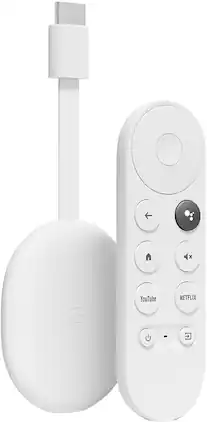
Chromecast with Google TV (4K) brings you the entertainment you love, in up to 4K HDR.¹ Get personal recommendations based on your subscriptions, viewing history, and content you own – all in one place. No more jumping between apps to decide what to watch. And use the remote to search with your voice.²

The Google TV Streamer (4K) delivers your favorite entertainment quickly, easily, and personalized to you.¹,² Get fast performance, responsive navigation, and tailored recommendations from Google’s most advanced streamer yet.⁵ And all your content is organized for you in one place, so you’ll do a lot less searching and way more watching.

Watch your favorite content with this NVIDIA SHIELD TV 4K streaming media player. The NVIDIA Tegra X1+ processor ensures fast performance, and Gigabit Ethernet and dual-band Wi-Fi connectivity help minimize buffering and maximize stream quality. This NVIDIA SHIELD TV 4K streaming media player includes an advanced remote that lets you search for and play content using voice commands.GeForce NOW instantly transforms SHIELD TV into a powerful PC gaming rig. Play over 1000+ titles and nearly 100 of the biggest free to play games. The new GeForce NOW RTX 3080 membership unlocks GeForce RTX 3080 gaming servers in 4K HDR, with shorter wait times and longer session lengths, with RTX ON including ray tracing and DLSS graphics for supported games.

Apple TV 4K lets you watch shows and movies in stunning 4K Dolby Vision and HDR10+.¹ Get theater-like Spatial Audio with Dolby Atmos that immerses you in sound.² Use it as a home hub to connect and control smart home accessories. With Ethernet for high-speed data transfer and Thread for more connectivity.
| Pros for Chromecast with Google TV (4K) - Snow | |||
|---|---|---|---|
| There were no pros for this product— | There were no pros for this product— | Speed, Ease of use, Remote, Performance, Streaming | Ease of use, Speed, Remote, Picture Quality, Interface |
| Cons for Chromecast with Google TV (4K) - Snow | |||
| There were no cons for this product— | There were no cons for this product— | Price, Lag, USB Port, RAM, Storage | Price, Lag, Ads |
Specs
Reviews
Customer Images
The vast majority of our reviews come from verified purchases. Reviews from customers may include My Best Buy members, employees, and Tech Insider Network members (as tagged). Select reviewers may receive discounted products, promotional considerations or entries into drawings for honest, helpful reviews.
- Rated 5 out of 5 stars
The Ultimate Entertainment Upgrade
I recently had the pleasure of upgrading my home entertainment setup with the Chromecast with Google TV (4K) in the elegant Snow color variant, and I must say, it has completely transformed the way I enjoy my favorite shows and movies. This sleek and powerful device is an absolute game-changer, offering a seamless streaming experience like no other. Let me share my experience with this fantastic product. First and foremost, the Chromecast with Google TV delivers breathtaking 4K picture quality. Every scene comes to life with stunning clarity, vibrant colors, and impressive detail. Whether I'm streaming the latest blockbuster or binge-watching my favorite series, the visual experience is nothing short of extraordinary. The Snow color variant adds a touch of elegance to my entertainment setup, blending seamlessly with my other devices. One of the standout features of this device is the integration of Google TV. The intuitive and user-friendly interface makes finding content a breeze. With personalized recommendations based on my viewing habits, I'm constantly discovering new shows and movies that align with my interests. The voice control functionality is a game-changer, allowing me to search for content or control playback with simple voice commands. It truly brings convenience to a whole new level. In terms of content availability, the Chromecast with Google TV offers a vast selection of streaming apps. Whether it's Netflix, Hulu, Disney+, or any other popular platform, I have access to an extensive library of entertainment options right at my fingertips. The device seamlessly integrates with multiple streaming services, ensuring I never miss out on my favorite shows or movies. Setting up the Chromecast with Google TV was a breeze. With straightforward instructions and an intuitive setup process, I was up and running in no time. The device connects effortlessly to my TV, and the included remote control makes navigation a breeze. It's ergonomically designed with a minimalistic approach, providing easy access to essential functions and maintaining a clutter-free living room. Another noteworthy feature of the Chromecast with Google TV is its ability to cast content from my smartphone or tablet. Whether it's photos, videos, or even presentations, I can effortlessly mirror my screen and enjoy them on the big screen. It adds a whole new dimension to sharing moments with friends and family or collaborating during work presentations. Lastly, the Chromecast with Google TV offers excellent value for its price. Considering the exceptional picture quality, seamless streaming experience, and the vast range of content available, it's an investment that enhances my entertainment experience. It brings the cinema right into my living room, delivering hours of immersive entertainment and making every viewing session memorable. In conclusion, the Chromecast with Google TV (4K) in Snow color is a must-have device for any entertainment enthusiast. With its stunning picture quality, intuitive interface, and extensive content options, it provides an unparalleled streaming experience. Upgrade your home entertainment setup with this sleek and powerful device, and prepare to be amazed by the world of entertainment at your fingertips.
This review is from Chromecast with Google TV (4K) - Snow
Posted by Carter
- Rated 5 out of 5 stars
Pretty awesome device
This is the most amazing product from Google I've owned yet. I purchased this initially to upgrade my older Chromecast. Everything about this "Google TV" is 1000x better than what I owned previously. I can now view my content in 4K which the older model could not do, and it has a great interface. It's Android 10 over the Google TV UI, and it's pretty appealing. I can easily ask Google to find something particular to watch and it'll do it. This thing will search movies across different apps to find exactly what you're looking for. What makes it even better is that it still has it's cast function. so you have the option to use the Google TV remote or cast from your Android phone like normal. I was hesitant at first, and I wish I had mad this purchase sooner. You can even control all your google connected with the remote included. For example I use my Google Home to control my AC, but I can also with my remote in hand tell the Google remote to turn the AC on or off, and it does it. Even quick than my home can which is pretty neat. If you were ever indecisive about buying this device then I hope this review helps you. You're gonna love this Google TV. For $50 you can't go wrong.
This review is from Chromecast with Google TV (4K) - Snow
Posted by Jaron
- Rated 5 out of 5 stars
Excellent Streaming at an Affordable Price
Chromecasts have long been something I've ignored because I don't like the idea of having to use my phone to cast to my TV for everything I watch. However, when Google announced their "Chromecast with Google TV" I was very intrigued at the mix of a streaming device with the ability to Chromecast. So far, I am quite happy with my purchase! SET-UP: - Unboxing and first impressions are always great with Google Products. They have a great way of making the unboxing process simple while providing a product that's uniquely Google. - I really go like the feel and look of the Chromecast and Remote. They are modern yet simple and feel very good in the hand, not too cheap at all. - Set-up was mainly simply but had a few hiccups. Google says you can use the "Google Home" app to do all your setup for you but I have largely found that the Google Home can be the most useful app I have while also being the most frustrating when setting up a new product. - I eventually ditched using the Google Home app and did the setup just via the remote and that was very simple and straight forward. After a little bit to download new firmware updates and download all my apps, I was ready to go! PROS: - I really like the interface! It's smooth, easy to maneuver, and when in doubt just ask Google where something is. - Speaking of which, the Google Assistant button is a fantastic addition. Use it for asking everyday questions or use it to find "movies that won Oscars in the 2000's" really whatever you need it to do! - The device uses your app subscriptions (Netflix, Hulu, HBO Max, Disney+...) to recommend TV and Movies you might want to watch. I really like how it does not push you to watch something you have no interest in or don't even have a subscription too. The whole add-less vibe feels nonintrusive and makes for a more personal experience. - If you have YouTube TV, this Chromecast is a must have! Google TV integrates Live TV right into the menu so you can quickly browse what's on air right now without having to open the YouTube TV app. I really like that because it makes the home menu screen your go to place to find anything you subscribe too. - The "Chromecast" feature of this Google TV device is also very easy to use! It syncs up with your Google Home Devices or phones so that if you are watching a video or streaming Spotify, you can just quickly cast it to your TV with the touch of a button. Or, simply say "Hey Google, play Netflix on my TV" and it can do that too without you even touching the remote. - Watching shows & movies on here is truly a great experience too! The 4K HDR is vibrant and crisp, it has Dolby Vision for movies/TV that it applies to, and Dolby Atmos for superior home theater sound quality. All three of those qualities are an absolute must for the best home theater experience and you are getting them all for only $50. CONS: - The one app that I wish this had is "Apple TV". I know Google/Apple don't usually get along, but I do with the Apple TV app was on here for those who want to stream "Apple TV+" - This isn't a con for me but although you don't need Google services (Like Google Smart Speakers, Android Phone, & YouTube TV) to enjoy this Chromecast, I would imagine that your experience would not be as great as mine without all those devices/services. - I think the "Library" section of the Home page is really lacking on 2 parts. First, if you have a large library of movies you digitally own, they will show in your library but its in one long scrollable line. Rather then a sortable area where you can view 20 movies at a time, its really just a long single line list where you can see 5 at a time. Second, Google TV is trying to push its "Watchlist" feature where from an Android phone you can easily add a Show/Movie to your watchlist and it will appear on your Google TV. But at the time of writing this, the Google TV app is not available on Android phones yet and hasn't even been announced on Apple phones yet. BOTTOM LINE: - If you are looking for a simple, easy to use streaming device but has all the high end specs you would want at a low price, the Chromecast with Google TV is an absolute no brainer. It is simple to use, has a great interface, and has all features you would want from a higher end streaming device (4K HDR, Dolby Vision/Atmos, Voice Commands). I really think Google TV is going to be a great solution for many home's entertainment needs!
This review is from Chromecast with Google TV (4K) - Snow
Posted by NJuice