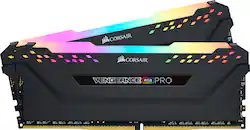
CORSAIR - Vengeance PRO 32GB (2PK x 16GB) 3200MHz DDR4 C16 DIMM Desktop Memory RGB - Black
- Key Specs
- Type of Memory (RAM): DDR4
- Form Factor: Desktop (The type of computer the memory is configured to fit in.)
- Speed: 3200 megahertz
- Latency: 16-18-18-36 (Refers to the amount of time between the moment a memory request is initiated and the moment the request is retrieved by a processor, commonly written as a series of 4 numbers, or timings. Each timing measures the performance of the module according to a specific parameter. Generally, the lower the numbers, the faster the RAM can respond to requests.)
- CAS Latency: 16 (Column Address Strobe (CAS) Latency refers to the number of clock cycles (for synchronous DRAM) or nanoseconds (for asynchronous DRAM) between the moment an instruction or command is initiated and the moment the data result is available. Generally, the lower the numbers, the better.)
- Lighting Type: RGB
- Memory Capacity (per Module): 16 gigabytes (Refers to the maximum amount of data that can be stored on the memory module.)
- Memory Capacity (Total): 32 gigabytes (Refers to the maximum total amount of data that can be stored on all included memory modules.)
- General
- Product Name: Vengeance PRO 32GB (2PK x 16GB) 3200MHz DDR4 C16 DIMM Desktop Memory RGB
- Brand: CORSAIR
- Memory Capacity (per Module): 16 gigabytes (Refers to the maximum amount of data that can be stored on the memory module.)
- Number Of Modules: 2
- Memory Capacity (Total): 32 gigabytes (Refers to the maximum total amount of data that can be stored on all included memory modules.)
- Model Number: CMW32GX4M2C3200C16
- Color: Black
- Compatibility
- Type of Memory (RAM): DDR4
- Pin Configuration: 288
- Form Factor: Desktop (The type of computer the memory is configured to fit in.)
- Operating System Compatibility: Windows
- Speed
- Memory Speed Rating: PC4-25600 (The RAM's bandwidth rating. The numbers refer to generation and transfer speed and are typically separated with a hyphen. For example, PC3-12800 would indicate that the module is 3rd generation and has a theoretical bandwidth of 12,800 megabytes per second (MBs). The higher the second number, the faster the speed.)
- Speed: 3200 megahertz
- Latency: 16-18-18-36 (Refers to the amount of time between the moment a memory request is initiated and the moment the request is retrieved by a processor, commonly written as a series of 4 numbers, or timings. Each timing measures the performance of the module according to a specific parameter. Generally, the lower the numbers, the faster the RAM can respond to requests.)
- CAS Latency: 16 (Column Address Strobe (CAS) Latency refers to the number of clock cycles (for synchronous DRAM) or nanoseconds (for asynchronous DRAM) between the moment an instruction or command is initiated and the moment the data result is available. Generally, the lower the numbers, the better.)
- Features
- Buffered or Registered: Unbuffered (Registered (buffered) memory modules are classified by the addition of a register between the memory controller and DRAM modules. When compared to conventional unbuffered (unregistered) memory, this type provides more stability with less electrical load on the controller, making it a common choice for use in robust applications, such as servers.)
- Data Integrity Check: Non-ECC (Error-correcting code (ECC) memory helps to maintain data integrity within a computer system, protecting it from potential crashes as well as losses or changes to data due to undetected errors. Systems that use ECC have an additional chip on the RAM that acts as the error check.)
- Memory Channels: Dual (Multi-channel memory increases the rate of data transfer between the DRAM memory and memory controller by adding more channels of communication. The more channels, the more memory bandwidth.)
- Lighting Type: RGB
- Power
- Voltage: 1.35 volts (Amount of power needed to support an electrical current.)
- Other
- UPC: 843591082914
Improve your gaming experience with this 32GB of Corsair Vengeance RGB Pro DDR4 desktop memory. Optimized on the latest motherboards, this desktop memory provides the bandwidth and response times to accelerate PC and gaming performance. This Corsair Vengeance RGB Pro DDR4 desktop memory has 10 RGB LEDs per module and lets you use the Corsair iCUE software to customize and synchronize lighting.
- Kit of two 16GB DDR4 SDRAM memory modules: For 32GB total memory.
- 288-pin DIMM: For capable system operation. DIMM is dual in-line memory module.
- Up to 3200MHz operating speed: For excellent multitasking capability.
- Anodized aluminum heatspreader: Keeps memory cool for efficient operation.
Whats Included
- CORSAIR Vengeance RGB PRO 32GB (2PK 16GB) 3.2GHz PC4-25600 DDR4 DIMM Unbuffered Non-ECC Desktop Memory Kit with RGB Lighting
Product Manuals
A: ECC Ram is for Servers. All it is is error checking done in RAM. You will want none ECC for your purposes.
Q: Can you upgrade a gaming laptop with these?
A: This Ram is not intended for laptops you have to specifically ask for laptop RAM
A: Hello, It would be! Just make sure to update your motherboard to the latest bios version. If you have anything else we can help with, please reach out: support.corsair.com -Art
A: Michael, The answer to your question is a bit tricky as it is more than just a simple yes or no answer. There are things that you need to consider. The short answer to your question is no. If you buy two packs of two 16GB sticks of ram of the same brand, model, frequency, and timing, etc. to increase to 64GB of ram it will not cause any problems, however, there are a lot of caveats to that. First question you need to ask is does your motherboard support 64GB of ram? If so, am I going to see any sort of diminishing returns for having all of my ram slots filled vs. only two of them being filled? Yes, this is an issue that has been seen with the Ryzen 3000 series processors. It has been shown that having all four ram slots filled will actually cause your ram to not function at full speed. Also take into consideration needing to have some hefty airflow in your case to cool all of that ram and those lovely led's. Does your motherboard actually support this speed of ram natively or do you have to overclock to get these speeds? This one might not be so much of a problem with some of the automatic overclocking tools coming included in the bios of a lot of motherboards in this era. However, if your motherboard doesn't have such tools this might become problematic if you are not entirely familiar with the intricacies of overclocking which could cause damage to your system. Just a few things to take into account when deciding what, and how much, ram to get.
Q: what is the max clock speed for this ram set.
A: 3200 mhz stock. If you are talking about overclocking, it depends on the chips on your actual kit. If you look at the sticker on them (even without opening the package, you can look at the back of the kit), it will say "Ver x.xx". That tells you what brand and model are the chips (some are Samsung b-die, the best, some are Hynix CJR, second best, some are Hynix AFR, MFR, just so so). Mine were ver 5.32, which looking online where Hynix CJR, so they overclock good. I have mines at 3600mhz with my Ryzen 9 (you have to dial the volts and timings, I used Ryzen Dram Calculator to dial them in) and are rock solid.
A: Hi, CPU would be fine, but that motherboard doesn't support neither the CPU nor the memory. If you have anything else we can help with, please reach out: support.corsair.com -Art
A: Hello, It'd be compatible, yep! If you need help, we can assist you through the support portal: support.corsair.com
A: The speed supported is actual determined by your motherboard. The speed INTEL rates it at is just the default supported without XMP. To use the RAM at 3200MHz you will have to enable XMP in BIOS and select the rated speed the RAM is set too.


















