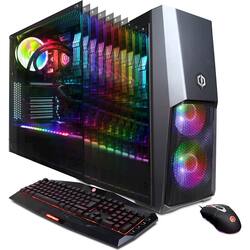
CyberPowerPC - Gaming Desktop - Intel Core i7-9700K - 32GB Memory - NVIDIA GeForce RTX 2080 Ti - 3TB HDD + 480GB SSD - Black
- Key Specs
- Processor Model: Intel 9th Generation Core i7 (Your computer's processor is like its brain. Working in combination with system memory, the power of the processor determines the complexity of software you can run, how many programs you can have open at the same time, and how fast those programs will run. Most computers feature an Intel or AMD processor.)
- Storage Type: SSD, HDD
- Total Storage Capacity: 3480 gigabytes
- System Memory (RAM): 32 gigabytes (Random-access memory (RAM) is a computing device's short-term data storage, which allows active information to be accessed quickly. The size and type of RAM determines how efficiently the device can handle large amounts of information at one time. For example, gaming or video editing requires more RAM for optimal performance.)
- General
- Product Name: Gaming Desktop - Intel Core i7-9700K - 32GB Memory - NVIDIA GeForce RTX 2080 Ti - 3TB HDD + 480GB SSD
- Brand: CyberPowerPC
- Model Number: SLC10120CPG
- Processor
- Processor Brand: Intel
- Processor Model: Intel 9th Generation Core i7 (Your computer's processor is like its brain. Working in combination with system memory, the power of the processor determines the complexity of software you can run, how many programs you can have open at the same time, and how fast those programs will run. Most computers feature an Intel or AMD processor.)
- Processor Model Number: i7-9700K
- Storage
- Storage Type: SSD, HDD
- Total Storage Capacity: 3480 gigabytes
- Solid State Drive Capacity: 480 gigabytes (The amount of data that can be stored on the device's solid state drive (SSD). SSD is a flash-based storage with faster speeds than a hard disk drive (HDD).)
- Hard Drive Capacity: 3000 gigabytes (The amount of data that can be stored on the device's mechanical hard drive. Hard disk drives (HDDs) typically have larger capacities than solid state drives (SSDs) but may have slower speeds.)
- Hard Drive Interface: SATA (Connects the hard drive to the host system for transferring data between the hard disk cache and system memory. IDE and SATA interfaces are primarily used for personal computing, while larger servers and workstations typically use SAS or SCSI.)
- Hard Drive RPM: 7200 revolutions per minute (A hard drive's data is stored on disks, or platters, that spin while transferring information to the host system. The higher the RPM, the faster the hard drive's performance.)
- Hard Drive Accelerator: None (A module integrated (or added) into a PC to improve performance speed. By acting as a high-speed cache, an accelerator speeds up access times to the hard drive, which results in faster web browsing, improved gaming experience, and overall more responsiveness.)
- Memory
- System Memory (RAM): 32 gigabytes (Random-access memory (RAM) is a computing device's short-term data storage, which allows active information to be accessed quickly. The size and type of RAM determines how efficiently the device can handle large amounts of information at one time. For example, gaming or video editing requires more RAM for optimal performance.)
- Type of Memory (RAM): DDR4 SDRAM (Each type of RAM delivers a different level of speed, bandwidth, energy efficiency and performance.)
- System Memory RAM Speed: 2400 megahertz (How fast the information-storing hardware operates. The faster the RAM, the faster memory can be transferred to other system components. Ultimately, faster RAM improves operational efficiency.)
- System Memory RAM Expandable To: 64 gigabytes (Adding more random-access memory (RAM) to a computer speeds up performance and improves efficiency. Upgrades to memory are limited by the number of expansion slots for additional RAM and existing RAM installed on the device.)
- Compatibility
- Operating System: Windows 10 Home (The operating system manages all software and hardware, including files, memory and connected devices. Most importantly, it lets you interact with your device and your programs in a visual way; otherwise, you'd be typing computer code to get anything done.)
- Operating System Architecture: 64-bit (An operating system (OS) manages computer hardware, software resources, and programs in conjunction with the system's processor. 64-bit operating systems can handle more data at once than 32-bit systems, resulting in faster speeds, more effiency, and overall improved performance.)
- Connectivity
- Ethernet Card: 10/100/1000 (Also known as an Ethernet adapter, this card plugs into a computer's motherboard and enables it to access an Ethernet network. Ethernet data transmission speeds are measured in Mbps (megabits per second) and Gbps (gigabits per second). For example, a 10/100 Ethernet port transmits 10 and 100 Mbps, while a 10/100/1000 Ethernet port transmits 10 and 100 Mbps and has a maximum speed of 1000 Mbps (1 Gbps).)
- Expansion
- Number Of Internal 2.5" Bays: 4
- Features
- Keyboard Type: RGB
- Customizable Case Lighting: true
- Audio Technology: 7.1 channel surround
- Dimensions
- Product Height: 18.7 inches (The out of box height of the item. Height is measured as the vertical distance from the bottom of the item to the top as it would be primarily used or placed.)
- Product Width: 8.3 inches (The out of box width of the item. Width is measured as the horizontal distance from one side of the item to the other as it would be primarily used or placed.)
- Product Depth: 19.4 inches (The out of box depth of the item. Depth is measured as the distance from the front of the item to the back as it would be primarily used or placed.)
- Certifications & Listings
- ENERGY STAR Certified: false (Devices carrying the ENERGY STAR service mark, such as computer products and peripherals, kitchen appliances, and other products, generally use 20% to 30% less energy than required by federal standards.)
- EPEAT Qualified: false (The Electronic Product Environmental Assessment Tool (EPEAT) was designed to provide an environmental assessment tool for purchasers. In order to qualify for EPEAT, a product must meet all 23 required criteria.)
- Included
- Keyboard Included: true
- Mouse Included: true
- Warranty
- Manufacturer's Warranty - Parts: 1 year
- Manufacturer's Warranty - Labor: 1 year
- Other
- UPC: 811842057691
Gain an advantage over the competition with this CyberPowerPC gaming computer. The Intel Core i7 processor and 32GB of RAM minimize lag to ensure games run smoothly, and the 480GB solid-state drive ensures fast boot times. This CyberPowerPC gaming computer has a liquid cooling system to prevent overheating during intense sessions.
- Windows 10 operating system: Windows 10 brings back the Start Menu from Windows 7 and introduces new features, like the Edge Web browser that lets you markup Web pages on your screen. Learn more ›
- 9th Gen Intel® Core™ i7-9700K processor: Powerful eight-core, sixteen-way processing performance.
- 32GB system memory for intense multitasking and gaming: Reams of high-bandwidth DDR4 RAM to smoothly run your graphics-heavy PC games and video-editing applications, as well as numerous programs and browser tabs all at once.
- 3TB hard drive and 480GB solid state drive (SSD) for a blend of storage space and speed: The hard drive provides ample storage, while the SSD delivers faster start-up times and data access.
- NVIDIA GeForce RTX 2080 Ti graphics: Driven by 11GB GDDR6 dedicated video memory to quickly render high-quality images for videos and games.
- Next-generation wireless connectivity: Connects to your network or hotspots on all current Wi-Fi standards. Connect to a Wireless-AC router for speed nearly 3x faster than Wireless-N. Gigabit LAN port also plugs into wired networks.
Whats Included
- CyberPowerPC Desktop - Intel Core i7 - 32GB Memory - NVIDIA GeForce RTX 2080 Ti - 3TB Hard Drive + 480GB Solid State Drive
- Keyboard
- Mouse
A: Thanks for reaching out Robert. The motherboard should be a Z370 chipset ATX. It should be SLI compatible if you are using the two same graphics cards. The CPU should be a 8-pin molex with 4x8GB RAM for a totally of 32GB. It has a SATAIII SSD. It should be a multi-fan GPU, however, again it may vary. If you have any further questions or concerns then please do not hesitate to give our tech support agents a call for any assistance; we're always happy to help. Tech support: (888)937-5582 -CyberpowerPC Support
A: Thanks for reaching out Yani. The brand may vary for each component based on what is available at time of assembly. However, it will come with the parts you see. If you have any further questions or concerns then please do not hesitate to give our tech support agents a call for any assistance; we're always happy to help. Tech support: (888)937-5582 -CyberpowerPC Support
A: Thanks for reaching out Adam. This PC should be able to run VR as it meets the minimum requirements to run VR. Please be aware you may need to utilize the other display ports as the HDMI will be taken by the VR. If you have any further questions or concerns then please do not hesitate to give our tech support agents a call for any assistance; we're always happy to help. Tech support: (888)937-5582 -CyberpowerPC Support
A: Thanks for reaching out Malik. The parts are all real. It is your preference if you want to purchase a pre-built PC or rather build your own. If you have any further questions or concerns then please do not hesitate to give our tech support agents a call for any assistance; we're always happy to help. Tech support: (888)937-5582 -CyberpowerPC Support
Q: I want to replace the 7200 drive with a SSD what mounting kit for a 2.5 ssd drive do I need?
A: Thank you for reaching out. For further assistance on this matter, please contact our tech support team at your earliest convenience; we're always happy to help. Tech Support: (855) 888-2039 [email protected] Hours of Operation: Monday - Friday: 8:30AM - 6:00PM PST Saturday: 9:30AM - 3:00PM PST -CyberPowerPC Support
A: Thank you for reaching out to us. You should be able to change the color of the RGB lighting on the software preinstalled on your PC. If you have any further questions or concerns then please do not hesitate to give our tech support agents a call for any assistance; we're always happy to help. Tech support: (888)937-5582 -CyberpowerPC Support
Q: How do you change the colors being displayed?
A: Thank you for reaching out to us Brandon. You should be able to change the color of the lighting by pressing the reset button on top of the PC towards the front. If you have any further questions or concerns then please do not hesitate to give our tech support agents a call for any assistance; we're always happy to help. Tech support: (888)937-5582 -CyberpowerPC Support
A: Thank you for reaching out to us Stefanie. Unfortunately the manufacturer, form factor, and type of ports available on the motherboards included with this system may vary depending on what was currently available at the time the PC was built. Most peripherals are now connected by USB and no longer use PS/2, however, the PS/2 ports are available to you in the case you need them. If you have any further questions or concerns then please do not hesitate to give our tech support agents a call for any assistance; we're always happy to help. Tech support: (888)937-5582 -CyberpowerPC Support



















