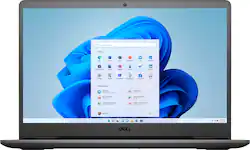
Dell - Inspiron 15.6" FHD+ Touch-Screen Laptop -AMD Ryzen 5 - 12GB Memory - 256GB SSD + 1TB HDD - Black
- Key Specs
- Screen Size: 15.6 inches (Size of the screen, measured diagonally from corner to corner.)
- Screen Resolution: 1920 x 1080 (Full HD) (Screens come in a range of resolutions (measured in pixels, horizontal x vertical). The higher the resolution, the greater the picture quality.)
- Touch Screen: true (Touch-screen devices make navigating more intuitive. Using a touch-screen display, you can do things such as tap to select, hold and drag to move items, swipe to scroll, and pinch to zoom.)
- Processor Model: AMD Ryzen 5 3000 Series (Your computer's processor is like its brain. Working in combination with system memory, the power of the processor determines the complexity of software you can run, how many programs you can have open at the same time, and how fast those programs will run. Most computers feature an AMD, Intel or Snapdragon processor.)
- Storage Type: HDD, SSD
- Total Storage Capacity: 1256 gigabytes
- System Memory (RAM): 12 gigabytes (Random-access memory (RAM) is a computing device's short-term data storage, which allows active information to be accessed quickly. The size and type of RAM determines how efficiently the device can handle large amounts of information at one time. For example, gaming or video editing requires more RAM for optimal performance.)
- Graphics: AMD Radeon Vega 8 (Often referred to as a "graphics processing unit" (GPU), this device is responsible for displaying image content and decoding/encoding video content in programs and games.)
- Display Connector(s): 1 x HDMI 1.4 (The number and type of connectors used to connect to an external display.)
- 2-in-1 Design: false (A laptop and a tablet combined in one lightweight, portable device. Sometimes referred to as "convertible" or "hybrid" laptops, these devices deliver the processing power and keyboard of a laptop. When you're ready to play, either detach the screen or fold your 2-in-1 into tablet mode to comfortably watch movies, play games, read an e-book and more.)
- Backlit Keyboard: false (Integrated lights allow for visibility of the keys in low-light conditions.)
- General
- Product Name: Inspiron 15.6" FHD+ Touch-Screen Laptop -AMD Ryzen 5 - 12GB Memory - 256GB SSD + 1TB HDD
- Brand: Dell
- Model Number: i3505-A330BLK-PUS
- Year of Release: 2020
- Color: Black
- Display
- Display Type: LED
- Screen Size: 15.6 inches (Size of the screen, measured diagonally from corner to corner.)
- Screen Resolution: 1920 x 1080 (Full HD) (Screens come in a range of resolutions (measured in pixels, horizontal x vertical). The higher the resolution, the greater the picture quality.)
- Touch Screen: true (Touch-screen devices make navigating more intuitive. Using a touch-screen display, you can do things such as tap to select, hold and drag to move items, swipe to scroll, and pinch to zoom.)
- Processor
- Processor Brand: AMD
- Processor Model: AMD Ryzen 5 3000 Series (Your computer's processor is like its brain. Working in combination with system memory, the power of the processor determines the complexity of software you can run, how many programs you can have open at the same time, and how fast those programs will run. Most computers feature an AMD, Intel or Snapdragon processor.)
- Processor Model Number: 3450U
- Storage
- Storage Type: HDD, SSD
- Total Storage Capacity: 1256 gigabytes
- Solid State Drive Capacity: 256 gigabytes (The amount of data that can be stored on the device's solid state drive (SSD). SSD is a flash-based storage with faster speeds than a hard disk drive (HDD).)
- Hard Drive Capacity: 1000 gigabytes (The amount of data that can be stored on the device's mechanical hard drive. Hard disk drives (HDDs) typically have larger capacities than solid state drives (SSDs) but may have slower speeds.)
- Solid State Drive Interface: PCIe (Connects the solid state drive to the host system. PCI and SATA interfaces are the most common; PCI interfaces are typically faster, but SATA interfaces are compatible with a wider range of systems.)
- Hard Drive Interface: SATA (Connects the hard drive to the host system for transferring data between the hard disk cache and system memory. IDE and SATA interfaces are primarily used for personal computing, while larger servers and workstations typically use SAS or SCSI.)
- Hard Drive RPM: 5400 revolutions per minute (A hard drive's data is stored on disks, or platters, that spin while transferring information to the host system. The higher the RPM, the faster the hard drive's performance.)
- Hard Drive Accelerator: None (A module integrated (or added) into a PC to improve performance speed. By acting as a high-speed cache, an accelerator speeds up access times to the hard drive, which results in faster web browsing, improved gaming experience, and overall more responsiveness.)
- Memory
- System Memory (RAM): 12 gigabytes (Random-access memory (RAM) is a computing device's short-term data storage, which allows active information to be accessed quickly. The size and type of RAM determines how efficiently the device can handle large amounts of information at one time. For example, gaming or video editing requires more RAM for optimal performance.)
- Type of Memory (RAM): DDR4 (Each type of RAM delivers a different level of speed, bandwidth, energy efficiency and performance.)
- System Memory RAM Speed: 2400 megahertz (How fast the information-storing hardware operates. The faster the RAM, the faster memory can be transferred to other system components. Ultimately, faster RAM improves operational efficiency.)
- Number Of Memory Slots: 2
- Number of Memory Sticks Included: 2
- Graphics
- Graphics Type: Integrated (Dedicated graphics uses a separate graphics card for processing video images. Because it does not use memory from the system's RAM, there is no extra burden on the CPU and graphics are processed more efficiently. Integrated graphics shares system RAM to process video images.)
- GPU Brand: AMD Radeon
- Graphics: AMD Radeon Vega 8 (Often referred to as a "graphics processing unit" (GPU), this device is responsible for displaying image content and decoding/encoding video content in programs and games.)
- Compatibility
- Operating System: Windows 11 Home in S Mode (The operating system manages all software and hardware, including files, memory and connected devices. Most importantly, it lets you interact with your device and your programs in a visual way; otherwise, you'd be typing computer code to get anything done.)
- Operating System Architecture: 64-bit (An operating system (OS) manages computer hardware, software resources, and programs in conjunction with the system's processor. 64-bit operating systems can handle more data at once than 32-bit systems, resulting in faster speeds, more effiency, and overall improved performance.)
- Connectivity
- Display Connector(s): 1 x HDMI 1.4 (The number and type of connectors used to connect to an external display.)
- Number of HDMI Outputs (Total): 1
- Number of DisplayPort Outputs (Total): 0
- Number of Thunderbolt Ports (Total): 0
- Number of VGA Ports: 0 (VGA (Video Graphics Adapter or Video Graphics Array) is a display standard that transmits via analog signals. This type of interface is typically used to connect a computer to a display device such as a monitor, projector, or TV.)
- USB Ports: 1 x USB-A 2.0, 3 x USB-A 3.2 (The number and type of USB ports the product has.)
- Number of USB Ports (Total): 3
- Headphone Jack: true (The device features an interface that allows for the connection of headphones.)
- Ethernet Card: 10/100 (Also known as an Ethernet adapter, this card plugs into a computer's motherboard and enables it to access an Ethernet network. Ethernet data transmission speeds are measured in Mbps (megabits per second) and Gbps (gigabits per second). For example, a 10/100 Ethernet port transmits 10 and 100 Mbps, while a 10/100/1000 Ethernet port transmits 10 and 100 Mbps and has a maximum speed of 1000 Mbps (1 Gbps).)
- Number Of Ethernet Ports: 1
- Power
- Battery Cells: 3-cell
- Battery Capacity: 42 milliampere hours (The amount of energy stored in the battery.)
- Expansion
- Number of M.2 Slots: 0 (This interface is most commonly used for high-speed solid state drives (SSDs), and is often used in laptops due to its small size.)
- Number Of Internal 2.5" Bays: 0
- Camera
- Front-Facing Camera: true
- Front Facing Camera Megapixels: 0.92 megapixels (The more megapixels, the more detail that the camera facing the user can capture.)
- Front Facing Camera Video Resolution: 720p (Refers to the number of pixels, both horizontally and vertically, used by the camera facing the user to capture video. The higher the resolution the finer the video detail that can be seen.)
- Built-In Microphone: true
- Features
- 2-in-1 Design: false (A laptop and a tablet combined in one lightweight, portable device. Sometimes referred to as "convertible" or "hybrid" laptops, these devices deliver the processing power and keyboard of a laptop. When you're ready to play, either detach the screen or fold your 2-in-1 into tablet mode to comfortably watch movies, play games, read an e-book and more.)
- Backlit Keyboard: false (Integrated lights allow for visibility of the keys in low-light conditions.)
- Customizable Keyboard Lighting: No
- Media Card Reader: true (A hardware device that allows for access to data on a memory card and enables the transfer of its files to a computer. These devices may have one or multiple slots for various types of memory cards, and may be integrated into the computer or available as an external device.)
- Customizable Case Lighting: false
- Speaker Type: Stereo speakers
- Security Features: Cable lock slot
- Cable Lock Slot: Noble Wedge Security Slot
- Stylus Dock: None
- Dimensions
- Product Height: 0.78 inches (The out of box height of the item. Height is measured as the vertical distance from the bottom of the item to the top as it would be primarily used or placed.)
- Product Width: 14.33 inches (The out of box width of the item. Width is measured as the horizontal distance from one side of the item to the other as it would be primarily used or placed.)
- Product Depth: 9.8 inches (The out of box depth of the item. Depth is measured as the distance from the front of the item to the back as it would be primarily used or placed.)
- Product Weight: 4.04 pounds (The out of box weight of the item.)
- Certifications Listings & Approvals
- ENERGY STAR Certified: true (Devices carrying the ENERGY STAR service mark, such as computer products and peripherals, kitchen appliances, and other products, generally use 20% to 30% less energy than required by federal standards.)
- EPEAT Qualified: false (The Electronic Product Environmental Assessment Tool (EPEAT) was designed to provide an environmental assessment tool for purchasers. In order to qualify for EPEAT, a product must meet all 23 required criteria.)
- Included
- Included Software: Microsoft(R) Office 30 Days Trial
- Optical Drive Type: None (An optical disk drive (ODD) uses a laser light to read data from or write data to an optical disc. These discs include CDs, DVDs, and Blu-ray Discs. This allows you to play music or watch movies using prerecorded discs.)
- Numeric Keypad: false
- Stylus Included: false
- Other
- UPC: 884116363330
The Dell Inspiron 15 3505 laptop has a 15.6 Inch display for your daily needs, sporting responsive performance in a sleek design with 2-sided narrow borders, Express Charge, and an AMD Quad Core Ryzen 5 3450U processor.
- Windows 11 Operating System: Windows 11 has all the power and security of Windows 10 with a redesigned and refreshed look. It also comes with new tools, sounds, and apps. Every detail has been considered. All of it comes together to bring you a refreshing experience on your PC.
- Hard drive + solid state drive: 1TB hard drive and 256GB solid state drive (SSD) for a blend of storage space and speed. The hard drive provides ample storage, while the SSD delivers faster start-up times and data access.
- 15.6" Full HD touch screen for hands-on control: Natural finger-touch navigation makes the most of Windows 10. The 1920 x 1080 resolution boasts impressive color and clarity with Wide Viewing angles display. Energy-efficient LED backlight.
- AMD Ryzen™ 5 3450U Mobile Processor: Enjoy high application performance and smoother gaming experiences with AMD Ryzen™ 5 processors, with machine intelligence, multitasking capabilities and efficient architecture with up to 4 cores and 8 processing
- 12GB system memory for advanced multitasking: Substantial high-bandwidth RAM to smoothly run your games and photo- and video-editing applications, as well as multiple programs and browser tabs all at once.
- Integrated Widescreen HD 720P Webcam with Dual Digital Microphone Array: A new 4-element lens delivers sharp video in all areas of the frame, especially in dim lighting conditions. The top-mounted mic provides for a better audio experience
- Rivet SmartByte: SmartByte detects and prioritizes your critical video and communication traffic to ensure your online video experience will be fast, smooth and at the highest resolution your network can support.
- Full keyboard with 10-key numeric keypad: Type comfortably, input numbers quickly and maneuver through games with ease. Touchpad with multitouch control.
- Built-in media reader for simple photo transfer: Supports SD memory card format.
- Additional ports: USB 3.2 Gen 1 (x2), USB2.0 (x1), HDMI 1.4- SD Media Card Reader (SD, SDHC, SDXC) - RJ45 - 10/100Mbps- 1 combo headphone / microphone jack
Whats Included
- Inspiron 15 3505
- power adapter
- documentation
A: I just received my laptop and am disappointed to find that it does not have a backlit keyboard nor does it have a finger print reader as described. It does have a touch screen though.
A: Yes, you can turn off S mode to allow installation of apps from outside of the Microsoft App Store. But, you will not be able to switch back to S mode once you turn it off. Ever. Just wanted to make that clarification.
Q: Does disabling S-mode void the warranty or 1-Year Accidental Geek Squad Protection?
A: No, disabling the S-mode does not void the warranty on the system.
A: This system is shipped with AMD Ryzen 5 3450U processor and here are the main differences between the processors. The AMD Ryzen 5 3450U has a max clock speed of 3.5GHz and the AMD Ryzen 5 3500U has a max clock speed of 3.7GHz.
A: This system has two SODIMM slots and comes with one 4 GB and one 8 GB SODIMM DDR4 RAM. The clock speed of each of the memory modules is 2400 MHz.
Q: Is it possible to turn off the touch screen use without turning off the screen completely ?
A: Yes, it is possible to turn off the touch screen use without turning off the screen completely. You could disable the touch screen using the Device Manager.
Q: Can you play Genshin Impact on this laptop?
A: I do not play Genshin much, but this computer is great at running games at similar graphics to Genshin. It can definitely be used well for mid- range gaming so I would assume it would run good.
Q: Can the Adobe Creative Suite be used on this laptop?
A: I had this computer for a little over a week. I was able to run Photshop Elements and Lightroom on it, so you should be able to run Adobe Creative Suite. Be warned, though, that it does not display colors accurately. I flood filled a Photoshop jpeg image with #FF0000 (true red). It didn't look red at all - more of a burnt orange/red. I was told by Geek Squad there was nothing that could be done to fix/improve how color displayed. I ended up returning the computer since a lot of what I'd use it for is photo editing and digtal scrapbooking. If it didn't display color correctly, it wouldn't be much good. Also, the color affects video streamed from Netflix, Hulu, etc. Everything had a sepia/muddy quality to it and seemed to need the contrast ramped up.


















