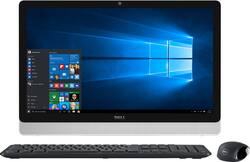
Dell - Inspiron 23.8" Touch-Screen All-In-One - AMD A8-Series - 8GB Memory - 1TB Hard Drive - White/Silver
- Key Specs
- Screen Size: 23.8 inches (Size of the screen, measured diagonally from corner to corner.)
- Processor Model: AMD A8-Series (Your computer's processor is like its brain. Working in combination with system memory, the power of the processor determines the complexity of software you can run, how many programs you can have open at the same time, and how fast those programs will run. Most computers feature an AMD, Intel or Snapdragon processor.)
- System Memory (RAM): 8 gigabytes (Random-access memory (RAM) is a computing device's short-term data storage, which allows active information to be accessed quickly. The size and type of RAM determines how efficiently the device can handle large amounts of information at one time. For example, gaming or video editing requires more RAM for optimal performance.)
- General
- Product Name: Inspiron 23.8" Touch-Screen All-In-One - AMD A8-Series - 8GB Memory - 1TB Hard Drive
- Brand: Dell
- Model Number: I3455-10040WHT
- Display
- Screen Type: Touchscreen LED
- Screen Size: 23.8 inches (Size of the screen, measured diagonally from corner to corner.)
- Screen Resolution: 1920 x 1080 (Full HD) (Screens come in a range of resolutions (measured in pixels, horizontal x vertical). The higher the resolution, the greater the picture quality.)
- Touch Screen: true (Touch-screen devices make navigating more intuitive. Using a touch-screen display, you can do things such as tap to select, hold and drag to move items, swipe to scroll, and pinch to zoom.)
- Processor
- Processor Brand: AMD
- Processor Model: AMD A8-Series (Your computer's processor is like its brain. Working in combination with system memory, the power of the processor determines the complexity of software you can run, how many programs you can have open at the same time, and how fast those programs will run. Most computers feature an AMD, Intel or Snapdragon processor.)
- Storage
- Hard Drive Capacity: 1000 gigabytes (The amount of data that can be stored on the device's mechanical hard drive. Hard disk drives (HDDs) typically have larger capacities than solid state drives (SSDs) but may have slower speeds.)
- Hard Drive RPM: 5400 revolutions per minute (A hard drive's data is stored on disks, or platters, that spin while transferring information to the host system. The higher the RPM, the faster the hard drive's performance.)
- Memory
- System Memory (RAM): 8 gigabytes (Random-access memory (RAM) is a computing device's short-term data storage, which allows active information to be accessed quickly. The size and type of RAM determines how efficiently the device can handle large amounts of information at one time. For example, gaming or video editing requires more RAM for optimal performance.)
- Type of Memory (RAM): DDR3L (Each type of RAM delivers a different level of speed, bandwidth, energy efficiency and performance.)
- System Memory RAM Speed: 1600 megahertz (How fast the information-storing hardware operates. The faster the RAM, the faster memory can be transferred to other system components. Ultimately, faster RAM improves operational efficiency.)
- Compatibility
- Operating System: Windows 8.1 (The operating system manages all software and hardware, including files, memory and connected devices. Most importantly, it lets you interact with your device and your programs in a visual way; otherwise, you'd be typing computer code to get anything done.)
- Operating System Architecture: 64-bit (An operating system (OS) manages computer hardware, software resources, and programs in conjunction with the system's processor. 64-bit operating systems can handle more data at once than 32-bit systems, resulting in faster speeds, more effiency, and overall improved performance.)
- Camera
- Built-In Webcam: true
- Features
- Media Card Reader: true (A hardware device that allows for access to data on a memory card and enables the transfer of its files to a computer. These devices may have one or multiple slots for various types of memory cards, and may be integrated into the computer or available as an external device.)
- Audio Technology: Waves MaxxAudio
- Dimensions
- Product Height: 15.2 inches (The out of box height of the item. Height is measured as the vertical distance from the bottom of the item to the top as it would be primarily used or placed.)
- Product Width: 22.7 inches (The out of box width of the item. Width is measured as the horizontal distance from one side of the item to the other as it would be primarily used or placed.)
- Product Depth: 1.5 inches (The out of box depth of the item. Depth is measured as the distance from the front of the item to the back as it would be primarily used or placed.)
- Certifications Listings & Approvals
- ENERGY STAR Certified: false (Devices carrying the ENERGY STAR service mark, such as computer products and peripherals, kitchen appliances, and other products, generally use 20% to 30% less energy than required by federal standards.)
- EPEAT Qualified: false (The Electronic Product Environmental Assessment Tool (EPEAT) was designed to provide an environmental assessment tool for purchasers. In order to qualify for EPEAT, a product must meet all 23 required criteria.)
- Included
- Wireless Keyboard: true
- Wireless Mouse: true
- Speaker(s) Included: true
- Other
- UPC: 884116166900


- Microsoft Windows 8.1 operating system preinstalled: Upgrade to Windows 10 for free** - it's easy. Learn more about Windows 10 ›
- All-in-one design saves space and cuts clutter: A full computer is housed inside the monitor, so you get all the power of a PC in a streamlined design that involves fewer cables and takes up less space on a desk, table or kitchen counter.
- 23.8" Full HD touch screen: Intuitive control is at your fingertips. Brilliant 1920 x 1080 resolution brings movies and games to life in crisp detail. TrueLife and IPS technologies produce stunning visuals. Energy-efficient LED backlight.
- AMD A8-7410 accelerated processor: Quad-core processing. AMD Quad-Core A8 APU handles the AMD Radeon graphics alongside the central processor to balance the load, enabling great performance, immersive graphics and a host of intelligent features.
- 8GB system memory for advanced multitasking: Substantial high-bandwidth RAM to smoothly run your games and photo- and video-editing applications, as well as multiple programs and browser tabs all at once.
- DVD/CD burner: Reads and writes to a variety of media formats, including DVD+R/RW, DVD-R/RW and CD-R/RW.
- 1TB hard drive for ample file storage space: Holds a significant collection of digital photos, music, HD videos and DVD-quality movies. 5400 rpm spindle speed for standard read/write times.
- Built-in 720p HD webcam with microphone array: Makes it easy to video chat with family and friends.
- Built-in media reader for simple photo transfer: Supports a variety of memory card formats.
- 2 USB 3.0 ports maximize the latest high-speed devices: Also includes 2 USB 2.0 ports to connect more accessories and peripherals. The USB 3.0 ports are backward-compatible with USB 2.0 devices (at 2.0 speeds).
- Wireless and wired network connectivity: Built-in high-speed wireless LAN connects to your network on the most common Wi-Fi standards. Ethernet LAN port plugs into wired networks.
- Bluetooth 4.0 interface syncs with compatible devices: Wirelessly transfer photos, music and other media between the computer and your Bluetooth-enabled cell phone or MP3 player, or connect Bluetooth wireless accessories.
- Easel design: Enjoy a comfortable viewing angle for watching movies, gaming and video chatting.
- Wireless keyboard and wireless mouse reduce cable clutter: Keep your desk neat and tidy as you navigate with ease.
- Basic software package included: Trial of Microsoft Office.
- Built-in stereo speakers: Waves MaxxAudio delivers clear, high-quality sound for enjoying music, streaming media and more.
- Additional ports: HDMI output. Microphone-in/headphone-out combo jack.
Whats Included
- Inspiron 23.8" Touch-Screen All-In-One
- KM632 wireless keyboard and mouse
- Owner's manual
Q: Can the touch screen be deactivated?
A: undefined
Q: How do you activate the touch screen
A: If the keyboard doesn't have a key on the first row on top of numbers, use the search button. My 11th yr old daughter did it herself. Very simple.
Q: 2nd monitor
A: Yes, You can add a monitor to any all in one if you have the right connecting wires
A: The back of the monitor. It's a little jack to your left hand side. Then plug it in and done! Turn it on on the right side. It starts running right away. Enjoy.
Q: Can you spli your viewing screen.
A: you can split screens while working on multiple applications. for example you can open email on one side and Netflix app or any other app in other half. What you have to do is to take your mouse pointer to the upper left corner of the screen and wait for couple of seconds and you will see the small logo of that app. left click on that logo and it will give you the option to split screen to the left or right. click the option and your app will be adjusted to that half and the other half can be used to launch another app.
A: I have not expanded it myself but the employee at the store I bought mine said it is expandable.
Q: What is the advantage of a PC over a Mac?
A: It will work but I always stick to a desktop. To me is better to work Office on a desktop. Macs are great but not for me. For Office I will get a PC. Good luck


















