Elgato - XLR Dock – For Stream Deck +, XLR/USB Microphone Interface and Customizable Audio Mixer - Black
Elgato - XLR Dock – For Stream Deck +, XLR/USB Microphone Interface and Customizable Audio Mixer - Black
Related Item

- General
- Brand: Elgato
- Model Number: 10GBM9901
- Product Name: XLR Dock – For Stream Deck +, XLR/USB Microphone Interface and Customizable Audio Mixer
- Color: Black
- Warranty
- Warranty - Parts: 2 years
- Warranty - Labor: 2 years
- Other
- Product Width: 5.39 inches (The out of box width of the item. Width is measured as the horizontal distance from one side of the item to the other as it would be primarily used or placed.)
- Product Length: 4.53 inches (The out of box length of the item. Length is measured as the longest dimension of the item.)
- Product Weight: 0.37 pounds (The out of box weight of the item.)
- Headphone Jack: false (The device features an interface that allows for the connection of headphones.)
- Volume Control: true
- UPC: 840006681595
Equip your Stream Deck + with XLR Dock, an audio interface and space-saving mic preamp. So you can mix, monitor, or control just about anything.
- For Stream Deck +: Designed to replace standalone interfaces.
- Saves space: Stows away out of sight to minimize desk clutter.
- Free a port: Connect both devices via one USB cable, not two.
- One for all: Control your entire setup—audio, video, anything.
- Your audio mixer: Customize keys and dials however you like.
- Loud and clear: 75 dB of gain to amplify your dynamic microphone.
- Phantom power: Brings condenser mics to life with 48 V.
- Clipguard technology: Get loud without fear of vocal distortion.
- Easy install: Assemble in minutes using only your screwdriver.
- For Stream Deck +: Designed to replace standalone interfaces.
- Saves space: Stows away out of sight to minimize desk clutter.
- Free a port: Connect both devices via one USB cable, not two.
- One for all: Control your entire setup—audio, video, anything.
- Your audio mixer: Customize keys and dials however you like.
- Loud and clear: 75 dB of gain to amplify your dynamic microphone.
- Phantom power: Brings condenser mics to life with 48 V.
- Clipguard technology: Get loud without fear of vocal distortion.
- Easy install: Assemble in minutes using only your screwdriver.
Whats Included
- Elgato XLR Dock for Stream Deck +
- Quick Start Guide
- Elgato XLR Dock for Stream Deck +
- Quick Start Guide
Product Manuals
Disclaimers
- Stream Deck Not Included
- Stream Deck Not Included
Q: Does the XLR Dock offer any monitoring features?
A: The Elgato XLR Dock allows you to mix, monitor, and control audio for your Stream Deck +.
Q: What types of microphones can be used with the XLR Dock?
A: The XLR Dock is compatible with both XLR and USB microphones.
Q: Are there any software applications that can be used with the XLR Dock?
A: The Elgato XLR Dock is an audio interface and mic preamp that allows you to mix, monitor, and control audio.
Q: What is the warranty period for the XLR Dock?
A: The XLR Dock is covered by a two-year warranty for parts.
Q: How does the XLR Dock connect to the Stream Deck +?
A: The XLR Dock is designed specifically for the Stream Deck +, acting as an audio interface and microphone preamp.
A: undefined
Q: Is this device compatible with MacBook/ IOS?
A: XLR Dock for Stream Deck + is compatible with MacBooks (macOS) but not with iOS devices like iPhones or iPads.
Compare similar products

Equip your Stream Deck + with XLR Dock, an audio interface and space-saving mic preamp. So you can mix, monitor, or control just about anything.
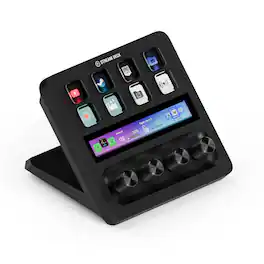
Iconic Stream Deck tech with LCD keys, dials, and touch strip. Fully customizable. Perfect for any workflow. Stream Deck + is your audio mixer, studio controller, production console – anything you want it to be. Trigger actions. Control mics and cameras. Adjust volume, lighting, and much more. Create limitless pages for different apps and swipe between them on the fly. Set up with ease in the Stream Deck app. Unlock Elgato Wave Link mixing software, and hit the Stream Deck Store for plugins, icon packs, thousands or royalty-free music tracks, sound effects, and more. With new plugins and updates added regularly, Stream Deck + evolves with your workflow.

Short on ports? Now your Stream Deck + doubles as a USB Hub. Around back, connect up to four devices, from peripherals to external drives. It also powers your laptop, freeing the port you‘d nor?mally use for charging. Transfer files fast at speeds up to 5 Gb/s via USB-C, or use the convenient SD card reader on its side. USB Hub stows away and hides cables, keeping your workspace clean. Plus, your ports are always within arm’s reach, and it assembles in seconds—no drivers needed. Everything you need to expand and streamline your setup, all from one device.

Hercules Stream 200 XLR is an audio controller featuring a built-in sound card, allowing streamers to separate the audio mix that they’re listening to from the mix being played for their audience. Thanks to this audio controller with a built-in LCD screen, you can manage all your audio sources in real time: games, chat software, music, XLR microphone, game console, second computer, and more. Hercules Stream 200 XLR lets you enjoy a customized experience by individually viewing and controlling the sound level of each audio track — for you, and for your audience! Instantly enable, turn down the volume, turn up the volume, mute or unmute the sound!
| Pros for Elgato - XLR Dock – For Stream Deck +, XLR/USB Microphone Interface and Customizable Audio Mixer - Black | |||
|---|---|---|---|
| Desk Space | Ease of use, Quality, Knobs, Customization, Volume Control | There were no pros for this product— | There were no pros for this product— |
Specs
Reviews
Customers are saying
Customers enjoy that the XLR Dock helps to free up desk space. Users appreciate that the dock removes clutter from their workspace. Overall, customers seem to be happy with the product's ability to optimize desk space.
Customer Images
The vast majority of our reviews come from verified purchases. Reviews from customers may include My Best Buy members, employees, and Tech Insider Network members (as tagged). Select reviewers may receive discounted products, promotional considerations or entries into drawings for honest, helpful reviews.
- Rated 5 out of 5 stars
Elgato XLR Dock
I upgraded from Audient Evo 8 with a Cloud Lifter now I don't need it anymore since it have 75 gain so it's plenty of gain with most mic in the market including Shure SM7B no need a cloud lifter when using this device
Primetime Posted
- Rated 5 out of 5 stars
Perfect addition to the Stream Deck Plus
No brainer if you have a Stream Deck Plus. I’m new to the Stream Decks and only purchased that version because of this add on module for my XLR module so I could replace my Wave XLR audio interface. The Stream Deck Plus makes it much cleaner and easier to use the Wave XLR, in my opinion. You can actually see percentages of the gain input versus LED dots only on the Wave XLR. Pushing in the dial mutes the mic instead of the capacitive touch button that I ALWAYS accidentally touched on the Wave XLR also. Install was super simple and I was up and running in 5 minutes or less. I’ve got one space tied up on my desk now instead of two like I had before for a cleaner look. This is a no brainer…get one if you have a XLR mic!
Moakes Posted
- Rated 4 out of 5 stars
Stream Deck and XLR Audio Mixer ASSEMBLE
Pros: It is very convenient and minimize desk space using stream deck and audio mixer as one. Cons: it is a bit pricey. You may notice the difference between using a separate audio mixer and XLR Dock. For mic sound quality you can adjust using Wave link, but it was not easy for me. Complaint: Only one color available (I have white Stream Deck+), but it is back plate, so it does not bother me too much
pigstar Posted