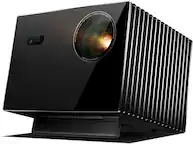
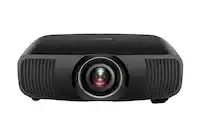
Epson - Pro EX9270 Wireless Full HD 1080p 3LCD Projector - Black
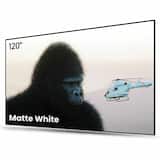 AWOL Vision - 120" Fixed Frame Projector Screen, 4K/8K UHD Active 3D Compatible with Standard, Short Throw and UST Projectors - Matte White$349.00$399.00

Related Item

Specifications
- Product Weight6.8 poundsLight SourceLampResolutionFull HD (1080p)Color Brightness (IDMS)4100 lumensWhite Brightness (ISO)4100 lumensContrast Ratio16,000:1
- Key Specs
- Product Weight: 6.8 pounds (The out of box weight of the item.)
- Light Source: Lamp
- Resolution: Full HD (1080p) (Refers to the number of pixels, both horizontally and vertically, used to capture video/images. The higher the resolution the finer the detail that can be seen.)
- Color Brightness (IDMS): 4100 lumens (Measurement of the device's color light output measured accordance with standards established by the Information Display Measurements Standard (IDMS). The more lumens, the brighter the output. In large and/or well-lit environments, such as auditoriums or rooms with plenty of natural light, a higher brightness improves the color quality of the projected image.)
- White Brightness (ISO): 4100 lumens (Measurement of the device's white light output measured in accordance with standards established by the International Organization for Standardization (ISO). The more lumens, the brighter the output. In large and/or well-lit environments, such as auditoriums or rooms with plenty of natural light, a higher brightness improves the quality of the projected image.)
- Contrast Ratio: 16,000:1 (Measured difference between a displayed image's brightest whites and darkest blacks. The larger the first number, the more detail and color that can be displayed.)
- Projector Use: Business, Educational (Classroom)
- Projector Throw Type: Standard Throw (The distance from the screen that the projector can be placed to project images. Standard throw projectors typically need to be at least 6 feet away while short throw and ultra short throw projectors can be placed closer to the screen for use in smaller rooms.)
- Portability: Portable (Fixed projectors are ideal when creating an authentic theater atmosphere in your home. Often designed to stay in one place they may require significant recalibration if moved. Portable projectors, weighing around 5 pounds, are easy to move, but will still require set-up calibration and often have technology to reduce the complexity. Ultra-portable projectors are very light, often battery-powered, and ideal for on-the-go use.)
- Smart Capable: false (Smart, or smart-capable devices are able to connect directly to your home network in order to stream content from the Internet, run Internet-based apps, or connect to other smart devices.)
- Wireless Connectivity: Wi-Fi (The manner in which a device sends data to another device over a short distance without the use of wires or cables.)
- Display Connector(s): 2 x HDMI (The number and type of connectors used to connect to an external display.)
- Power Source: Plug-in
- General
- Brand: Epson
- Model Number: V11HB59120
- Product Name: Epson Pro EX9270 Wireless Full HD 1080p 3LCD Projector
- Color: Black
- Dimensions
- Product Height: 4.1 inches (The out of box height of the item. Height is measured as the vertical distance from the bottom of the item to the top as it would be primarily used or placed.)
- Product Width: 12.2 inches (The out of box width of the item. Width is measured as the horizontal distance from one side of the item to the other as it would be primarily used or placed.)
- Product Depth: 11.5 inches (The out of box depth of the item. Depth is measured as the distance from the front of the item to the back as it would be primarily used or placed.)
- Product Weight: 6.8 pounds (The out of box weight of the item.)
- Display
- Light Source: Lamp
- Display Technology: 3LCD (Denotes the product’s visual process, sometimes manufacturer specific, used to display an image.)
- Resolution: Full HD (1080p) (Refers to the number of pixels, both horizontally and vertically, used to capture video/images. The higher the resolution the finer the detail that can be seen.)
- Resolution (Native): 1920 x 1080 (Native resolution of a screen refers to its single, fixed resolution. Sometimes screens must scale an image up or down in order to fit the native resolution. This can cause a loss of resolution or detail.)
- 3-Chip Technology: true (Projectors with this technology are able to display images with optimal brightness, color, and detail. Because of their high-performance design, these projectors are primarily used in large venues and digital cinemas.)
- Color Brightness (IDMS): 4100 lumens (Measurement of the device's color light output measured accordance with standards established by the Information Display Measurements Standard (IDMS). The more lumens, the brighter the output. In large and/or well-lit environments, such as auditoriums or rooms with plenty of natural light, a higher brightness improves the color quality of the projected image.)
- White Brightness (ISO): 4100 lumens (Measurement of the device's white light output measured in accordance with standards established by the International Organization for Standardization (ISO). The more lumens, the brighter the output. In large and/or well-lit environments, such as auditoriums or rooms with plenty of natural light, a higher brightness improves the quality of the projected image.)
- High Dynamic Range (HDR): false (An HDR-compatible 4K TV or other HDR-compatible product displays HDR video content when it's available from sources like 4K Ultra HD Blu-ray Discs and 4K streaming services.)
- Light Source Life (Economy Mode): 12000 hours (The light source's estimated length of operating time when economy mode is enabled.)
- Light Source Life (Normal Mode): 5500 hours (The light source's estimated length of operating time when normal operating mode is enabled.)
- Contrast Ratio: 16,000:1 (Measured difference between a displayed image's brightest whites and darkest blacks. The larger the first number, the more detail and color that can be displayed.)
- Aspect Ratio: 16:9 (The measurement of the width of a screen compared to the height of a screen, expressed as a ratio.)
- Throw Ratio Range: 1.30 - 2.09 (This measurement indicates what size of projected image can be produced from a certain distance. The smaller the ratio, the closer the projector can be to the screen while still producing a large image.)
- Digital Keystone Correction: true ("Keystone effect" refers to the distortion of an image when it is projected on an angled surface or when the projector is positioned too high or too low from the center of the display. Projectors with a digital keystone correction feature are able to scale the image as needed before it is projected, resulting in the correct image orientation no matter where it is displayed.)
- 3D Technology: false
- Viewing
- Screen Included: false
- Minimum Viewable Screen Size: 31 inches
- Maximum Viewable Screen Size: 304 inches
- Features
- Projector Use: Business, Educational (Classroom)
- Projector Throw Type: Standard Throw (The distance from the screen that the projector can be placed to project images. Standard throw projectors typically need to be at least 6 feet away while short throw and ultra short throw projectors can be placed closer to the screen for use in smaller rooms.)
- Portability: Portable (Fixed projectors are ideal when creating an authentic theater atmosphere in your home. Often designed to stay in one place they may require significant recalibration if moved. Portable projectors, weighing around 5 pounds, are easy to move, but will still require set-up calibration and often have technology to reduce the complexity. Ultra-portable projectors are very light, often battery-powered, and ideal for on-the-go use.)
- Smart Capable: false (Smart, or smart-capable devices are able to connect directly to your home network in order to stream content from the Internet, run Internet-based apps, or connect to other smart devices.)
- Remote Control Included: true
- Screen Mirroring: Mobile to screen (Casts the screen of one device onto another wirelessly, using a common protocol (typically Bluetooth).)
- Maximum Noise Level: 37 decibels
- Screen Mirroring Technology: Apple AirPlay
- Exposure Control
- Focus Adjustment: Manual (The method used to focus the device in order to view or display a sharper image.)
- Connectivity
- Number of HDMI Inputs (Total): 2
- Wireless Connectivity: Wi-Fi (The manner in which a device sends data to another device over a short distance without the use of wires or cables.)
- Display Connector(s): 2 x HDMI (The number and type of connectors used to connect to an external display.)
- Network Connector(s): No network connectors
- Audio Only Outputs: No audio only outputs
- Number of USB Port(s): 2
- Audio
- Integrated Speaker(s): true
- Speaker(s) Included: true
- Power
- Power Source: Plug-in
- Warranty
- Warranty - Parts: 1 year limited
- Warranty - Labor: 1 year limited
- Other
- UPC: 198390001919
Designed for modern hybrid workspaces, the Pro EX9270 offers a bright, dynamic display that elevates visibility and cultivates collaboration. See and be seen with images up to 300''—4x the size of a 75'' flat panel—perfect for maximizing productivity. The Pro EX9270 offers 4,100 lumens of color brightness (IDMS rated) and 4,100 lumens of white brightness (ISO Rated)¹ for bright images—even in well-lit spaces. Stunning Full HD 1080p resolution, combined with real-time adaptive scene-by-scene color processing, helps ensure vibrant colors and sharp contrast, every time you display. With Apple AirPlay, wirelessly stream videos, music, photos and presentations to your projector right from your iPhone, iPad, or Mac for hassle-free content sharing². Plus, easily mirror your screen and stream directly from your Windows PC using Miracast³. With a wide range of connectivity options and a built-in speaker, you can connect devices such as Amazon Fire, Apple TV, Roku and Chromecast for streaming⁴, right out of the box. In addition, you can connect laptops for seamless video conferencing, Zoom meetings and more. And enjoy easy installation in nearly any space with 1.6x optical zoom, keystone correction and four-corner adjustment for accurate alignment.
- Outstanding Image Size: Up to 300''—4x the size of a 75'' flat panel; elevate your Zoom video conferencing experience with stunning Full HD 1080p resolution
- Amazing Brightness: 4,100 lumens of color brightness (IDMS rated) and 4,100 lumens of white brightness (ISO Rated)¹ —ideal for displaying group presentations, spreadsheets and videos, even in well-lit rooms
- Exceptional Image Quality: Advanced 3-Chip 3LCD technology displays 100% of the RGB color signal for every frame, providing outstanding color accuracy while maintaining excellent color brightness, without any distracting “rainbowing” or “color brightness” issues seen with other projection technologies
- Works with Apple Airplay: Wirelessly stream videos, music, photos and presentations to your projector right from your iPhone, iPad, or Mac², plus screen mirroring with Miracast to stream from your Windows PC³
- Versatile Connectivity: Features two HDMI ports and a USB port that functions as a power source for streaming devices⁴; easily connect laptops and devices including Fire TV, Apple TV, Roku, and Chromecast; connect laptops for seamless video conferencing and more
- Hassle-Free Setup: With easy image adjustments and convenient control such as 1.6x optical zoom, horizontal slider and auto vertical correction
- Immersive Sound: Built-in 16 W speaker for astounding audiovisual experience and exceptional sound quality right out of the box
- Built-In Picture Skew Sensor: Automatically analyzes the picture and corrects the vertical keystone to help square the image
- Dynamic Contrast Ratio Up to 16,000:1: Provides crisp, rich detail for graphs, images and videos
- Award-Winning Service and Support: Standard 1-year limited projector warranty⁵, full-unit replacement along with free technical phone support for the life of the product
- Outstanding Image Size: Up to 300''—4x the size of a 75'' flat panel; elevate your Zoom video conferencing experience with stunning Full HD 1080p resolution
- Amazing Brightness: 4,100 lumens of color brightness (IDMS rated) and 4,100 lumens of white brightness (ISO Rated)¹ —ideal for displaying group presentations, spreadsheets and videos, even in well-lit rooms
- Exceptional Image Quality: Advanced 3-Chip 3LCD technology displays 100% of the RGB color signal for every frame, providing outstanding color accuracy while maintaining excellent color brightness, without any distracting “rainbowing” or “color brightness” issues seen with other projection technologies
- Works with Apple Airplay: Wirelessly stream videos, music, photos and presentations to your projector right from your iPhone, iPad, or Mac², plus screen mirroring with Miracast to stream from your Windows PC³
- Versatile Connectivity: Features two HDMI ports and a USB port that functions as a power source for streaming devices⁴; easily connect laptops and devices including Fire TV, Apple TV, Roku, and Chromecast; connect laptops for seamless video conferencing and more
- Hassle-Free Setup: With easy image adjustments and convenient control such as 1.6x optical zoom, horizontal slider and auto vertical correction
- Immersive Sound: Built-in 16 W speaker for astounding audiovisual experience and exceptional sound quality right out of the box
- Built-In Picture Skew Sensor: Automatically analyzes the picture and corrects the vertical keystone to help square the image
- Dynamic Contrast Ratio Up to 16,000:1: Provides crisp, rich detail for graphs, images and videos
- Award-Winning Service and Support: Standard 1-year limited projector warranty⁵, full-unit replacement along with free technical phone support for the life of the product
Whats Included
- Projector
- Power Cable
- Remote Control
- Quick Start Guide
- Projector
- Power Cable
- Remote Control
- Quick Start Guide
Disclaimers
- 1. Color brightness (color light output) and white brightness (white light output) will vary depending on usage conditions. Color light output measured in accordance with IDMS 15.4; white light output measured in accordance with ISO 21118.
- 2. Recommended wireless network connection of 25 Mbps or faster. Some apps require paid subscriptions.
- 3. The projector supports direct peer-to-peer wireless casting of local content from Miracast-enabled devices or via the Epson iProjection™ app. For best performance when using Epson iProjection, it is recommended that the projector and connecting devices be configured on a network, either through the Ethernet port on the projector or via a wireless connection. The Epson iProjection App does not support all files and formats. See www.epson.com/iprojection for details.
- 4. Requires wireless network connection of 5 Mbps or faster. Some apps require paid subscriptions.
- 5. 90-day limited lamp warranty.
- 1. Color brightness (color light output) and white brightness (white light output) will vary depending on usage conditions. Color light output measured in accordance with IDMS 15.4; white light output measured in accordance with ISO 21118.
- 2. Recommended wireless network connection of 25 Mbps or faster. Some apps require paid subscriptions.
- 3. The projector supports direct peer-to-peer wireless casting of local content from Miracast-enabled devices or via the Epson iProjection™ app. For best performance when using Epson iProjection, it is recommended that the projector and connecting devices be configured on a network, either through the Ethernet port on the projector or via a wireless connection. The Epson iProjection App does not support all files and formats. See www.epson.com/iprojection for details.
- 4. Requires wireless network connection of 5 Mbps or faster. Some apps require paid subscriptions.
- 5. 90-day limited lamp warranty.
Q: Does this projector support screen mirroring?
A: Yes, this projector supports screen mirroring to mobile devices.
Q: Does this projector have built in speakers?
A: Yes, this projector has integrated speakers included.
Q: Can I stream from my Apple devices to this projector?
A: Yes, you can wirelessly stream from your Apple devices to the projector using Apple AirPlay.
Q: What is the maximum image size I can get with this projector?
A: You can get an outstanding image size of up to 300 inches with this projector.
Q: How many HDMI ports does this projector have?
A: This projector has two HDMI ports for connectivity.
Q: What is the lamp life in economy mode for this projector?
A: The lamp can last up to 12000 hours in economy mode.
Q: What is the native resolution of this projector?
A: The native resolution of this projector is 1920 x 1080.
Compare similar products

Designed for modern hybrid workspaces, the Pro EX9270 offers a bright, dynamic display that elevates visibility and cultivates collaboration. See and be seen with images up to 300''—4x the size of a 75'' flat panel—perfect for maximizing productivity. The Pro EX9270 offers 4,100 lumens of color brightness (IDMS rated) and 4,100 lumens of white brightness (ISO Rated)¹ for bright images—even in well-lit spaces. Stunning Full HD 1080p resolution, combined with real-time adaptive scene-by-scene color processing, helps ensure vibrant colors and sharp contrast, every time you display. With Apple AirPlay, wirelessly stream videos, music, photos and presentations to your projector right from your iPhone, iPad, or Mac for hassle-free content sharing². Plus, easily mirror your screen and stream directly from your Windows PC using Miracast³. With a wide range of connectivity options and a built-in speaker, you can connect devices such as Amazon Fire, Apple TV, Roku and Chromecast for streaming⁴, right out of the box. In addition, you can connect laptops for seamless video conferencing, Zoom meetings and more. And enjoy easy installation in nearly any space with 1.6x optical zoom, keystone correction and four-corner adjustment for accurate alignment.
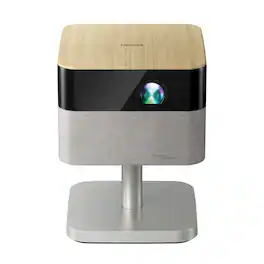
The Lifestudio family of Epson projectors is designed to create moments that bring us together. They offer unique ways to connect with family and friends, helping you create, share, and relive the experiences that matter most. Put your personal devices aside and gather around the big screen. Whether it’s a family movie night under the stars, the ultimate birthday celebration, gaming with friends, or a cozy evening indoors, Lifestudio projectors make experiences feel bigger, brighter and more connected. Because memories aren’t just seen—they’re shared. Turn any gathering into an unforgettable event with the Lifestudio Flex Plus portable lifestyle projector. Delivering a sharp 4K PRO-UHD¹ picture up to 150", it transforms ordinary moments into extraordinary experiences. Powered by Epson-exclusive 3-chip 3LCD Triple Core Engine technology and designed with an adjustable stand, it projects stunning, vivid images on almost any flat surface with ease. Set the perfect vibe with built-in ambient lighting that casts a soft, colorful glow—bringing your space to life with immersive, cinematic charm. And it offers 1,000 Lumens of Color Brightness (IDMS Rated) and 1,000 Lumens of White Brightness (ISO Rated)² for a bright, balanced picture that feels true to life. Enjoy immersive sound that fills the room with the world’s first smart streaming projectors featuring Sound by Bose technology. The custom-designed stereo system creates audio you can feel, delivering rich, balanced sound, pulling you—and everyone around you—right into the action. Our unique Epson Projection Studio app³ for iOS and Android is a whole new way to play. Liven up your next event with personalized videos that bring your favorite moments to the big screen. We can’t wait for you to see it. Finding something to watch has never been easier. Just power on your Lifestudio portable lifestyle projector and the built-in Google TV⁴ puts over 10,000 streaming apps at your fingertips⁵, including Netflix, Disney+, and Hulu. Plus, with Google Assistant you can use the included voice remote to search across all apps, including live TV and even YouTube to find exactly what you’re looking for. Welcome to the Epson family of Lifestudio projectors. What unforgettable moments will you create?

The perfect solution for the evolving workplace, the Pro EX11000 Full HD 1080p laser projector produces a bright and vibrant display designed to maximize visibility and engagement. Cultivate collaboration during Zoom meetings and video conferences with vivid, immersive images up to 300"—all while keeping the lights on. Experience amazing clarity with 4,600 lumens of color and white brightness (1) plus, with the 20,000-hour laser light source (2) there are no lamps to replace, ever. With Best-in-Class Color Brightness (3) and a built-in 16 W speaker, the Pro EX11000 helps ensure that you won’t miss any of the important details. Offering a multitude of connectivity options, including two HDMI ports and a USB port to power popular streaming devices like Fire TV, Apple TV, Roku, and Chromecast (4), the Pro EX11000 redefines versatility. With 3-chip 3LCD technology, experience remarkable color accuracy while maintaining color brightness. Featuring easy-to-use image adjustments, 1 – 1.6x optical zoom, auto vertical correction and more, you will be up and running in no time. Work better together with the Pro EX11000.

The Lifestudio family of Epson projectors are designed to create moments that bring us together. They offer unique ways to connect with family and friends, helping you create, share, and relive the experiences that matter most. Put your personal devices aside and gather around the big screen. Whether it’s a family movie night under the stars, the ultimate birthday celebration, gaming with friends, or a cozy evening indoors, Lifestudio projectors make experiences feel bigger, brighter and more connected. Because memories aren’t just seen—they’re shared. Transform any gathering into a memorable event with the Lifestudio Pop Plus personal lifestyle projector. Delivering a sharp 4K PRO-UHD¹ picture up to 150", it elevates everyday moments into extraordinary experiences. Equipped with Epson exclusive 3-chip 3LCD Triple Core Engine technology and housed in a sleek, compact design, it effortlessly projects vibrant, high-quality images on nearly any flat surface. And it offers 700 Lumens of Color Brightness (IDMS Rated) and 700 Lumens of White Brightness (ISO Rated)² for a bright, balanced picture that feels true to life. Enjoy immersive sound that fills the room with the world’s first smart streaming projectors featuring Sound by Bose technology. The custom-designed stereo system creates audio you can feel, delivering rich, balanced sound, pulling you—and everyone around you—right into the action. Our unique Epson Projection Studio app³ for iOS and Android is a whole new way to play. Liven up your next event with personalized videos that bring your favorite moments to the big screen. We can’t wait for you to see it. Finding something to watch has never been easier. Just power on your Lifestudio personal lifestyle projector and the built-in Google TV⁴ puts over 10,000 streaming apps at your fingertips⁵, including Netflix, Disney+, and Hulu. Plus, with Google Assistant you can use the included voice remote to search across all apps, including live TV and even YouTube to find exactly what you’re looking for. Welcome to the Epson family of Lifestudio projectors. What unforgettable moments will you create?
| Pros for Epson - Pro EX9270 Wireless Full HD 1080p 3LCD Projector - Black | |||
|---|---|---|---|
| Brightness, Connectivity | Sound Quality, Portability, Design, Focus | Brightness, Connectivity, Picture Quality, Ease of use, Zoom | Portability, Sound Quality, Connectivity, Autofocus |
| Cons for Epson - Pro EX9270 Wireless Full HD 1080p 3LCD Projector - Black | |||
| Noise Level | Brightness | Fan Noise | Brightness |
Specs
Reviews
Customers are saying
Customers love the Pro EX9270 Wireless Full HD 1080p 3LCD Projector for its brightness, which allows for decent projection even in daylight. The dual HDMI ports are also appreciated for their convenient connectivity. However, some customers have noted that the fan noise is noticeable.
Customer Images
The vast majority of our reviews come from verified purchases. Reviews from customers may include My Best Buy members, employees, and Tech Insider Network members (as tagged). Select reviewers may receive discounted products, promotional considerations or entries into drawings for honest, helpful reviews.
- Rated 1 out of 5 stars
Shatters the Pedestal I had Epson Projectors On
TLDR: Excellent brightness, but fan noise makes it problematic for anything but the largest conference rooms. Features and firmware are not yet available. PROS Upto 4000 lumens of brightness 1920 x 1080 full HD resolution Multiple connection options including AirPlay CONS Below average contrast ratio Brightness comes at the cost of high fan noise Product released without firmware to fix bugs Unresponsive Remote Control THEATER USE I’ve had Epson projectors in my theater for years now. Starting with the 880, upgrading to a 3800, then a 5040UBe, and now the 9270. I had high hopes for the 9270. On paper the 9270 had impressive specs. Light output to 4000 lumens, full HD resolution, all wrapped in a package that is about 25% smaller in every dimension than my 3800, nearly half the size of my old 5040UBe. I was IMMEDIATELY disappointed in the 9270 on fire up. I could tell right away that this is not worthy of the Epson Pro designation. Starting with the lack of contrast between the light and dark sections. Nothing nearly as good as my similarly priced 3800. Blacks are a very light gray and shadow details are nearly non-existent, being washed out by the projectors’ inability to control light output. I know others will say I am probably comparing apples to oranges, but I am doing back-to-back 1080p comparisons. Even though that 3800 is a “4k” projector, it isn’t. It pixel shifts. At heart, it is a 3LCD, 1080p projector, just like the 9270 is. Second. The dynamic iris is extremely noisy during operation. Distractedly so. It sounds like a set of stripped gears rattling around inside the projector when being activated. A crunchy and grinding sound overpowers quiet scenes in movies. To be fair, the 3800 exhibited these same traits when I first installed it, but an immediate firmware update remedied the situation. That’s not an option with this projector. Lastly. The 9270 can throw out a terrifically bright image. In my light controlled, dedicated theater the 9270 can put my current Epson 3800 to shame. Even on ECO mode, the 9270 is significantly brighter. Producing bright images and rich colors. But, that beautiful, bright image is also its downfall. Bright lights = Loud fans. Even on Eco mode the 9270’s fan is considerably louder than my 3800. Take it out of Eco mode to enjoy a huge and bright picture and the fan noise is so loud it will drown out voices. Unacceptable for theater use. CONFERENCE ROOM USE The 9270 was never marketed as a true home theater projector, but most projectors can serve dual duty. To be fair to the 9270, I decided to try it in a home office setting. Again, I was left wanting. The fan noise is just too loud to use. Obnoxious when sitting on a table and projecting on a wall-mounted screen. Not much better when mounted 10ft in the air. The fan is just too dang loud. An office setting makes it that much worse. Because it is harder to control lighting, it forces you to use the 9270 on Normal mode instead of Eco. That fan is so loud, it is audible over Teams or Zoom meetings. Not to mention when it is on a conference room table, everyone must raise their voices to talk over the projector. Ceiling mounting options don’t help a great deal either. That fan just sits and howls above your head. I love the light output, but the fan destroys a good thing. I would trade a dimmer picture for a quieter fan. APPLE AIRPLAY One of the most desirable features of the 9270 was its support for Apple AirPlay. That is EXTREMELY convenient for simple streaming from an iOS device. After 3 failed attempts to update the firmware, the 9270 finally managed to install the latest firmware. Good thing, as the remote control no longer works with the projector. AirPlay performance is spotty, at best. During my testing, roughly 25% of the apps recognized the projector as an AirPlay destination. The other 75% of the apps I tested, found every other compatible device on my network (a total of 12), but not the projector. FINAL THOUGHTS This product isn’t ready for prime time. There are still too many bugs to fix. To add insult to injury, the projector has stopped taking all commands from its remote control. The remote worked perfectly 2 days ago during set-up and hours of movie and TV watching but now it refuses to control the projector. I know it's working. I have a separate IR receiver for all my gear inside an equipment closet. If I aim the remote at the receiver, I get an acknowledgement that it received commands, but the projector still refuses to operate via the remote, even after installing fresh batteries. There are VERY few products that I give 1-star ratings to. Most products, even if they don’t do it for me, have some redeeming qualities about them. Unfortunately, I can’t find any redeemable qualities to recommend this projector. A non-functional remote. Spotty Wi-Fi connectivity. No available firmware updates available via the Epson website, and a fan that is louder than any gaming laptop I’ve ever tested. It hurts. I’ve had Epson projectors in my house for years now. Many, many years. I’ve recommended Epson projectors to friends and family. I’ve installed Epson projectors for family members. When my work was remodeling the conference room, they asked me what projector I’d use? You guessed it, I said, Epson. We’ve all loved them. The EX9270? Nope. NOT RECOMMENDED
Posted by NAMO
- Rated 3 out of 5 stars
Good old-school projector - Big Screen, No Smarts
Summary: —----------- If you like classic projectors (non-smart projectors with manual adjustment controls) whose primary job is to deliver a really good, really wide and bright image in the dark, and a decent projection in daylight, you will be very happy with the Epson Pro EX9270. However, you may be disappointed if you’re looking for smart features, like many devices in this day and age, or hoping to replace your smart TV with this projector, unless you’re aware and comfortable with the limitations I detail later in this review. For watching movies, sports, or binge-worthy shows, avoid connecting your laptop and don’t bother trying to mirror your iPhone with Apple Play–it’s more headache than it’s worth. Instead, plug in a streaming device like an Apple TV, Google Chromecast, Roku, or Fire TV Stick. That instantly gives the projector a brain and solves most of the issues I mention later. As for the sound? The built-in speaker is fine for a slideshow or video you recorded on your phone, but if you care about audio quality, grab an external speaker. —---- Pros —---- - Great picture definition and brightness in the dark - With enough space, you can have a massive screen, way bigger than any TV! The specs say the image size can go up to 300 inches!! I tested it on a 120” white projector screen, which I thought was super big, and to my surprise, it felt small the moment I turned on this projector. I had to shrink the image size on the Epson Pro EX9270 just to make it fit! —------------- Not so great —------------- - During daytime, while you can see the projection, it is dimmed. The good thing is that you can see it. I had a 1,100-lumen projector where you could not see anything in daylight. I had another 3,000-lumen projector and you could see enough in daylight to know what was happening, but the image was fairly dim. With this 4,100-lumen projector, I expected wonders… and it didn’t live up to my expectations. The projection is still dim in daylight but it’s certainly better than the other 2 projectors I mentioned. But it won’t be as bright as an LED or OLED TV. - Sound is not great. You’d be better off hooking up a speaker, otherwise the sound is very boxy… I tried a Bluetooth speaker and the sound improved so much! However, when watching a movie, the character’s lips movement didn’t match the sound as there was enough delay that it was bothersome to me. Granted, this might not be an issue with the projector itself, but if the projector’s sound was better, there wouldn’t be a need for an external speaker - Manual Controls – The Epson Pro EX9270 offers manual controls that let you adjust the image size, focus, and edge alignment—especially useful when projecting from an angle rather than directly in front of the screen. While this is helpful, I wish there were options to automate these adjustments. In today’s world, many devices include smart features to simplify setup, such as auto-focus. Unfortunately, this projector lacks that capability. - This is not a “smart” projector. In other words, it doesn’t have any built-in apps to watch movies, TV shows, sports, etc. If you don’t mind hooking up an external smart device such as an Apple TV, Google Chromecast, Roku or Fire TV stick, then this shouldn’t be an issue for you at all. But if you don’t have one of these devices and don’t want to buy one, then, I would not recommend you buy this Epson for watching movies/TV shows. Here’s why… —- Laptop/Computer: While you can also hook up a laptop/computer through an HDMI cable, I find that super inconvenient. First, that means that instead of using a remote, you have to control everything through the laptop (search, play, pause, skip, etc.). That means having to be next to it (very annoying to me). I tried playing a TV show on Netflix using the Microsoft Edge internet browser on Windows 11. Unfortunately, the top margin of the screen kept moving slightly up and down, making the projection very shaky and just terrible. To be clear, this is not at all an issue with the projector. It’s probably some bug/issue on Netflix's full-screen feature or on Microsoft Edge. Regardless, that means trying to watch a movie/TV show/etc by hooking up your laptop/computer to the projector is not enjoyable. —- Apple Play - The good thing is that this projector allows mirroring your phone’s screen using Apple Play. This is great for photos and videos on your phone. However, if you’re thinking of projecting movies from Netflix or Disney+, that won’t work. When trying to mirror anything from Disney+, it results in a black screen being projected (the movie/show is only shown on your phone), although you can hear the sound through the projector’s built-in speakers. As for Netflix, every time I tried to mirror a movie from my phone, the app displayed an error message: “Error. Cannot play title. Please try again later.” When I used another projector, it at least provided a warning stating that, due to copyright restrictions, content from Disney+ and Netflix cannot be mirrored. I wish the Epson projector had offered a similar explanation so we could understand that the issue isn’t with the projector itself, but rather an expected limitation due to legal constraints.
Posted by cleon
- Rated 5 out of 5 stars
Great and brighter than expected.
This was brighter than I expected. This was purchased to show a slideshow at a celebration of life party and it performed flawlessly. It you just want something that you can plug USB stick into this was perfect. It worked great in a fire hall in the daytime.
Posted by JustinS