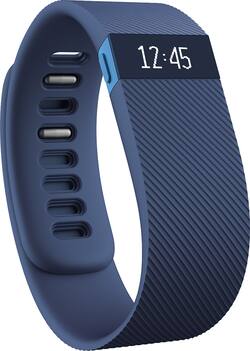
Fitbit - Charge Wireless Activity Tracker + Sleep Wristband (Large) - Blue
- Key Specs
- Operating System Compatibility: Android, Apple iOS, Windows
- Global Positioning: None (A system of satellites which enables a mobile receiver to determine its precise location based on signals received from satellites such as the US Global Positioning System (GPS), the Russian Global Navigation Satellite System (GLONASS), the European Global Navigation Satellite System (Galileo), or the Japanese Quasi-Zenith Satellite System (QZSS).)
- Metrics Measured: Activity vs. inactivity, Calories burned, Distance traveled, Pace, Sleep quality, Stairs climbed, Steps taken
- Maximum Depth of Water Resistance: 0 feet (Measurement of the maximum depth of water in which the product is able to resist some degree of water penetration.)
- General
- Product Name: Charge Wireless Activity Tracker + Sleep Wristband (Large)
- Brand: Fitbit
- Product Type: Activity tracker
- Form Factor: Wristband (The size, arrangement, and physical configuration of the product.)
- Model Number: FB404BUL
- Display
- Display Screen: false
- Clock Display: true
- Compatibility
- Operating System Compatibility: Android, Apple iOS, Windows
- Features
- Global Positioning: None (A system of satellites which enables a mobile receiver to determine its precise location based on signals received from satellites such as the US Global Positioning System (GPS), the Russian Global Navigation Satellite System (GLONASS), the European Global Navigation Satellite System (Galileo), or the Japanese Quasi-Zenith Satellite System (QZSS).)
- Activity
- Metrics Measured: Activity vs. inactivity, Calories burned, Distance traveled, Pace, Sleep quality, Stairs climbed, Steps taken
- Performance
- Maximum Depth of Water Resistance: 0 feet (Measurement of the maximum depth of water in which the product is able to resist some degree of water penetration.)
- Dimensions
- Product Width: 0.83 inches (The out of box width of the item. Width is measured as the horizontal distance from one side of the item to the other as it would be primarily used or placed.)
- Product Length: 9 inches (The out of box length of the item. Length is measured as the longest dimension of the item.)
- Power
- Rechargeable: true
- Battery Strength Indicator: true
- Charging Interface(s): Other (The connection for transmitting power to charge the device.)
- Other
- UPC: 810351021643
Monitor your activity with this Fitbit Charge FB404BUL wireless wristband, which tracks your steps taken, distance traveled, calories burned, stairs climbed, pace, active minutes and more to help you achieve your fitness goals.
- Accurately tracks number of steps taken, stairs climbed and calories burned: Plus distance traveled, active minutes, elapsed time and pace, so you can achieve your fitness goals throughout the day.
- Monitors sleep metrics: Including how long and how well you sleep, so you can keep an eye on your patterns. The silent vibrating alarm gently wakes you up.
- Receive call notifications from your wrist: When paired with an enabled smartphone, so you can stay on top of important events.
- Wireless syncing: Works with select computers and select Android, iOS and Windows devices, so you can wirelessly and automatically send your statistics to your devices.
- Bright OLED screen: Allows you to clearly see your activity data and the current time of day.
Whats Included
- Charge Wireless Activity Tracker + Sleep Wristband (Large)
- Owner's manual
Q: Charger?
A: The Fitbit Charge comes with its own proprietary charger, unique only to this device. If lost, it can be purchased on the company's website. It is a real short cord, like 5 or 6 inches. One end had a USB 2.0 connection and the other end is the proprietary connection to the device itself. You can plug the USB end to your computer or a wall adaptor that had USB port on it. One full charge does indeed last a whole week, unless you are checking the stats on your device a lot. The Fitbit app on your phone will tell you your device's approximate battery charge remaining.
Q: Clock?
A: Yes! There is a button on the side of the screen where you can click through time of time, steps taken, stairs climbed, etc.
Q: How do you determine which size to purchase if you're buying on line?
A: I got a Large and love it.cause u can adjust it and make it tight or lose i like it more lose but some times i like it tight
Q: Compatible with Apple products - computers and phones?
A: It works with iPhone 5, 5s, and 6 for sure; not sure about other Apple products. Does not work with Apple health app however.
Q: wrist size
A: Go to the manufacturer website and there is more detail about the sizing. If you can get to a BB store, there is a scale on the box you can lay your wrist on to be sure of size.
Q: How does the sleep tracker work; and how accurate is it?
A: It depends on a couple factors: which wrist you wear it on (non dominant hand is set to be more sensitive to movement vs dominant hand, and how much you move when you're sleeping) Overall its accurate enough to get an idea of how much good sleep you got
Q: how do you reset the time on a fitbit charge
A: 1Plug your charging cable into the USB port and insert the other end into the port on the back of your Charge. Your Charge will begin charging. 2Press and hold the button for 10 to 12 seconds until you see the Fitbit icon and a version number (e.g. "V30"). 3Let go of the button. 4Unplug your tracker from the charging cable.
Q: What is the difference between Fitbit charge HR and the Surge
A: The surge has a built in GPS and can also track your walks and runs and plot them on a map which is great for runners. Besides the GPS, both do almost the same exact things and work on using the fitbit app.


















