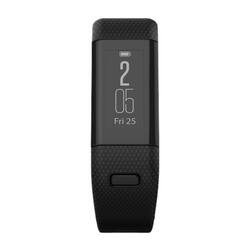
Garmin - Approach X40 GPS Watch - Gray/Black
- Key Specs
- Touch Screen: true (Touch-screen devices make navigating more intuitive. Using a touch-screen display, you can do things such as tap to select, hold and drag to move items, swipe to scroll, and pinch to zoom.)
- Operating System Compatibility: Android, Apple iOS
- App Compatible: true (The product can be connected to a program or software application on a mobile device, which then receives collected data from the product.)
- Global Positioning: GPS (A system of satellites which enables a mobile receiver to determine its precise location based on signals received from satellites such as the US Global Positioning System (GPS), the Russian Global Navigation Satellite System (GLONASS), the European Global Navigation Satellite System (Galileo), or the Japanese Quasi-Zenith Satellite System (QZSS).)
- Metrics Measured: Activity vs. inactivity, Calories burned, Distance traveled, Resting heart rate, Pace, Steps taken
- Protective Qualities: Water resistant
- Maximum Depth of Water Resistance: 164 feet (Measurement of the maximum depth of water in which the product is able to resist some degree of water penetration.)
- Band Material: Other
- General
- Product Name: Approach X40 GPS Watch
- Brand: Garmin
- Product Type: Activity tracker
- Form Factor: Wristband (The size, arrangement, and physical configuration of the product.)
- Model Family: Garmin Approach X40
- Model Number: 010-01513-00
- Year of Release: 2016
- Color: Gray/Black
- Design
- Band Type: Adjustable
- Band Color: Gray
- Clasp Type: Buckle
- Display
- Display Screen: true
- Touch Screen: true (Touch-screen devices make navigating more intuitive. Using a touch-screen display, you can do things such as tap to select, hold and drag to move items, swipe to scroll, and pinch to zoom.)
- Display Type: LCD
- Color Display: false
- Clock Display: true
- Backlit Display: false (Integrated lights allow for visibility of the display in low-light conditions.)
- Compatibility
- Operating System Compatibility: Android, Apple iOS
- App Compatible: true (The product can be connected to a program or software application on a mobile device, which then receives collected data from the product.)
- Connectivity
- Wireless Connectivity: Bluetooth (The manner in which a device sends data to another device over a short distance without the use of wires or cables.)
- Features
- GPS Enabled: true
- Global Positioning: GPS (A system of satellites which enables a mobile receiver to determine its precise location based on signals received from satellites such as the US Global Positioning System (GPS), the Russian Global Navigation Satellite System (GLONASS), the European Global Navigation Satellite System (Galileo), or the Japanese Quasi-Zenith Satellite System (QZSS).)
- Mobile Notifications: true
- Alert Type: Vibration, Visual
- Silent Alarm: true
- Activity
- Metrics Measured: Activity vs. inactivity, Calories burned, Distance traveled, Resting heart rate, Pace, Steps taken
- Multi-Sport Tracking: false
- Sensors: Accelerometer (Detects stimuli such as heat, light, sound, motion, or pressure and responds accordingly by operating a control or initiating a function of the device.)
- Performance
- Protective Qualities: Water resistant
- Maximum Depth of Water Resistance: 164 feet (Measurement of the maximum depth of water in which the product is able to resist some degree of water penetration.)
- Dimensions
- Product Width: 0.8 inches (The out of box width of the item. Width is measured as the horizontal distance from one side of the item to the other as it would be primarily used or placed.)
- Product Length: 0.83 inches (The out of box length of the item. Length is measured as the longest dimension of the item.)
- Minimum Wrist Size: 127 millimeters
- Maximum Wrist Size: 203.2 millimeters
- Power
- Rechargeable: true
- Battery Strength Indicator: true
- Charging Interface(s): Other (The connection for transmitting power to charge the device.)
- Replaceable Battery: false
- Material
- Band Material: Other
- Other
- UPC: 753759153519
Improve your golfing skills with this Garmin Approach band. It has automatic shot tracking, which measures shot distances and auto-records detected shots, and its Elevate technology lets you track your heart rate, steps taken, distance and calories burned. Receive calls, texts and alerts with the vibrating smart notifications of this Garmin Approach band.
- Measures heart rate and calories burned: To help you monitor multiple fitness activities.
- Touch-screen LCD display: Delivers clear visual readouts.
- Delivers accurate, reliable location info: High-sensitivity GPS receiver.
- Waterproof design: Offers comfort and durability to support an active lifestyle.
- Built-in rechargeable lithium ion battery: Offers up to 10 hours of use on a full charge.
Whats Included
- Data/charging clip
- Garmin Approach X40 GPS Watch
Q: Does it even have a time display? Can it just be used for a watch when not on the course?
A: Yes it does have a time display, a little awkward displaying the two digit hour above the two digit minute. Once you get used to it, its fine. The only thing I do not like about it, is the wristband is kind of small. Wish Best Buy would sell the XL version with the larger wristband. I do not need all the graphics bling of some other golf watches and I did not want anything bulky and clunky on my wrist as I was playing. I have already recommended this to a couple of my friends
A: Here is a get started video: https://www.youtube.com/watch?v=uAOIBTp7iJE&feature=youtu.be For more information contact us at [email protected] or visit our Support Center, https://support.garmin.com/en-US/ Thanks Jenny
A: This device does have activity tracking. It is not compatible with live tracking, so it will not provide the GPS coordinates live. For more information contact us at [email protected] or visit our Support Center, https://support.garmin.com/en-US/ Thanks Jenny
A: Hi Lucky, You can change or view the units for distance on the device from the Main Menu, then selecting the Gear Icon, then System, then Units. This can also be found on page 6 of the Owner's Manual. http://static.garmin.com/pumac/Approach_X40_OM_EN.pdf
Q: I can’t even figure out how to get ENGLISH
A: Hello, Being in a different language can be challenging to get back into English. Could you please submit an email to our support group at [email protected].
Q: Does it vibrate or chime for incoming text or calls
A: Hi Geo, Yes, the Approach x40 will vibrate when you get incoming text or call. Thanks Chris














