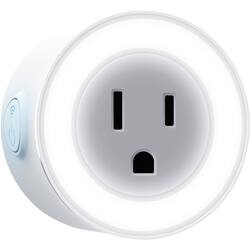
Geeni - Wi-Fi Smart Plug & Nightlight - White
- Key Specs
- Indoor or Outdoor Use: Outdoor
- Installation Type: Replacement
- General
- Product Name: Wi-Fi Smart Plug & Nightlight
- Brand: Geeni
- Model Number: GN-WW108-199
- Color: White
- Power
- Voltage: 120 volts (Amount of power needed to support an electrical current.)
- Number Of Switches: 1
- Features
- Indoor or Outdoor Use: Outdoor
- Compatibility
- Installation Type: Replacement
- Dimensions
- Product Height: 1.3 inches (The out of box height of the item. Height is measured as the vertical distance from the bottom of the item to the top as it would be primarily used or placed.)
- Product Width: 1.3 inches (The out of box width of the item. Width is measured as the horizontal distance from one side of the item to the other as it would be primarily used or placed.)
- Product Length: 1.4 inches (The out of box length of the item. Length is measured as the longest dimension of the item.)
- Other
- UPC: 844702074521
Control a device remotely with this Geeni smart plug. It has built-in Wi-Fi and doesn't need to connect with a hub, and you can control it with the Geeni app or a voice assistant. This Geeni smart plug has an LED night-light that casts a soft glow in a room or hallway.
- Control any plug in device from anywhere using the Geeni app: No hub required, Wi-Fi is built-in.
- Wireless technology: Makes it easy to connect to devices from the other side of the home or office.
- Built in LED night light: Night time navigation to bathroom or kitchen has never been safer.
Whats Included
- Geeni Wi-Fi Smart Plug & Nightlight
A: Hi Vin! All Geeni Devices will only work for 2.4 GHZ for best performance and functionality. The 2.4 GHz band provides coverage at a wider range. and 5 GHz band provides less coverage because it cannot penetrate solid objects, such as walls and floors. If your Wi-Fi is set to 5Ghz, you can actually change it to 2.4Ghz by accessing your Graphic User Interface (GUI). In addition, if your router is on dual band (combination of 2.4Ghz and 5Ghz), they need to be separated so you can access the 2.4Ghz connection only. If you don't know how to access your GUI, we're advising you to contact you're internet service provider and request to change it for you. While for dual-band routers, your service provider will separate the 2.4GHz to 5.0GHz for them to have different SSID. If you have any issues moving forward, please let us know as we’re here to help. Feel free to contact our revamped support channels via email at [email protected] or call us at +1 (888) 232-3143, available from Mon-Sun, 7:00 AM to 12:00 Midnight EST.

















