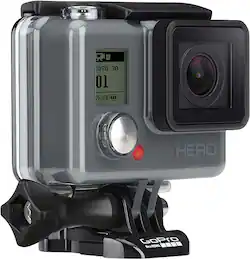
GoPro - HERO HD Waterproof Action Camera - Gray
- Key Specs
- Effective Pixels: 10 megapixels (The actual number of pixels which make up the viewable image.)
- General
- Product Name: HERO HD Waterproof Action Camera
- Brand: GoPro
- Model Number: GoPro Hero HD
- Color: Gray
- Imaging
- Image Sensor Type: CMOS (CCD and CMOS are the two main technologies used in image sensors. CCD, the older of the two types, turns analog light signals into digital pixels. This conversion happens without distortion, resulting in high-quality images. Newer CMOS sensors use transistors at each pixel to move electrical charges. CMOS sensors are typically less expensive, but also require more light to create distortion-free images.)
- Image Resolution (Display): 1080 (Refers to the number of pixels, both horizontally and vertically, used to either capture an image or display it. The higher the resolution the finer the image details.)
- Digital Zoom: None (A digital zoom is accomplished electronically, with no adjustment of the camera's optics, and no optical resolution gained in the process. The existing data is not enhanced or added to, merely displayed at a lower resolution, thereby giving an illusion of an enlarged image.)
- Optical Zoom: None (The optical zoom uses a combination of lenses that magnify the image prior to it being registered at high resolution by the imaging sensor.)
- Image Stabilization: None (This feature helps reduce image/video blur or distortion that may occur from unsteady motion.)
- Low Light/High Sensitivity: true (High sensitivity digital imaging devices are designed to work in low light conditions to produce a high dynamic range image.)
- Image File Format(s): JPEG (Standardized software format(s) of storing digital images. The type of format chosen for capturing and compressing the image can determine quality, level of detail, and storage space required.)
- Exposure Control
- Maximum Aperture: f/2 (The limit to how wide a lens can be open, typically expressed in f-numbers. The smaller the number, the larger the aperture and the more light that can enter the lens. A larger aperture creates a shallower depth of field, helpful for keeping subjects in focus and blurring background details.)
- Effective Pixels: 10 megapixels (The actual number of pixels which make up the viewable image.)
- Display
- Display Type: Other
- Screen Size: 0.5 inches (Size of the screen, measured diagonally from corner to corner.)
- Aspect Ratio: 16:9 (The measurement of the width of a screen compared to the height of a screen, expressed as a ratio.)
- Touch Screen: false (Touch-screen devices make navigating more intuitive. Using a touch-screen display, you can do things such as tap to select, hold and drag to move items, swipe to scroll, and pinch to zoom.)
- Video
- Video Encoding Formats: MP4 (The process of preparing the video for output, where the digital video is encoded to meet proper formats and specifications for recording and playback with the use of a compatible device.)
- Compatibility
- Memory Card Compatibility: microSD (The type of memory card(s) recommended for use with the product.)
- Features
- Wind Noise Reduction: false (If you take a lot of outside videos, in windy conditions, you'll need to make sure you have wind noise reduction on your camcorder. It does just what it says it does, cuts down the noise of the wind as it hits the microphone.)
- Connectivity
- Wireless Connectivity: None (The manner in which a device sends data to another device over a short distance without the use of wires or cables.)
- Output(s): USB, USB 2.0
- Microphone Type: Built-in
- Power
- Rechargeable Battery: true
- Battery Size: Other (The battery size required for operation.)
- Included
- Batteries Included: true (Indicates whether the product comes with the required batteries for its operation.)
- Memory Card Included: false (Indicates whether a memory card is included.)
- Dimensions
- Product Height: 13 inches (The out of box height of the item. Height is measured as the vertical distance from the bottom of the item to the top as it would be primarily used or placed.)
- Product Width: 4.06 inches (The out of box width of the item. Width is measured as the horizontal distance from one side of the item to the other as it would be primarily used or placed.)
- Product Weight: 0.83 pounds (The out of box weight of the item.)
- Other
- UPC: 818279012262
GoPro HERO HD Waterproof Action Camera: Capture footage of your adventures in HD with this waterproof action camera from GoPro. GoPro's wearable, mountable design makes it easy to capture the action from your unique first-person perspective. The GoPro HERO HD waterproof camera's user-friendly video modes like QuikCapture, SuperView, and Auto Low Light make it easier to achieve professional-quality video. 
- Capture high-quality video: With resolutions of 1080p30, 960p30 and 720p60 for crisp, smooth footage.
- Ultrawide angle glass lens captures an expansive field of view: For stunning videos and photos. Ultrawide, medium and narrow field-of-view options allow you to select your perspective.
- Shoot low-light scenes without having to adjust settings: Auto Low Light mode intelligently changes frame rates based on lighting conditions for optimal low-light performance.
- 5.0MP photo resolution: Allows you to take clear photographs. Hold down the shutter button for burst shooting up to 5 fps (frames per second) to capture fast-action sequences.
- Turn your camera on and begin recording with the touch of a single button: QuikCapture one-touch activation ensures you get the shot even when things happen fast.
- Take great shots even from the car: Spot meter is ideal when you are in a dark space pointing the camera toward a brighter scene.
- Standard waterproof housing: This GoPro HERO HD Waterproof Camera is waterproof down to 131' when enclosed in housing.
- Wearable, mountable design lets you catch all the action from the first-person perspective: Record the action as it happens — hiking, biking, skiing, boating and more.
- Record crisp, clear audio: Built-in microphone records with minimal distortion and a high dynamic range.
- microSD slot: Supports select cards for expansive storage capabilities (card not included).
Whats Included
- GoPro HERO HD Waterproof Action Camera
- Built-in battery
- USB cable
- Skeleton backdoor, curved adhesive mount, flat adhesive mount, quick-release buckle
- Owner's manual
Q: Does HERO work as is, or are other items needed?
A: Works great out of the box. You don't need anything else to use it. You will find that over time you may want an accessory or two
Q: Do any of the GoPro Hero cameras have a zoom option?
A: You cannot zoom; however, when you use the GoPro studio software, which is provided for free on the GoPro website, the software does allow you to zoom in/out, slow/speed up footage. The software is very user friendly. If you have any problems with it, YouTube is loaded with tons of editing guide videos and tutorials.
A: It will only hold a 32gb card and does about 4 hours of video give or take a few minutes.
Q: can it go in the ocean/salt water
A: Yes it can! We go snorkeling with it!
Q: What kind of issues? Was thinking about one of these for my son.
A: None, it records great 1080p 30fps video. I can get around 2 hours and 50 minutes of recording time on mine. Plus, this camera can take a beating depending on how active he is. And it's as simple as it gets when it comes to being user friendly.
A: Yes. The videos automatically record all audio. There are (2) doors that come with the camera (these doors protect the back of the camera). One is a solid piece that can be used to waterproof the camera. The other has openings that allows the camera to provide better audio quality, but will not be waterproof. The waterproof door will still record audio, just not with the same quality.
Q: Can this HERO model send live video via an external transmitter?
A: No. This hero model does not have any live video features. Nor can you see what you are recording. To view recordings you must connect to a computer or pop out the MicroSD card to download the video files for review.
Q: Is there a PAUSE option, or do you have to STOP and START a new video?
A: GoPro cameras do not allow you to pause video. You have continuous playback. Pushing the shutter button begins and stops recording for that clip. The next time it is pressed it starts a new clip (when imported you will see the video clips are named differently), also the front of the camera will inform you how much video you have left in hours and minutes and the large number will indicate the clips you have saved so far (i.e. 5) Clips are broken down into 13-20 minute segments when imported






















