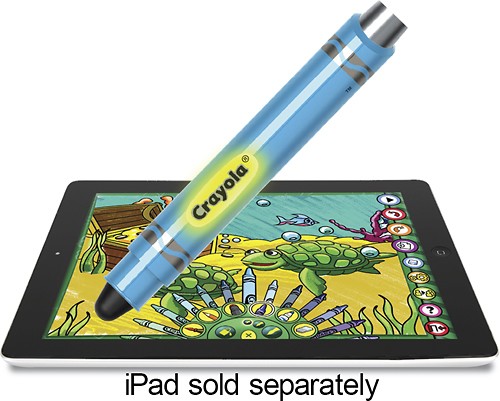

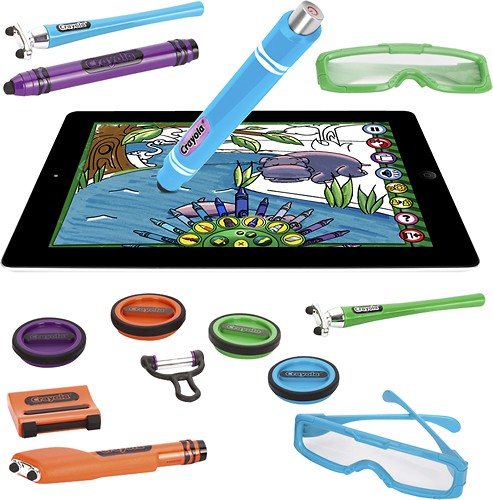

Griffin Technology - Crayola ColorStudio HD for Apple® iPad® - Blue
This item is no longer available in new condition.
See similar items below.
Description
Features
Crayola ColorStudio HD app
Lets you draw and color using your Apple iPad.
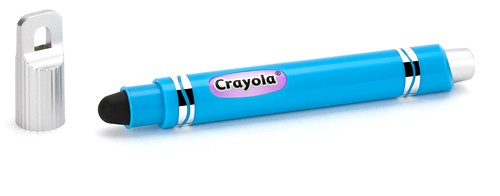
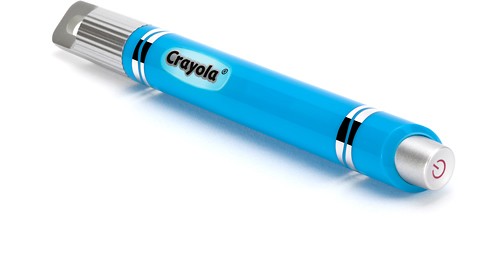
iMarker intelligent digital stylus
Offers the look and feel of a Crayola marker for comfortable use. Touch interaction allows easy navigation and control.
Animated coloring book pages
Feature sound and special effects to help entertain your little one.
Design printable coloring book pages
For even more creative fun.
Share your child's artwork
Via e-mail, Facebook or printing (requires iOS 4.2).
iPad is a trademark of Apple Inc., registered in the U.S. and other countries
What's Included
Griffin Technology Crayola ColorStudio HD for Apple® iPad®
iMarker stylus
Other
- Brand CompatibilityiPad
- UPC685387358830
Customer reviews
Rating 2.9 out of 5 stars with 124 reviews
(124 customer reviews)to a friend
Customers are saying
Customers are impressed with the child-friendly design and mess-free experience of the product. They appreciate that it keeps their children entertained and engaged. However, some customers have expressed concerns about the pressure required to use the pen and the overall difficulty in using the product.
This summary was generated by AI based on customer reviews.
- Cons mentioned:Ease of use
Rated 3 out of 5 stars
Crayola pen needs improvement
||Posted .This reviewer received promo considerations or sweepstakes entry for writing a review.Slightly disappointed that this is not as child friendly as I hoped. You really need to press hard to draw, which can often be discouraging for young children. Also it is too easy to press off while you're just holding it, which is also a source of frustration for young children. The concept is awesome and that they do love.
I would recommend this to a friend Rated 3 out of 5 stars
Could be better
||Posted .This reviewer received promo considerations or sweepstakes entry for writing a review.Our daughter has been wanting to color on her tablet and my wife found this product to use on our iPad. The stylus was not quite up to expectations. With a bit of work, I can get the stylus to work fine, but it struggles at time and the power button does not work at all. The stylus will not turn off, so I imagine the battery will run out shortly and I'm not sure we will replace it.
No, I would not recommend this to a friendRated 3 out of 5 stars
It was a gift
||Posted .This reviewer received promo considerations or sweepstakes entry for writing a review.It was a gift for my niece. So I don't know if she has got around to using it yet.
I would recommend this to a friend- Pros mentioned:App qualityCons mentioned:Pen functionality
Rated 1 out of 5 stars
Barely works - Terrible for kids
||Posted .This reviewer received promo considerations or sweepstakes entry for writing a review.This is such a good concept but fails on most marks. The app is cool and has some good pictures, but the pen itself barely works. You have to push so hard that I'm afraid the tablet screen will crack, and even then it's not guaranteed that the pen will actually leave a mark. What's worse is that on the app there isn't an option to just use your fingers instead of the pen, you have to use the pen, but the pen doesn't work. It's terrible and a real let down.
No, I would not recommend this to a friend - Cons mentioned:Pen functionality
Rated 3 out of 5 stars
Eh
||Posted .This reviewer received promo considerations or sweepstakes entry for writing a review.Seemed like it was going to be fun. But after 5 minutes we found ourselves just using our fingers instead of pen. The pen did work as well as we thought it would.
No, I would not recommend this to a friend Rated 3 out of 5 stars
Great idea but lots of limitations
||Posted .This reviewer received promo considerations or sweepstakes entry for writing a review.App needed is very clunky. The sensitivity of the pen is poor.
No, I would not recommend this to a friend- Cons mentioned:Ease of use
Rated 1 out of 5 stars
Not one I would buy again
||Posted .This reviewer received promo considerations or sweepstakes entry for writing a review.You have to press extremely hard to get it to work and even then it will break up lines in-between trying to draw or color. Too frustrating to try to use. Gave up after multiple attempts.
No, I would not recommend this to a friend Rated 3 out of 5 stars
Odd stylus
||Posted .This reviewer received promo considerations or sweepstakes entry for writing a review.This is definitely an odd stylus. It still confuses me how it works with the app for it but not the rest of the iPad. I don't know why it needs a battery to work at all. It's a great toy for the kids. My brother loves it.
I would recommend this to a friend
Q: Questionwhat size ipad does this fit?
Asked by Anonymous.
- A:Answer The Crayola ColorStudio HD will work with most iPads. However, that item has been discontinued and no longer works properly after the iOS 9 update. Thanks ^ Jen.
Answered by Griffin Technology Q&A

Q: QuestionDoes it work with any iPad?
Asked by Anonymous.
- A:Answer This item will not work with iPads using iOS 9 or greater. However, it may still be compatible with previous versions of iOS. Thanks! ^ Jen.
Answered by Griffin Technology Q&A
Q: QuestionWhat size is it ?
Asked by Paulus.
- A:Answer A coloring book without the mess
Answered by Matt
Most viewed
- $299.00Your price for this item is $299.00$349.00The comparable value for this item is $349.00
- Year End Deal$799.00Your price for this item is $799.00
- $399.99Your price for this item is $399.99$499.99The comparable value for this item is $499.99
- $99.99Your price for this item is $99.99$129.99The comparable value for this item is $129.99
- $531.68Your price for this item is $531.68
- $599.99Your price for this item is $599.99
- $929.99Your price for this item is $929.99$1,099.99The comparable value for this item is $1,099.99
- $799.00Your price for this item is $799.00
- $499.99Your price for this item is $499.99
- $249.00Your price for this item is $249.00$299.00The comparable value for this item is $299.00
- Year End Deal$249.99Your price for this item is $249.99
- $349.89Your price for this item is $349.89$469.89The comparable value for this item is $469.89
- Year End Deal$329.99Your price for this item is $329.99
- Year End Deal$199.99Your price for this item is $199.99
- $599.99Your price for this item is $599.99$899.99The comparable value for this item is $899.99
- $679.99Your price for this item is $679.99$979.99The comparable value for this item is $979.99
- Year End Deal$549.99Your price for this item is $549.99
- $199.99Your price for this item is $199.99
- $499.99Your price for this item is $499.99$849.99The comparable value for this item is $849.99



















