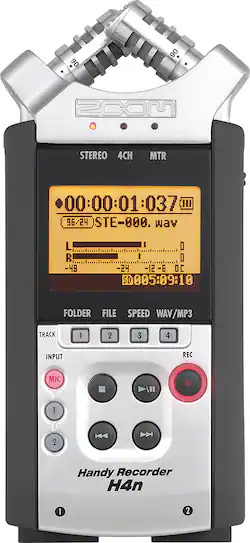
Let's get this out of the way right now: I'm not a "sound guy," and I'm sure that there are many other better (more expensive) options for sound. However, even given my limited budget I am not completely unfamiliar with sound editing. I have been using a Zoom H1 at work for the last couple of years, but I wanted something with a little more oomph for my own projects, so I upgraded to the Zoom H4. I will be comparing the two throughout this review, so bear in mind that I am not coming at this from a completely fresh perspective.
PROS:
Even though the H4 costs nearly twice as much as the H1, they balance out in some ways. For example, they both feature pretty good stereo sound capture from the built-in microphones. They both allow for an external input for recording, and they both allow you to connect a pair of headphones to listen to the sound as you record. If you want, you can use the headphone jack via a male-to-male stereo 1/8" audio cable to connect to a camera's microphone input (I typically use a Canon EOS Rebel T5i). Whereas the H1 only features a single simple stereo input, the H4 also features two XLR microphone connectors which gives it far more versatility. The H4 also features a more active display for greater visual feedback as you record, which is a step up from the H1. More buttons and switches allow you to have more direct control over the quality of your audio when using the H4 instead of the H1. Best of all, if you're just using it to dictate or record conversations, the H4 has a built-in mono speaker for playback, which the H1 lacks. Both the H1 and the H4 can be used as high-quality USB microphones when connected to a PC, just remember to use a pop shield. The H4 has a standard size SDXC card slot, while the H1 only has a micro SDXC slot, which makes it a little more attractive when looking for a blank card to record to (I've been getting a lot use from my old class 4 SDHC cards that are too slow for my DSLR cameras).
CONS:
The H4 is considerably heavier than the H1, which will add more bulk to your recording setup. Even though the H4 takes two AA batteries (as opposed to the H1's single AA), it drains them really quickly -- you'll get more uptime from the H1 even though it uses less power. The flatter, more rectangular shape of the H4 makes wind screens difficult to find, and when you do they don't always fit the best (plus the H1's slimmer profile makes it easier to fit inside a zeppelin enclosure). My biggest complaint about the H4 as opposed to the H1 is that the tripod mount is too shallow -- you can't get enough of the threading into the H4 to give it a stable base. This can be corrected using some washers around the mounting screw, and I suspect it is because the H4 is so jam-packed full of features that they couldn't make the hole any deeper, but it is really inconvenient at times, especially since... the external "line in" port is located on the bottom of the unit. This means that if you want to use a simple wired lapel mic or audio line to record, tripod mounting is pretty much a necessity so that you don't bend the wires or damage the unit. Because there is only one stereo output, if you have the H4 connected directly to a camera you can no longer listen to the audio as you record, which can be a problem (though in fairness, the H1 has this flaw too).
CONCLUSION:
For the nearly $200 I spent on this recorder, I am extremely happy with it. It's considerably more professional than a normal audio recorder, it's a lot easier than lugging a trunk full of professional sound gear out on shoots, it's small enough that you could carry it with you in a backpack or camera bag, and it's much better than using even the best consumer-grade camera's on-board microphone. If you already own the H1 and aren't sure whether to upgrade, it's a toss-up, but if you are looking for your first audio recorder and are trying to decide, I recommend going for the H4.