Outlet EventEnds Oct. 26. Limited quantities. No rainchecks.Shop now

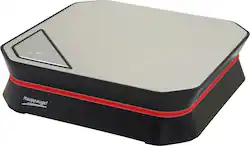
Capture your gaming skills in real time as you play through your favorite video games with this Hauppauge HD PVR 60 1600 USB video recorder, which features 1080p recording resolution for clear visuals. The no-delay pass through minimizes lag time in your recordings.
Customers frequently mention the HD PVR 60 USB Video Recorder's ease of use, with many praising its simple setup and operation. However, video quality is a recurring concern, with some users reporting issues such as image fragmentation, pixelation, and occasional skips in recordings. The software's performance is also mentioned as an area needing improvement. Overall, the product receives mixed reviews regarding its video recording capabilities.
The vast majority of our reviews come from verified purchases. Reviews from customers may include My Best Buy members, employees, and Tech Insider Network members (as tagged). Select reviewers may receive discounted products, promotional considerations or entries into drawings for honest, helpful reviews.
Before I dive into my review of the product, allow me to explain what I mean by "budget capture card". (Anything sub $120.00) Now that I've gotten that out of the way I'll begin my review. I've had tons of experience with Hauppauge capture devices over the years using the HD PVR 2 as my "daily driver" capture card to record footage for my Youtube Gaming Channel. Hardware: The hardware is fairly small (3.2 x 7.5 x 8 inches) and doesn't take up too much space. It's sleek with a silver finish across the top with that actually looks pretty nice. I was skeptical about the color scheme at first but it works well with the black finish around the device. To my surprise there is a blue LED strip that lights up when the device is powered and during recording. It looks great! Also, there's a push-to-record button at the top corner edge to trigger recording if you're unable to get to your computer. Just press the button and the recording process begins instantly. The rear I/O of the device has three ports, an HDMI IN (from the source) HDMI OUT (to connect to your TV) and a USB port. Setup: The HD PVR 60 setup process is a breeze (as with the HD PVR 2) and can be done in as little as two minutes. Just connect the provided USB cable to the device along with your HDMI cable to the "HDMI IN" slot, download the Hauppauge Capture software and you're good to go! There is no power cable to connect as the device is powered from your computer's USB port. (this is extremely practical and a welcomed change as the older devices included a bulky ac adapter.) Software The Hauppauge Capture Software is streamlined and user friendly. Its very simple to use! The video quality settings, microphone input levels, game sound levels, and face cam settings are all located on the main screen for easy access. In addition the tabs across the top of the program allow for easy video editing, streaming and uploading to Youtube. There is also an option for skip back recording which I rarely use but it's useful if you're playing a game and forget to hit record. Bottom line is it just gets the job done. There are other 3rd party applications that are compatible with the PVR 60 but I won't mention them in this review. The software allows you to export recordings in MP4, MT2S and TS formats. It is also can capture video at a bitrate of up to 16Mbps and 48k audio at 384kbps. I find the software extremely simple to use. It just works! Video Quality The video quality of the card captures is quite impressive. It uses a H.264 AVCHD high definition video encoder, which allows recording resolutions to 1080p 60 frames per sec at up to 16mbps. Simply put, the recording a crystal clear, crisp and super smooth! The image quality will rival any non PCIE capture cards. Personally, I record gameplay at a constant 16Mbps bitrate and capture about ten minutes of gameplay at at a time. The file sizes range anywhere from 4GB -5GB per file. (NOTE: this can be easily adjusted for lower file sizes by adjusting the bitrate. I just wanted to give you an example of file sizes to obtain the best possible image quality) Cons Despite the many things that I love about this card, there are a handful of negatives that I must list here because this card/software are not 100% perfect. - The software (or hardware) sometimes disconnects after long periods of continuous recording. Could be a USB connectivity issue or perhaps overheating? Or Firmware? I'm not really sure - Image quality sometimes appears fragmented or pixelated. To be fair this has only happened once so it may be an anomaly but still it's worth mentioning. - 16Mbps bitrate recording. This is just my personal preference but I'd like to see this a bit higher. I've seen other competitors cards offer bitrates up into the 20's and I'd like to see this product up into that range as well. Conclusion This is an amazing product that I highly recommend! Image quality is great, sound is great, and despite a few cons its still an amazing capture card. Especially at this price point. You won't be disappointed.
Posted by conceptual23
The Hauppauge is a great card, very easy to set up. The only issues we have from it is the inability to work with OBS to stream, which could change in the future. The internal streaming from Hauppauge is also very slow and lacks the ability to change many settings and manipulate your stream the way you want. Capture works perfectly. Overall, a good system to work with.
Posted by Mercy0kay
Works great for capturing 1080P @ 60fps game-play from Xbox or other gaming consoles. Clarity of video and audio is crisp and clean, and the RAW MP4 file formats rendered are compatible with Samsung Galaxy smartphones, allowing you to upload them straight to your phone. FaceCam and SkipBack are also great features provided by the bundled software available for the HDPVR60, although, the FaceCam does demand quite a bit of resources from your PC to function properly. I do not use FaceCam as I have an older i7 1.6GHz Quad core laptop used to capture, and running FaceCam pegs my CPU at 100% when enabled. I have been using Hauppauge! capture devices for 8 years and this one does not disappoint, allowing me to go a step higher than 1080i at 30fps for a much smoother and increased image quality video file. Well worth the price!
Posted by cyberty62












