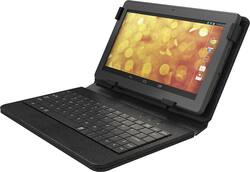
Hipstreet - 10" – 16GB - with Keyboard - Black
- Key Specs
- Screen Size: 10 inches (Size of the screen, measured diagonally from corner to corner.)
- Screen Resolution: 1024 x 600 (Screens come in a range of resolutions (measured in pixels, horizontal x vertical). The higher the resolution, the greater the picture quality.)
- Processor Model: A9 (Your computer's processor is like its brain. Working in combination with system memory, the power of the processor determines the complexity of software you can run, how many programs you can have open at the same time, and how fast those programs will run. Most computers feature an AMD, Intel or Snapdragon processor.)
- General
- Product Name: 10" – 16GB - with Keyboard
- Brand: Hipstreet
- Model Number: HS-10DTB12-16GB
- Display
- Display Type: LCD
- Screen Size: 10 inches (Size of the screen, measured diagonally from corner to corner.)
- Screen Resolution: 1024 x 600 (Screens come in a range of resolutions (measured in pixels, horizontal x vertical). The higher the resolution, the greater the picture quality.)
- Processor
- Processor Model: A9 (Your computer's processor is like its brain. Working in combination with system memory, the power of the processor determines the complexity of software you can run, how many programs you can have open at the same time, and how fast those programs will run. Most computers feature an AMD, Intel or Snapdragon processor.)
- Memory
- System Memory (RAM): 1 gigabytes (Random-access memory (RAM) is a computing device's short-term data storage, which allows active information to be accessed quickly. The size and type of RAM determines how efficiently the device can handle large amounts of information at one time. For example, gaming or video editing requires more RAM for optimal performance.)
- Connectivity
- Headphone Jack: true (The device features an interface that allows for the connection of headphones.)
- GPS Enabled: true
- Data Plan Required: false
- Camera
- Front-Facing Camera: true
- Front Facing Camera Megapixels: 0.3 megapixels (The more megapixels, the more detail that the camera facing the user can capture.)
- Rear-Facing Camera: true
- Rear Facing Camera Megapixels: 2 megapixels (The more megapixels, the more detail that the camera facing away from the user can capture.)
- Certifications Listings & Approvals
- ENERGY STAR Certified: false (Devices carrying the ENERGY STAR service mark, such as computer products and peripherals, kitchen appliances, and other products, generally use 20% to 30% less energy than required by federal standards.)
- Included
- Included Software: Google Play store, Google Maps, Google Now
- Other
- UPC: 628905020314
Enjoy videos and Web content in crisp detail with this Hipstreet Phoenix HS-10DTB12-16GB tablet's 10" TFT-LCD touch screen, which offers sharp images and makes navigation easy. The included Bluetooth keyboard case enables simple, comfortable typing.
- Android 4.4 KitKat operating system: Allows you to stay connected and productive on the go.
- 10" TFT-LCD touch screen with 1024 x 600 resolution: Simplifies navigation of features and content and delivers clear images.
- 16GB storage capacity: Provides ample space for music, videos, photos, apps and other content.
- Quad-core processor: A9 processor with 1.6GHz processor speed and 1GB RAM for optimal performance.
- Wi-Fi 802.11b/g/n network: Makes it easy to connect to the Web, so you can stream content, access social media, check e-mail and download apps.
- Bluetooth interface: Enables simple wireless pairing with compatible devices.
- 2.0MP rear-facing camera: Captures sharp photos and videos. The 0.3MP front-facing camera allows you to shoot self-portraits and movie clips.
- microSD slot: Allows storage expansion up to 32GB with a compatible card (not included).
- Multicore graphics processor: For lush visuals. HDMI output enables easy connection to an HDTV or other high-definition display, so you can enjoy images with up to 1080p resolution.
- Google Play: Offers access to a variety of useful and entertaining apps. Google Now, Hipstreet support, KOBO and other preloaded apps for enhanced functionality.
- Micro USB 2.0 port: For simple connectivity.
- Bluetooth keyboard case: Lets you type comfortably.
Whats Included
- AC adapter, USB charging cable
- Bluetooth keyboard case
- Hipstreet 10" – 16GB - with Keyboard
- Lithium-polymer battery (6000 mAh)
- Owner's manual
A: The keyboard is embedded into the case. The keyboard is Bluetooth, and there is no wire. You just need to pair it to the tablet and it will work wireless. It charges via a usb cable that comes with the tablet. Usually I will slip the tablet into the case, stand it up and then start typing. The keyboard has an off/on switch to turn the keyboard on and off to conserve the keyboards battery life.
Q: is this item Adobe Flash Compatible
A: This tablet is NOT Adobe Flash compatible, however this is a capability related to the Android OS. Any videos available online through an Android OS today are in HTML5 format and this can be played/viewed with this tablet. Yes you can play Candy Crush & Stream online videos as well. As this tablet is Google Certified, you can download lots of cool apps from the Google Play Store and get connected to watch videos.
Q: Can this run microsoft word , excel , and powerpoint?
A: Yes, this tablet can run Word , Excel and Powerpoint. You need to download the apps from Google play.
Q: can i return this product to the store?
A: yes Best Buy has an easy return policy
Q: What kind of charger does this use?
A: The Hipstreet Phoenix 10" tablet can charge with either a standard Micro USB or 5V 2A pin barrel charger, but you will get a faster recharge with the 5V charger. For charging the keyboard, there is a standard USB cable provided to allow charging when connected to a USB port like that of your computer. A user can also use a standard Micro USB charger to recharge the keyboard.
Q: does this tablet have an octa core graphics processor?
A: The Hipstreet Quad Core Phoenix 10" tablet has a 1024x600 display that uses a Mali-450 processor.
Q: how do i get the keyboard to work
A: You have to pair the keyboard to the tablet, you have to go into the settings and enable bluetooth, then turn on the keyboard and press connect. It should show up on the tablets screen as a device. You will then need to pair it with the tablet, I believe it asks you to type in a sequence of characters and then it will be paired with the keyboard each time you turn it on (assuming you leave bluetooth enabled).
Q: How much internal memory actually available>?
A: This tablet is not clogged up with pre-loaded apps. You can get everything you want at Google Play yourself.


















