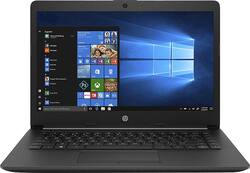
HP - 14" Laptop - AMD A4-Series - 4GB Memory - 500GB Hard Drive - Jet Black, Mesh Knit Pattern With Textured Surface
- Key Specs
- Screen Type: Widescreen LED
- Screen Size: 14 inches (Size of the screen, measured diagonally from corner to corner.)
- Screen Resolution: 1366 x 768 (HD) (Screens come in a range of resolutions (measured in pixels, horizontal x vertical). The higher the resolution, the greater the picture quality.)
- Touch Screen: false (Touch-screen devices make navigating more intuitive. Using a touch-screen display, you can do things such as tap to select, hold and drag to move items, swipe to scroll, and pinch to zoom.)
- Processor Model: AMD A4 (Your computer's processor is like its brain. Working in combination with system memory, the power of the processor determines the complexity of software you can run, how many programs you can have open at the same time, and how fast those programs will run. Most computers feature an AMD, Intel or Snapdragon processor.)
- Storage Type: HDD
- Total Storage Capacity: 500 gigabytes
- System Memory (RAM): 4 gigabytes (Random-access memory (RAM) is a computing device's short-term data storage, which allows active information to be accessed quickly. The size and type of RAM determines how efficiently the device can handle large amounts of information at one time. For example, gaming or video editing requires more RAM for optimal performance.)
- Backlit Keyboard: false (Integrated lights allow for visibility of the keys in low-light conditions.)
- General
- Product Name: 14" Laptop - AMD A4-Series - 4GB Memory - 500GB Hard Drive
- Brand: HP
- Model Number: 14-CM0020NR
- Display
- Screen Type: Widescreen LED
- Screen Size: 14 inches (Size of the screen, measured diagonally from corner to corner.)
- Screen Resolution: 1366 x 768 (HD) (Screens come in a range of resolutions (measured in pixels, horizontal x vertical). The higher the resolution, the greater the picture quality.)
- Touch Screen: false (Touch-screen devices make navigating more intuitive. Using a touch-screen display, you can do things such as tap to select, hold and drag to move items, swipe to scroll, and pinch to zoom.)
- Processor
- Processor Brand: AMD
- Processor Model: AMD A4 (Your computer's processor is like its brain. Working in combination with system memory, the power of the processor determines the complexity of software you can run, how many programs you can have open at the same time, and how fast those programs will run. Most computers feature an AMD, Intel or Snapdragon processor.)
- Processor Model Number: A4-9125
- Storage
- Storage Type: HDD
- Total Storage Capacity: 500 gigabytes
- Hard Drive Capacity: 500 gigabytes (The amount of data that can be stored on the device's mechanical hard drive. Hard disk drives (HDDs) typically have larger capacities than solid state drives (SSDs) but may have slower speeds.)
- Hard Drive Interface: SATA (Connects the hard drive to the host system for transferring data between the hard disk cache and system memory. IDE and SATA interfaces are primarily used for personal computing, while larger servers and workstations typically use SAS or SCSI.)
- Hard Drive RPM: 5400 revolutions per minute (A hard drive's data is stored on disks, or platters, that spin while transferring information to the host system. The higher the RPM, the faster the hard drive's performance.)
- Hard Drive Accelerator: None (A module integrated (or added) into a PC to improve performance speed. By acting as a high-speed cache, an accelerator speeds up access times to the hard drive, which results in faster web browsing, improved gaming experience, and overall more responsiveness.)
- Memory
- System Memory (RAM): 4 gigabytes (Random-access memory (RAM) is a computing device's short-term data storage, which allows active information to be accessed quickly. The size and type of RAM determines how efficiently the device can handle large amounts of information at one time. For example, gaming or video editing requires more RAM for optimal performance.)
- Type of Memory (RAM): DDR4 SDRAM (Each type of RAM delivers a different level of speed, bandwidth, energy efficiency and performance.)
- System Memory RAM Speed: 1866 megahertz (How fast the information-storing hardware operates. The faster the RAM, the faster memory can be transferred to other system components. Ultimately, faster RAM improves operational efficiency.)
- Compatibility
- Operating System: Windows 10 Home (The operating system manages all software and hardware, including files, memory and connected devices. Most importantly, it lets you interact with your device and your programs in a visual way; otherwise, you'd be typing computer code to get anything done.)
- Operating System Architecture: 64-bit (An operating system (OS) manages computer hardware, software resources, and programs in conjunction with the system's processor. 64-bit operating systems can handle more data at once than 32-bit systems, resulting in faster speeds, more effiency, and overall improved performance.)
- Connectivity
- Headphone Jack: true (The device features an interface that allows for the connection of headphones.)
- Ethernet Card: 10/100/1000 (Also known as an Ethernet adapter, this card plugs into a computer's motherboard and enables it to access an Ethernet network. Ethernet data transmission speeds are measured in Mbps (megabits per second) and Gbps (gigabits per second). For example, a 10/100 Ethernet port transmits 10 and 100 Mbps, while a 10/100/1000 Ethernet port transmits 10 and 100 Mbps and has a maximum speed of 1000 Mbps (1 Gbps).)
- Power
- Battery Cells: 3-cell
- Camera
- Front-Facing Camera: true
- Features
- Backlit Keyboard: false (Integrated lights allow for visibility of the keys in low-light conditions.)
- Touchpad Type: Multi-touch, with gesture support
- Media Card Reader: true (A hardware device that allows for access to data on a memory card and enables the transfer of its files to a computer. These devices may have one or multiple slots for various types of memory cards, and may be integrated into the computer or available as an external device.)
- Speaker Type: Stereo speakers
- Dimensions
- Product Height: 0.8 inches (The out of box height of the item. Height is measured as the vertical distance from the bottom of the item to the top as it would be primarily used or placed.)
- Product Width: 13.2 inches (The out of box width of the item. Width is measured as the horizontal distance from one side of the item to the other as it would be primarily used or placed.)
- Product Depth: 9.2 inches (The out of box depth of the item. Depth is measured as the distance from the front of the item to the back as it would be primarily used or placed.)
- Certifications Listings & Approvals
- ENERGY STAR Certified: true (Devices carrying the ENERGY STAR service mark, such as computer products and peripherals, kitchen appliances, and other products, generally use 20% to 30% less energy than required by federal standards.)
- EPEAT Qualified: false (The Electronic Product Environmental Assessment Tool (EPEAT) was designed to provide an environmental assessment tool for purchasers. In order to qualify for EPEAT, a product must meet all 23 required criteria.)
- Included
- Included Software: HP Support Assistant, HP Games Powered by WildTangent, Netflix, McAfee LiveSafe, Dropbox, HP Audio Switch, HP JumpStart and HP Connection Optimizer
- Other
- UPC: 193424600618
HP Laptop:Work effectively in meetings or while traveling with this HP laptop computer. The AMD Radeon R3 graphics card provides smooth motion for applications, while the AMD A4-9125 dual-core processor delivers high-speed performance. This HP laptop computer has 500GB of storage space for holding media, documents and data, while the 14-inch screen ensures contents are easy to see.
- Windows 10 operating system: Windows 10 brings back the Start Menu from Windows 7 and introduces new features, like the Edge Web browser that lets you markup Web pages on your screen. Learn more ›
- 14" display: BrightView glossy screen maintains the vivid colors in your photos and videos. Typical 1366 x 768 HD resolution. IPS technology. WLED backlight.
- AMD A4-9125 accelerated processor: Dual-core processing. AMD A4 APU handles the AMD Radeon graphics alongside the central processor to balance the load, enabling smooth, fast Internet browsing and fast, responsive performance.
- 4GB system memory for basic multitasking: Adequate high-bandwidth RAM to smoothly run multiple applications and browser tabs all at once.
- 500GB hard drive for serviceable file storage space: Holds your growing collection of digital photos, music and videos. 5400 rpm spindle speed for standard read/write times.
- AMD Radeon R3: Integrated graphics chipset with shared video memory provides solid image quality for Internet use, movies, basic photo editing and casual gaming.
- Weighs 3.31 lbs. and measures 0.8" thin: Ultrathin and ultralight for maximum portability, featuring a smaller screen size and omitting the DVD/CD drive to achieve the compact form factor. 3-cell lithium-ion battery.
- HDMI output expands your viewing options: Connect to an HDTV or high-def monitor to set up two screens side by side or just see more of the big picture.
- Built-in media reader for simple photo transfer: Supports SD memory card formats.
- Next-generation wireless connectivity: Connects to your network or hotspots on all current Wi-Fi standards. Connect to a Wireless-AC router for speed nearly 3x faster than Wireless-N. The Gigabit Ethernet LAN port also plugs into wired networks.
- Built-in HP TrueVision HD webcam with dual-array digital microphone: Makes it easy to video chat with family and friends or teleconference with colleagues over Skype or other popular applications. Automatically adjusts for available light.
- Additional port: Headphone/microphone combo jack.
Whats Included
- HP 14-cm0020nr
- 3-cell battery
- Power adapter
A: No, you most likely need a faster processor and more RAM to play those games. It's fine for general school work.
Q: What parts can you upgrade like the hard drive and such on the laptop
A: While we recommend the assistance of an experienced computer technician for upgrades, it is possible to upgrade the memory and storage capacity of this laptop.
A: This laptop would not be one we'd recommend for gaming due to the limited processing power, memory, and graphics capability, but it could manage Chrome and Google Docs just fine!
A: This would be your best option with a laptop that has a CD/DVD drive built in. The alternative would be to use an external USB CD/DVD drive. https://www.bestbuy.com/site/hp-15-6-gaming-laptop-amd-a9-series-4gb-memory-amd-radeon-r5-1tb-hard-drive-ash-silver-keyboard-frame/6344763.p?skuId=6344763
A: This is a very basic laptop. You might want a laptop with a better processor to handle a program like Powerpoint since it is very graphic intensive. I would recommend a laptop with an Intel i5 processor. As far as connecting to a projector, majority of HP's laptops including this one has a HDMI port. I would suggest looking at the ports on the projector to see if there is a HDMI port. If not, you may need to use an adapter. I would suggest partnering with someone in the computer department at Best Buy.
A: No, this laptop does not have a DVD drive. You can use a USB external DVD drive.
Q: Can you upgrade the hard drive
A: Yes, the hard drive can be upgraded. You'll need to either find the HP service manual or take it to a shop or tech friend whom you trust. Some laptops (Dell is one) have a hard disk tray on the side or bottom that's held in place by a couple of screws; the tray can be removed once the screws are removed. Depending on your level of knowledge, a laptop hard disk swap should be simple. I suggest taking an image, or clone, of your existing hard disk (using free software such as Clonezilla) so you don't have to reinstall everything from scratch. You'll need an external hard disk and a USB thumb drive for this.
A: That's correct. This would NOT be considered a "gaming laptop", unless you define games as basic light apps from the Microsoft store (such as Candy Crush, Bubble Witch, etc).














