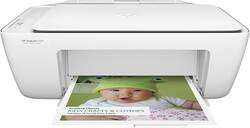
HP - DeskJet 2130 All-In-One Printer - White
- Key Specs
- Networking: Not Applicable
- ENERGY STAR Certified: true (Devices carrying the ENERGY STAR service mark, such as computer products and peripherals, kitchen appliances, and other products, generally use 20% to 30% less energy than required by federal standards.)
- Printer Type: All In One
- ISO Color Print Speed: 5.5 pages per minute (The number of color pages able to be printed per minute in the device's default single-side mode, as tested by the International Standards Organization (ISO).)
- ISO Mono Print Speed: 7.5 pages per minute (The number of black ink (grayscale) pages able to be printed per minute in the device's default single-side mode, as tested by the International Standards Organization (ISO).)
- General
- Product Name: DeskJet 2130 All-In-One Printer
- Brand: HP
- Model Number: F5S40A#B1H
- Dimensions
- Product Height: 9.79 inches (The out of box height of the item. Height is measured as the vertical distance from the bottom of the item to the top as it would be primarily used or placed.)
- Product Width: 16.73 inches (The out of box width of the item. Width is measured as the horizontal distance from one side of the item to the other as it would be primarily used or placed.)
- Product Weight: 7.55 pounds (The out of box weight of the item.)
- Certifications Listings & Approvals
- EPEAT Qualified: false (The Electronic Product Environmental Assessment Tool (EPEAT) was designed to provide an environmental assessment tool for purchasers. In order to qualify for EPEAT, a product must meet all 23 required criteria.)
- TWAIN Compliant: false (Products with this label are compliant with standards set by the TWAIN Working Group for regulating communication between software and digital imaging devices. Devices that are TWAIN compliant are compatible for use with each other without requiring additional software, even if they have different capabilities.)
- Features
- Automatic Reduction/Enlargement: true
- Tray Capacity: 60
- Duty Cycle: Up to 1,000 (The maximum number of pages per month that the device can produce without failing, as specified by the manufacturer.)
- Scanner Info
- Scanner Type: Other
- Duplex Scan Function: true
- Scanner Resolution: Up to 1200 x 1200 (Refers to the number of pixels/dots, both horizontally and vertically, of the image produced by the scanner. Generally, the higher the resolution, the sharper and cleaner the produced image.)
- Fax Info
- Integrated Fax: false
- Ink
- Compatible Cartridges: HP 63 black, HP 63 tricolor, HP 63XL black, HP 63XL tricolor
- Memory
- Memory Card Slot: false
- Paper Info
- Maximum Document Length: 14 inches
- Maximum Document Width: 8.5 inches
- Supported Paper Sizes: Plain, photo, brochure
- Paper Feeder: Multipurpose tray
- Paper Handling: 60-sheet input tray, 25-sheet output tray
- Copier Info
- Maximum Number Of Copies: 9
- Copier Resolution (Black): Up to 600 x 300 (Refers to the number of pixels/dots, both horizontally and vertically, of the image produced by the copier in black ink. Generally, the higher the resolution, the sharper and cleaner the produced image.)
- Copier Resolution (Color): Up to 600 x 300 (Refers to the number of pixels/dots, both horizontally and vertically, of the image produced by the copier in colored ink. Generally, the higher the resolution, the sharper and cleaner the produced image.)
- Performance
- Printer Resolution (Black): Up to 1200 x 1200 (Refers to the number of pixels/dots, both horizontally and vertically, of the image produced by the printer in black ink. Generally, the higher the resolution, the sharper and cleaner the produced image.)
- Printer Resolution (Color): Up to 4800 x 1200 (Refers to the number of pixels/dots, both horizontally and vertically, of the image produced by the printer in colored ink. Generally, the higher the resolution, the sharper and cleaner the produced image.)
- Connectivity
- Minimum System Requirements: PC: Windows 7, 8 or 8.1: 1.0GHz 32-bit (x86) or 64-bit (x64) processor, 2GB hard disk space, CD-ROM/DVD drive or Internet connection, USB port, Microsoft Internet Explorer
- Other
- UPC: 889296132134
HP DeskJet 2130 All-In-One Printer: With the ability to print, copy and scan photos and documents, this versatile all-in-one printer helps you complete a variety of office tasks. Just connect your PC or Mac to the USB 2.0 port to get started.
- Inkjet printers are best for home or small business use: They offer excellent print quality for photos and documents and accept a variety of paper types and sizes.
- Up to 4800 x 1200 dpi (dots per inch) color resolution: High resolution for producing incredible quality and detail in documents and photos. Up to 1200 x 1200 dpi when printing black only.
- 1 black and 1 tri-color print cartridge: Color inks produce vivid photos, and the black ink produces crisp text.
- Standard paper handling: 60-sheet input and 25-sheet output capacity.
- 1 USB port for simple connectivity: 1 high-speed USB 2.0 port offers a standard connection to your computer or a simple way to plug in and print with a USB drive, camera or other device.
- More print, copy and scan solutions: Print 2-sided documents, scan documents to your computer or directly to e-mail and more.
- PC system requirements: Windows 7, 8 or 8.1: 1.0GHz 32-bit (x86) or 64-bit (x64) processor, 2GB hard disk space, CD-ROM/DVD drive or Internet connection, USB port, Microsoft Internet Explorer.
- Mac system requirements: OS X v10.8 Mountain Lion, v10.9 Mavericks or v10.10 Yosemite; 1GB hard drive, Internet, USB port.
Whats Included
- DeskJet 2130 All-In-One Printer
- HP 63 black and tri-color ink cartridges
- Power cord
- Software CD
- Owner's manual
Q: What is the printer ink catridge for this HPDeskjet 2130?
A: The printer ink cartridge that you would need for this HP Deskjet are HP 63 Black and HP 63 Tri-color.
Q: does this printer work with windows 10?
A: Good question. Yes, this printer is compatible with Windows 10. The new HP printers have been tested for compatibility. You will be able to install the drivers for Windows 10 with the CD provided in the printer's box or you can download it from the HP Drivers website. Here is the link to the drivers page for the HP DeskJet 2130: http://support.hp.com/us-en/drivers/selfservice/HP-DeskJet-2130-All-in-One-Printer-series/7174550/model/7174551 I hope this helps!
A: Yes, this item is compatible with Windows 10.
Q: Will this printer work with a Mac?
A: Yes, the printer is compatible with Mac OS.
Q: Will this printer work with Vista?
A: yes, the printer is compatible with Windows Vista.
Q: If the color cartridge runs out of ink, can I still print black and white documents?
A: Yes. As long as the black cartridge still has ink
Q: Is this printer compatible with the HP Notebook 15-AYO15?
A: Yes, you can use this with your laptop.
Q: I need to remove the black ink jet. This is my first attempt since the purchase.
A: Here is a link to a video overview on how to replace cartridges on your printer: http://support.hp.com/us-en/document/c04603884 I hope this helps.





















