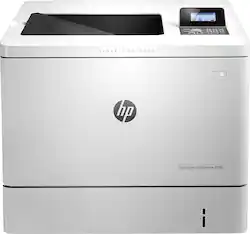
HP - LaserJet Enterprise M553dn Color Laser Printer - Light Gray
- Key Specs
- Networking: Wired
- ENERGY STAR Certified: true (Devices carrying the ENERGY STAR service mark, such as computer products and peripherals, kitchen appliances, and other products, generally use 20% to 30% less energy than required by federal standards.)
- Printer Type: Printer
- Duty Cycle: Up to 80,000 (The maximum number of pages per month that the device can produce without failing, as specified by the manufacturer.)
- ISO Color Print Speed: 40 pages per minute (The number of color pages able to be printed per minute in the device's default single-side mode, as tested by the International Standards Organization (ISO).)
- ISO Mono Print Speed: 40 pages per minute (The number of black ink (grayscale) pages able to be printed per minute in the device's default single-side mode, as tested by the International Standards Organization (ISO).)
- Monochromatic/Color: Color
- General
- Product Name: LaserJet Enterprise M553dn Color Laser Printer
- Brand: HP
- Display Screen: true
- Display Screen Size: 2.5 inches
- Model Number: B5L25A#BGJ
- Color: Light Gray
- Dimensions
- Product Height: 15.7 inches (The out of box height of the item. Height is measured as the vertical distance from the bottom of the item to the top as it would be primarily used or placed.)
- Product Width: 27.5 inches (The out of box width of the item. Width is measured as the horizontal distance from one side of the item to the other as it would be primarily used or placed.)
- Product Weight: 60.6 pounds (The out of box weight of the item.)
- Features
- Automatic Document Feeder: true
- Photo Printing: false
- Automatic Reduction/Enlargement: false
- Touch Screen: false (Touch-screen devices make navigating more intuitive. Using a touch-screen display, you can do things such as tap to select, hold and drag to move items, swipe to scroll, and pinch to zoom.)
- Automatic Two-Sided Printing: false
- Certifications Listings & Approvals
- EPEAT Qualified: true (The Electronic Product Environmental Assessment Tool (EPEAT) was designed to provide an environmental assessment tool for purchasers. In order to qualify for EPEAT, a product must meet all 23 required criteria.)
- EPEAT Level: Silver (The Electronic Product Environmental Assessment Tool (EPEAT) was designed to provide an environmental assessment tool for purchasers. In order to qualify for EPEAT, a product must meet all 23 required criteria. Products are rated Bronze, Silver or Gold based on how many of 28 optional criteria they meet (below 50%, 50%, 75%).)
- Paper Info
- Automatic Document Feeder Capacity: 100 sheets
- Maximum Document Length: 11.7 inches
- Maximum Document Width: 8.5 inches
- Paper Feeder: Bottom loader
- Supported Paper Sizes: Letter, legal, oficio, executive, statement, 4" x 6", 3" x 5", 5" x 7", 5" x 8", postcard, 8.5" x 13", envelope, 3" x 5" to 8.5" x 14", 4" x 5.85" to 8.5" x 11.69"
- Tray Capacity: 100
- Media Weight (Minimum): 60 grams per square meter
- Media Weight (Maximum): 220 grams per square meter
- Ink
- Compatible Cartridges: B5L35A, B5L36A, B5L37A, CF360A, CF360X, CF361A, CF361X, CF362A, CF362X, CF363A and CF363X
- Ink Subscription Service Available: false (The printer monitors ink usage and alerts the subscription provider when levels are low. A purchased subscription provides refills of ink based on usage.)
- Performance
- Approximate Page Yield (Black): 6000
- Approximate Page Yield (Color): 5000
- Printer Resolution (Color): Up to 1200 x 1200 (Refers to the number of pixels/dots, both horizontally and vertically, of the image produced by the printer in colored ink. Generally, the higher the resolution, the sharper and cleaner the produced image.)
- Output Tray Capacity: 250
- Recommended Monthly Volume: 2000 to 6000 pages (The maximum number of pages that can be printed per month, as recommended by the manufacturer. Printing in excess of this number may reduce the machine's overall lifespan or print quality over time.)
- First Page Out Time: 6 seconds (The time it takes the printer to print and deliver the first page in the output tray. May depend on the complexity of the copy being printed.)
- Connectivity
- Minimum System Requirements: PC: Windows Vista (32-bit), 7 (32- or 64-bit), 8 (32-bit or 64-bit), 8.1 (32- or 64-bit; excluding RT OS) or Windows 10 (32- or 64-bit; excluding RT OS); Mac: OS X 10.7 - 10.10; iOS; Android; USB drive; Internet access
- Other
- UPC: 888182487426
Produce office documents quickly and efficiently with this HP LaserJet Enterprise m553dn color printer, which prints up to 40 ISO ppm* in black and color. The 4-line color display with keypad makes it easy to choose settings.
- Prints up to 40 ISO ppm* in black and color: To generate business documents efficiently.
- Be sure you have the right cartridge: Enter your printer's model number into our Ink and Toner Finder to find compatible cartridges. Get started ›
- HP Web Jetadmin: Helps enable centralized control of your office environment.
- HP ePrint: Enables you to print using your compatible mobile devices. Apple® AirPrint allows Apple iPad® and iPhone® printing.
- JetAdvantage Security Solutions: Offers embedding and other features to protect sensitive information.
- Up to 1200 x 1200 dpi resolution: For clear, crisp images.
- Prints from sleep mode in as little as 9 seconds*: So you can get documents printed quickly.
- 4-line color display with keypad: For simple operation.
- 550-sheet input tray: Lets you print large quantities at once.
- 2-sided printing: Along with JetIntelligence ink cartridge technology enable quick, efficient use.
- PC system requirements: Windows XP (32- or 64-bit), Vista (32- or 64-bit), 7 (32- or 64-bit), 8/8.1 (32- or 64-bit, excluding RT OS for Tablets), 10 (32- or 64-bit, excluding RT OS for Tablets).
- Mac system requirements: Mac OS X 10.7 Lion, OS X 10.8 Mountain Lion, OS X 10.9 Mavericks, OS X 10.10 Yosemite; Internet; USB; 1GB available hard disk.
- Linux OS (In-OS HPLIP) requirements: SUSE Linux (12.2, 12.3, 13.1), Fedora (17, 18, 19, 20), Linux Mint (13, 14, 15, 16, 17), Boss (3.0, 5.0), Ubuntu (10.04, 11.10, 12.04, 12.10, 13.04, 13.10, 14.04, 14.10), Debian (6.0.x, 7.x).
- Mobile OS (In-OS drivers) requirements: iOS, Android or Windows 8/8.1/10 RT.
Whats Included
- 4 HP 805A LaserJet toner cartridges (black, cyan, magenta, yellow)
- LaserJet Enterprise Color Printer
- Owner's manual
- Power cord
- Software CD
- Toner collection box
A: Yes, it has automatic duplex (double-sided printing).
Q: is this printer Apple mac compatible?
A: Yea it is, IPhone, IPad using wireless connection and Mac wireless and wired.
Q: Can you plug this into a UL Surge Power Strip Tower?...It will not reach my wall outlet.
A: The short but honest answer is "it depends". Here's why it depends: When a laser printer is turned on, and again when you print something and the fuser begins operating, it draws a large amount of current-possibly enough to trip the built in circuit breaker in the power strip. If it doesn't trip, then it's fine. You'll want to make sure that you don't have anything else plugged into that strip, so the breaker doesn't have to deal with whatever else is on plus the printer.
Q: Is there a straight thru feed for card stock printing?
A: The printer has a flip down tray which is labeled as tray 1 it has the envelope feeder as well as a paper tray that is designed to handle thicker card stock and paper. As with any color laser printer in order to print on photo type paper you will need to research what paper is supported by the printer.
Q: are included cartridges full size?
A: The print cartridge set included is a starter set as stated on packaging included inside the box. I purchased additional cartridges to make sure I had them on hand when needed. (Keep a look-out for sales on ink for this printer, it is quite costly.)
Q: Can this printer be used for printing only in BLACK using a high-yield BLACK TONER CARTRIDGE?
A: Yes. In the control panel...devices and printers, select the printer and then click on the color button and change it there to not print in color.
Q: Does this do borderless printing on letter size paper (8.5" x 11")?
A: If 0.08 inch is sufficiently borderless, yes.That's for the current Windows drivers. Generally, print drivers sometimes enforce limits that hardware does not have. I speculate that printing beyond the paper risks toner/ink buildup. If precise size doesn't matter but the border is visually unacceptable, I'd prefer to print to standard paper and trim off the border.