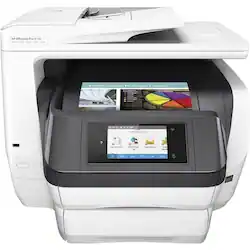
HP - OfficeJet Pro 8740 Wireless All-In-One Instant Ink Ready Printer - White
- Key Specs
- Networking: Wired
- ENERGY STAR Certified: true (Devices carrying the ENERGY STAR service mark, such as computer products and peripherals, kitchen appliances, and other products, generally use 20% to 30% less energy than required by federal standards.)
- Printer Type: All In One
- ISO Color Print Speed: 19 pages per minute (The number of color pages able to be printed per minute in the device's default single-side mode, as tested by the International Standards Organization (ISO).)
- ISO Mono Print Speed: 24 pages per minute (The number of black ink (grayscale) pages able to be printed per minute in the device's default single-side mode, as tested by the International Standards Organization (ISO).)
- Output Tray Capacity: 150 sheets
- Touch Screen: true (Touch-screen devices make navigating more intuitive. Using a touch-screen display, you can do things such as tap to select, hold and drag to move items, swipe to scroll, and pinch to zoom.)
- General
- Product Name: OfficeJet Pro 8740 Wireless All-In-One Instant Ink Ready Printer
- Brand: HP
- Display Screen: true
- Display Screen Size: 4.3 inches
- Model Number: K7S42A#B1H
- Color: White
- Dimensions
- Product Height: 16.2 inches (The out of box height of the item. Height is measured as the vertical distance from the bottom of the item to the top as it would be primarily used or placed.)
- Product Width: 21.7 inches (The out of box width of the item. Width is measured as the horizontal distance from one side of the item to the other as it would be primarily used or placed.)
- Product Depth: 19.7 inches (The out of box depth of the item. Depth is measured as the distance from the front of the item to the back as it would be primarily used or placed.)
- Product Weight: 40.6 pounds (The out of box weight of the item.)
- Features
- Automatic Document Feeder: true
- Photo Printing: true
- Monochromatic/Color: Color
- Automatic Reduction/Enlargement: true
- Automatic Two-Sided Printing: true
- Tray Capacity: 500
- Duty Cycle: Up to 30,000 (The maximum number of pages per month that the device can produce without failing, as specified by the manufacturer.)
- Certifications Listings & Approvals
- EPEAT Qualified: false (The Electronic Product Environmental Assessment Tool (EPEAT) was designed to provide an environmental assessment tool for purchasers. In order to qualify for EPEAT, a product must meet all 23 required criteria.)
- Scanner Info
- Scanner Type: Flatbed
- Duplex Scan Function: true
- Scanner Resolution: Up to 1200 x 1200 (Refers to the number of pixels/dots, both horizontally and vertically, of the image produced by the scanner. Generally, the higher the resolution, the sharper and cleaner the produced image.)
- Fax Info
- Integrated Fax: true
- Ink
- Compatible Cartridges: HP 952
- Ink Subscription Service Available: true (The printer monitors ink usage and alerts the subscription provider when levels are low. A purchased subscription provides refills of ink based on usage.)
- Memory
- Memory Card Slot: false
- Paper Info
- Automatic Document Feeder Capacity: 50 sheets
- Maximum Document Length: 14 inches
- Maximum Document Width: 8.5 inches
- Supported Paper Sizes: ANSI A, Legal, A4, Custom Size
- Paper Feeder: Multipurpose tray
- Paper Handling: ADF-50 sheets, Input tray-250 sheets, Output tray-150 sheets
- Media Weight (Minimum): 60 grams per square meter
- Media Weight (Maximum): 180 grams per square meter
- Compatible Media Types: Plain paper, Photo paper, Thick paper, Card stock, Glossy paper, Matte paper
- Copier Info
- Maximum Number Of Copies: 99
- Copier Resolution (Black): Up to 600 (Refers to the number of pixels/dots, both horizontally and vertically, of the image produced by the copier in black ink. Generally, the higher the resolution, the sharper and cleaner the produced image.)
- Copier Resolution (Color): Up to 600 (Refers to the number of pixels/dots, both horizontally and vertically, of the image produced by the copier in colored ink. Generally, the higher the resolution, the sharper and cleaner the produced image.)
- Performance
- First Page Out Time: 12 seconds (The time it takes the printer to print and deliver the first page in the output tray. May depend on the complexity of the copy being printed.)
- Printer Resolution (Black): Up to 1200 x 1200 (Refers to the number of pixels/dots, both horizontally and vertically, of the image produced by the printer in black ink. Generally, the higher the resolution, the sharper and cleaner the produced image.)
- Printer Resolution (Color): Up to 2400 x 1200 (Refers to the number of pixels/dots, both horizontally and vertically, of the image produced by the printer in colored ink. Generally, the higher the resolution, the sharper and cleaner the produced image.)
- Approximate Page Yield (Black): 265
- Approximate Page Yield (Color): 310
- Compatibility
- Works With: Amazon Alexa, Cortana, Google Assistant (Compatible with or able to be connected to other smart devices or applications.)
- Connectivity
- Minimum System Requirements: Apple Mac OS X 10.8, Apple Mac OS X 10.9, MS Windows 7 (32/64 bits), Apple Mac OS X 10.10, MS Windows XP 32-bit Edition SP3 or later, Windows 8 (32/64-bits), Windows 8.1 (32/64-bits), Windows 10 (32/64-bits), MS Windows Vista 32-bit Edition
- Other
- UPC: 889894310828
Create professional documents right from your desk with this HP OfficeJet Pro printer, featuring copy, print and scanning capabilities. A forward thinking output bed keeps your printed papers in place, eliminating scattering, and this HP OfficeJet Pro printer includes a 4.3-inch touchpad, making slecting your choices as easy as a press of a button.
- Easy Replenish: With a printer set up for Easy Replenish, you'll automatically receive shipments of the ink you need. The printer monitors its own ink levels, so you'll only receive ink when you need it.
- Be sure you have the right cartridge: Enter your printer's model number into our Ink and Toner Finder to find compatible cartridges. Get started ›
- Works with Amazon Alexa: Ask your compatible device (separate device required) to print custom shopping lists, to-do lists, as well as a variety of coloring activities and crossword puzzles.
- Works with Google Assistant: Ask your compatible device (separate device required) to print your Google Calendar, templates for custom calendars and checklists, as well as select activities and word games.
- Works with Cortana: Ask your compatible device (separate device required) to print coloring pages, as well as various puzzles, comics, and coloring activities.
- Prints up to 24 ISO ppm* in black, up to 19 ISO ppm* in color: To generate documents quickly.
- 4-in-1 functionality: Copies, faxes, prints and scans to accommodate your business and personal needs.
- Wireless and mobile printing capability: Connect this printer to your home or office network with built-in Ethernet or wireless LAN. Plus, print from your mobile device with the free HP ePrint app or Apple® AirPrint.
- Color resolution up to 2400 x 1200 dpi: Along with a black-and-white resolution up to 1200 x 1200 dpi produces clear, vibrant images.
- 4 individual print cartridges are economical: Only replace ink cartridges (black, cyan, magenta and yellow) when a color runs out.
- 250-sheet input tray: With 150-sheet output tray. The 50-page auto document feeder enables quick paper reloading.
- 4.3" touch screen: Makes operation simple.
- USB 2.0 port for simple connectivity: High-speed USB 2.0 port offers a standard connection to your PC or a simple way to plug in and print with a USB drive, camera or other device.
- HP Instant Ink Compatible: Save up to 50% on Ink with Instant Ink
- Built-in duplex printing: Print on both sides of the page without turning it over manually, to minimize your printing costs and help the environment.
- More print, copy and scan solutions: Automatically print 2-sided documents, scan documents to your computer or directly to e-mail and more.
- Copies up to 37 cpm* in black, up to 37 ISO cpm* in color: To ensure efficient performance.
- Copy resolution up to 600 dpi: To generate copies quickly.
- Scanner with color CIS (contact image sensor): Allows you to scan documents in up to 1200 x 1200 dpi optical resolution to reproduce exact colors and large documents.
- NFC capability: Allows wireless printing via compatible mobile devices with a simple touch.
Whats Included
- HP - OfficeJet Pro 8740 Wireless All-In-One Instant Ink Ready Printer
- Ink cartridge - black - HP 952, Ink cartridge - cyan - HP 952, Ink cartridge - magenta - HP 952, Ink cartridge - yellow - HP 952
- Power Cable
- Phone cable
- software CD-ROMs
- installation guide
Q: Do you have to buy a monthly plan to get ink on this printer?
A: No, you can purchase the HP printer cartridges (expensive $75 to $125 a set). Beware there are few if any generic cartridges available due to the chips HP has in its cartridges and the firmware used by the printer.
Q: I'm a realtor will this printer work for for all my needs...flyers, many forms and 'pamphlets
A: Great question. This printer is an excellent option for your documents. This printer has a USB port with walk-up PDF, Word, and Powerpoint printing. The two trays make it more convenient to use different types of paper without having to switch them out. It also has a legal-size scanning bed, automatic 2-sided printing and scanning, and prints up to 24 ppm. That is only a few of the features. For more detailed specs, please visit the following link: http://www8.hp.com/h20195/v2/GetPDF.aspx/c04853111.pdf I hope this helps.
Q: Is this printer better than the previous printer before this
A: I have less break downs than the HP 8710, but my printer is less than a year old. I had issues with print software and its interaction with my network, but eventually figured out the issue. I believe it is more reliable than the HP 8710.
Q: Does this printer have fax capabilities?
A: Yes, this copies, faxes, prints and scans.
A: YEP - Wireless. EASY install! We have Xfinity here. If the Xfinity service 'goes down/comes back up', simply turnoff/on your printer to reboot. LOVE this Printer!
Q: Can this printer print on different sizes of paper (ie...3x5, 4x6 and 5x7)? Can it print envelopes?
A: Yes it can. You will notice special marks on the bottom of the paper trays. Just put the 4" X 6" (or whatever size) in the tray against the end of the tray, press the button on the side and both edges will move so that the paper is centered; slide the button at the front of the tray forward until it hits the rear of the paper and it will be held firmly in place just like the normal paper is held. When you start to print, don't forget to specify the size as well as type paper; i.e. glossy, matte, etc. That's it!
Q: Is this printer a laser printer?
A: No, is an inkjet.
Q: Does this printer can into PDF files?
A: Yes you can scan into a pdf.



















