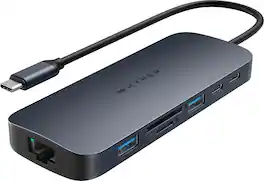
Hyper - HyperDrive Next 10 Port USB-C Dock, dual 4K HDMI, Ethernet, 1 USB-C, 2 USB-A, SD, for MacBook and Windows PC - Midnight Blue
FREE shipping to
Related Item

Specifications
- Number of USB Port(s)10
- Key Specs
- Number of USB Port(s): 10
- General
- Brand: Hyper
- Model Number: HD7001GL
- Product Name: HyperDrive Next 10 Port USB-C Dock, dual 4K HDMI, Ethernet, 1 USB-C, 2 USB-A, SD, for MacBook and Windows PC
- Color: Midnight Blue
- Features
- Hub Type: USB hubs (The type of connection, such as Ethernet or USB, used to connect peripheral devices to the hub for shared access.)
- Ports
- Number of USB Port(s): 10
- Port Type(s): HDMI, USB, RJ-45, Other (USB 2.0 connects external drives, gaming controllers, smartphones, MP3 players and other accessories.USB 3.0 transfers data faster than USB 2.0, but only when used with USB 3.0 devices.USB Type-C provides fast speeds and versatile power, featuring connectors with identical ends that plug in upside down or right side up. Adapters allow for video as well as backward compatibility.Thunderbolt provides ultra-high bandwidth for fast data transfer between devices featuring a Thunderbolt or MiniDisplayPort connection.HDMI allows you to connect a projector or display HD media on your HDTV or monitor.Media card slots allow you to transfer photos from your digital camera or camcorder.)
- Dimensions
- Product Height: 6.69 inches (The out of box height of the item. Height is measured as the vertical distance from the bottom of the item to the top as it would be primarily used or placed.)
- Product Length: 0.65 inches (The out of box length of the item. Length is measured as the longest dimension of the item.)
- Product Width: 3.27 inches (The out of box width of the item. Width is measured as the horizontal distance from one side of the item to the other as it would be primarily used or placed.)
- Product Weight: 0.53 pounds (The out of box weight of the item.)
- Warranty
- Warranty - Parts: 2 year limited
- Warranty - Labor: 2 year limited
- Other
- UPC: 817110017039
Introducing the HyperDrive Next 10 Port Business Class USB-C Docking Station with pro-grade performance for productivity anywhere you work. With dual 4K monitor support for PC, Mac, and Chromebook, 10 ultra-fast ports, and lightning-fast data transfers, and detachable USB-C cable and slim design enable portable productivity. Experience 2X faster file transfers using the 10Gbps USB ports, 3X faster photo and video transfers with SD 4.0, charge your device with a 100W PD power pass-through port, and make a sustainable choice with EcoSmart technology.
- Dual extended 4K monitor support for PC, and chromebook: Enhance your productivity and multitasking capabilities by providing a spacious workspace, allowing users to simultaneously work on multiple high-resolution content, such as videos, images, documents, and applications, with crisp visuals.
- Transfer data at 2X speeds with 10Gbps USB 3.2: Enables lightning-fast data transfer, allowing users to move large files, backup data, and sync devices in a fraction of the time compared to traditional USB connections, increasing productivity and efficiency.
- Transfer photos and video at 3X speeds with 312MB/s SD 4.0: Provides time savings for video editing and photography workflows, as it allows for fast and efficient transfer of high-resolution images and videos, enabling seamless editing, quicker file backups, and post-production processes.
- Pass-through charging power with 100W PD 3.0: Power and charge your devices up to 85W with a 100W PD 3.0 charger (when connected to a PD 3.0 host connection), while using the hub, ensuring uninterrupted productivity making it ideal for power-hungry devices and busy professionals on the go.
- EcoSmart sustainability without compromise: Faster speeds and better for the planet with 85% recycled plastic.
- Dual extended 4K monitor support for PC, and chromebook: Enhance your productivity and multitasking capabilities by providing a spacious workspace, allowing users to simultaneously work on multiple high-resolution content, such as videos, images, documents, and applications, with crisp visuals.
- Transfer data at 2X speeds with 10Gbps USB 3.2: Enables lightning-fast data transfer, allowing users to move large files, backup data, and sync devices in a fraction of the time compared to traditional USB connections, increasing productivity and efficiency.
- Transfer photos and video at 3X speeds with 312MB/s SD 4.0: Provides time savings for video editing and photography workflows, as it allows for fast and efficient transfer of high-resolution images and videos, enabling seamless editing, quicker file backups, and post-production processes.
- Pass-through charging power with 100W PD 3.0: Power and charge your devices up to 85W with a 100W PD 3.0 charger (when connected to a PD 3.0 host connection), while using the hub, ensuring uninterrupted productivity making it ideal for power-hungry devices and busy professionals on the go.
- EcoSmart sustainability without compromise: Faster speeds and better for the planet with 85% recycled plastic.
A: Yes, Dual extended monitors in addition to your MacBook. Be sure to install the Silicon Motion software first: https://www.siliconmotion.com/download/3Xf/a/index.html
A: Hi, thanks for reaching out. Yes, it will pass-through 85W of power from your charger to the laptop. It’s a great desktop and portable dock.
Q: How do I switch from mirrored display to extended display?
A: undefined
Q: how do I get a replacement power cord?
A: There is a usb-c port directly to the right of the dc adapter port, and that acts as an additional power port.
Q: If connected to a 2019 MacBook, will I have 2x4k outs or will the 2nd out be less than 4k? Thanks
A: They will both be 4K outputs. However, the first display will run at 4K at 60hz, but the second display will only run at 4k at 30hz. If you run lower resolution displays then you can maintain both displays at 60hz. This also works on Apple silicon MacBooks, but you do need to download the driver from hyperdrives website.
Q: Does it work with a Apple Mini M1?
A: undefined
Q: Hi. Is this compatible with Lenovo ThinkPad?
A: Yes, it will work seamlessly with Lenovo and all PCs. You can get dual extended monitor support on Mac and PC. Thanks for asking!
Compare similar products

Introducing the HyperDrive Next 10 Port Business Class USB-C Docking Station with pro-grade performance for productivity anywhere you work. With dual 4K monitor support for PC, Mac, and Chromebook, 10 ultra-fast ports, and lightning-fast data transfers, and detachable USB-C cable and slim design enable portable productivity. Experience 2X faster file transfers using the 10Gbps USB ports, 3X faster photo and video transfers with SD 4.0, charge your device with a 100W PD power pass-through port, and make a sustainable choice with EcoSmart technology.

This compact multi-port dock is ideal for office application, featuring everything from the essential two HDMI outputs, USB ports, Gigabit Ethernet, SD/microSD card reader, Audio Jack and an upgraded Power Delivery 3.1 specification. It comes with a mount for saving-space vertical placement and gives you the ability to connect your MacBook or other USB-C compatible laptops to a 4K monitor or TV. With USB Power Delivery 3.1 it’ll take you to a new flexible power application, you'll be able to charge your laptop and power your peripherals with a single USB-C power adapter even if your laptop only has one USB-C port. The top of the dock functions as a wireless charging pad that supports up to 15W fast charging. Access a wired network through the Gigabit Ethernet port for a fast and stable network connection. It is also equipped with a cable storage compartment which ensures an easy connection regardless of your USB-C port’s location. Power Adapter to support Wireless Charging Sold Separately.
Introducing the HyperDrive Next 10 Port USB-C Hub - the ultimate connectivity solution for creators, editors, photographers, and more. With extended 4K60Hz monitor support for Mac, PC, and Chromebook, 10 ultra-fast ports, and lightning-fast data transfers, unleash your creative potential anywhere. Experience 2X faster file transfers using the 10Gbps USB ports and 3X faster photo and video transfers with microSD and SD 4.0. Benefit from 40% more power with a PD 3.1 140W power pass-through port, ensuring efficient charging. Make a sustainable choice with EcoSmart technology.

Meet the newest way we’re extending M1 & M2 MacBook connectivity. With the Dual 4K HDMI 10-in-1 USB-C Hub, you can extend to 2 displays at 4K video while getting access to 10 essential ports, including USB-C, HDMI, USB-A, and many more. Enjoy transferring photos in a flash, quick charging your device, and extending to 2 HDMI displays, all without having to download cumbersome drivers. And it’s fully compatible with MacBook Air/Pro (M1, M2, M3 & Intel powered) devices, Windows PC devices as well as Chromebook devices.
| Pros for Hyper - HyperDrive Next 10 Port USB-C Dock, dual 4K HDMI, Ethernet, 1 USB-C, 2 USB-A, SD, for MacBook and Windows PC - Midnight Blue | |||
|---|---|---|---|
| There were no pros for this product— | There were no pros for this product— | Overall Performance, Ease of use, Connectivity, Port Quantity, USB-C | Ease of use, Overall Performance, Connectivity, HDMI, Compatibility |
| Cons for Hyper - HyperDrive Next 10 Port USB-C Dock, dual 4K HDMI, Ethernet, 1 USB-C, 2 USB-A, SD, for MacBook and Windows PC - Midnight Blue | |||
| There were no cons for this product— | There were no cons for this product— | Heat Dissipation | Heat, Price, Refresh Rate, Cable Length, Power |
Specs
Reviews
- Rated 4 out of 5 stars
Great Value
does the job well. I've stuck this to the side of my desk to keep my HDMI and other cables out of site as well as making it easier to pick up my laptop and go. The ethernet connection has worked just as well as having it directly connected to my laptop if not better; not once has it disconnected. I'm only giving this a 4 star because the holder for the USB-C cable was an obvious waste of space; putting the DC in or PD in for that location instead would've made a lot more sense. the power button being directly next to the input cable also seems a bit odd considering how awkward it'd be to turn off or on if you ever did want to do that (though I doubt the need for a power button to begin with). overall, a good reliable buy and hyper is on my radar if I ever do need an upgrade from this.
This review is from Hyper - HyperDrive Next 10 Port USB-C Dock, dual 4K HDMI, Ethernet, 1 USB-C, 2 USB-A, SD, for MacBook and Windows PC - Midnight Blue
Posted by ChristopherT
- Rated 5 out of 5 stars
Needs a driver from hyper but works fine after.
works great , after buying the docking station you must download a driver for it to fully work. The displays might look blurry you can adjust from the side. Or download better display for the display to be fixed like I did. The driver MUST be from the hyper website. Just find this product and download the driver.
This review is from Hyper - HyperDrive Next 10 Port USB-C Dock, dual 4K HDMI, Ethernet, 1 USB-C, 2 USB-A, SD, for MacBook and Windows PC - Midnight Blue
Posted by Elizabeth
- Rated 4 out of 5 stars
Good… but
This has helped me so much with my work, but i find that not all ports work fully (i think some of them are meant to charge and others for data transfer but i wish they just did both)
This review is from Hyper - HyperDrive Next 10 Port USB-C Dock, dual 4K HDMI, Ethernet, 1 USB-C, 2 USB-A, SD, for MacBook and Windows PC - Midnight Blue
Posted by JohnF








